> ## Documentation Index
> Fetch the complete documentation index at: https://docs.asapp.com/llms.txt
> Use this file to discover all available pages before exploring further.
# AI Summary Data for Agent Desk
## Feature Release
This is the announcement for an upcoming ASAPP feature. Your ASAPP account team will provide a target release date and can direct you to more detailed information as needed.
## Overview
The S3 data table `rep_assignment_disposition` will include a new field called `auto_summary_txt` that shows the automatically generated summary text submitted in Agent Desk for a given assignment. The field `disposition_notes_txt` will remain and continue to show any free-text disposition notes submitted by the agent.
## Use and Impact
The `auto_summary_txt` field will be present for all customers, though it will only show a value if AI Summary (formerly called Automatic Summaries) is enabled in Agent Desk.
The `auto_summary_txt` field will always be present if AI Summary is enabled, regardless of the underlying model used to generate summaries.
Providing AI Summary data outside the agent experience gives contact center teams a consistent, high-coverage data source for key events that occur in the conversation. This data source serves as a succinct conversation description for quality assurance purposes that doesn't require teams to read entire transcripts, particularly when manual disposition notes are missing or incomplete.
## How It Works
**Expected Output**
When AI Summary is enabled, the `auto_summary_txt` shows a string containing each sentence of the automatically generated summary successively in a paragraph, in the order the key events occurred in the conversation. The `disposition_notes_txt` field will show any additional notes as a string.
| Field | Description |
| :---------------------- | :---------------------------------------------------------------------------------------------------------------------------------------------------------------------------------------------------------------------------------------------------------------------------------------------------------------------------------------------------------------------------------------------------------------------------------- |
| `auto_summary_txt` | Customer chatted in for help with using their flight credit. Customer explained they were unable to use the credit because their reservation was on hold. Agent explained the customer would need to set the ticket on hold again. Agent informed the customer that they would have to accept voluntary changes to the reservation made under the confirmation code ejzqxr. Agent was unable to help the customer with the booking. |
| `disposition_notes_txt` | pax wanted to make payment using flight credit / informed pax to proceed with vol changes // pax denied |
**Agent Edits**
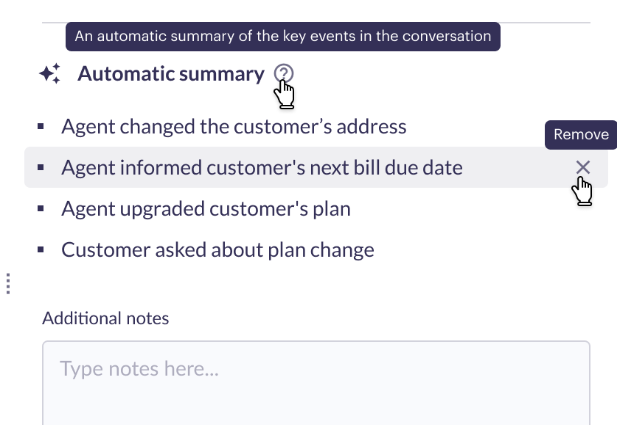
When AI Summary presents a bulleted summary to agents at disposition time, the agent can choose to remove any bullet before submitting their disposition for the assignment. Removed parts of the summary are not included in `auto_summary_text`.
 ## FAQs
1. **When will `auto_summary_text` have a value?**
* For any assignment where the agent submitted one or more bullets of an automatically generated summary.
* If an agent removes every bullet in the summary, the `auto_summary_text` field will be empty.
* If AI Summary is not enabled, the `auto_summary_text` field will be empty.
2. **Does the type of model used for AI Summary affect the value in `auto_summary_text`?**
* If AI Summary is enabled, the `auto_summary_text` field will have a value regardless of the model used to generate the summary. The underlying model only affects the words used in the generated summary.
3. **How can I tell if AI Summary is enabled?**
* When the right-hand panel expands at disposition time, the **Notes** panel shows a bulleted automatic summary above a manual disposition field labeled **Additional Notes**.
* If AI Summary is not yet enabled, the **Notes** panel contains summary tags that agents can manually select to be inserted into a manual disposition field below. For more information about the process to enable AI Summary, reach out to your ASAPP account team.
## FAQs
1. **When will `auto_summary_text` have a value?**
* For any assignment where the agent submitted one or more bullets of an automatically generated summary.
* If an agent removes every bullet in the summary, the `auto_summary_text` field will be empty.
* If AI Summary is not enabled, the `auto_summary_text` field will be empty.
2. **Does the type of model used for AI Summary affect the value in `auto_summary_text`?**
* If AI Summary is enabled, the `auto_summary_text` field will have a value regardless of the model used to generate the summary. The underlying model only affects the words used in the generated summary.
3. **How can I tell if AI Summary is enabled?**
* When the right-hand panel expands at disposition time, the **Notes** panel shows a bulleted automatic summary above a manual disposition field labeled **Additional Notes**.
* If AI Summary is not yet enabled, the **Notes** panel contains summary tags that agents can manually select to be inserted into a manual disposition field below. For more information about the process to enable AI Summary, reach out to your ASAPP account team.