> ## Documentation Index
> Fetch the complete documentation index at: https://docs.asapp.com/llms.txt
> Use this file to discover all available pages before exploring further.
# Transfer to Paused Queues in Agent Desk
## Feature Release
This is the announcement for an upcoming ASAPP feature. Your ASAPP account team will provide a target release date and can direct you to more detailed information as needed.
## Overview
Agents now have the ability to transfer customers to a paused queue.
 ## Use and Impact
In some cases, the only agents that can properly address a customer's issue are part of a queue that is temporarily paused. To ensure that agents can always redirect customers to the applicable queue, this feature allows agents to transfer customers to a paused queue, even if the wait times are long.
This feature prevents poor customer experience by telling customers to reach out later or sending them to a queue that cannot appropriately help them.
It also saves agents time by enabling them to route the customer to the proper queue when they cannot address the issue.
## How It Works
Administrators might pause a queue if they detect they are getting a higher demand than expected.
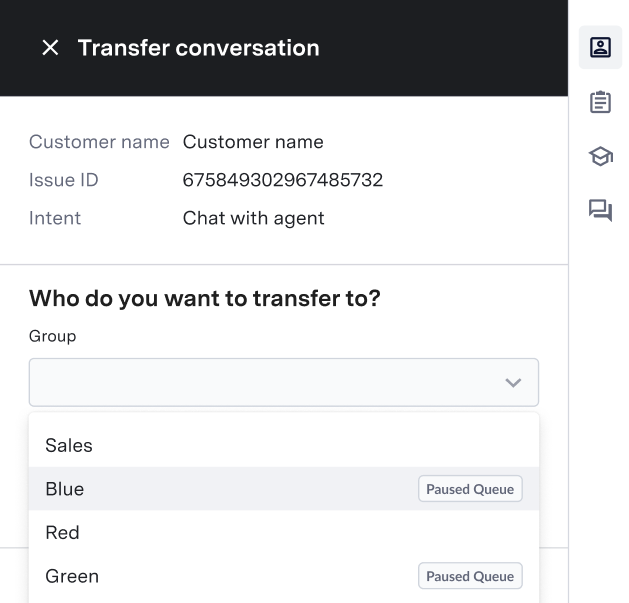
When enabled, paused queues appear in the agent's transfer menu with a label indicating their status so that agents can identify them.
When transferring a customer to a paused queue, the customer gets placed at the end of that queue.
**Configuration**
To enable your agents to transfer customers to a paused queue, contact your ASAPP account team.
## Use and Impact
In some cases, the only agents that can properly address a customer's issue are part of a queue that is temporarily paused. To ensure that agents can always redirect customers to the applicable queue, this feature allows agents to transfer customers to a paused queue, even if the wait times are long.
This feature prevents poor customer experience by telling customers to reach out later or sending them to a queue that cannot appropriately help them.
It also saves agents time by enabling them to route the customer to the proper queue when they cannot address the issue.
## How It Works
Administrators might pause a queue if they detect they are getting a higher demand than expected.
When enabled, paused queues appear in the agent's transfer menu with a label indicating their status so that agents can identify them.
When transferring a customer to a paused queue, the customer gets placed at the end of that queue.
**Configuration**
To enable your agents to transfer customers to a paused queue, contact your ASAPP account team.