> ## Documentation Index
> Fetch the complete documentation index at: https://docs.asapp.com/llms.txt
> Use this file to discover all available pages before exploring further.
# iOS
## Pre-requisites
* ASAPP iOS SDK 9.4.0 or later, correctly configured and initialized [see more here](/agent-desk/integrations/ios-sdk/ios-quick-start).
## Getting Started
Once you've successfully configured and initialized the ASAPP SDK, you can start using Chat Instead for iOS.
1. Create a New Instance.
```json theme={null}
let chatInsteadViewController = ASAPPChatInsteadViewController(phoneNumber: phoneNumber, delegate: delegate, title: title, chatIcon: image)
```
| | |
| :--------------------- | :------------------------------------------------------------------------------------------------------------------------------------------------------------------------------------------------------------------------------------------------------------------------- |
| phoneNumber (required) | The phone number to call when the phone channel is selected. Must be a valid phone number. For more information, see Apple's documentation on [phone links](https://developer.apple.com/library/archive/featuredarticles/iPhoneURLScheme_Reference/PhoneLinks/PhoneLinks). |
| delegate (required) | An object that implements `ASAPPChannelDelegate`. |
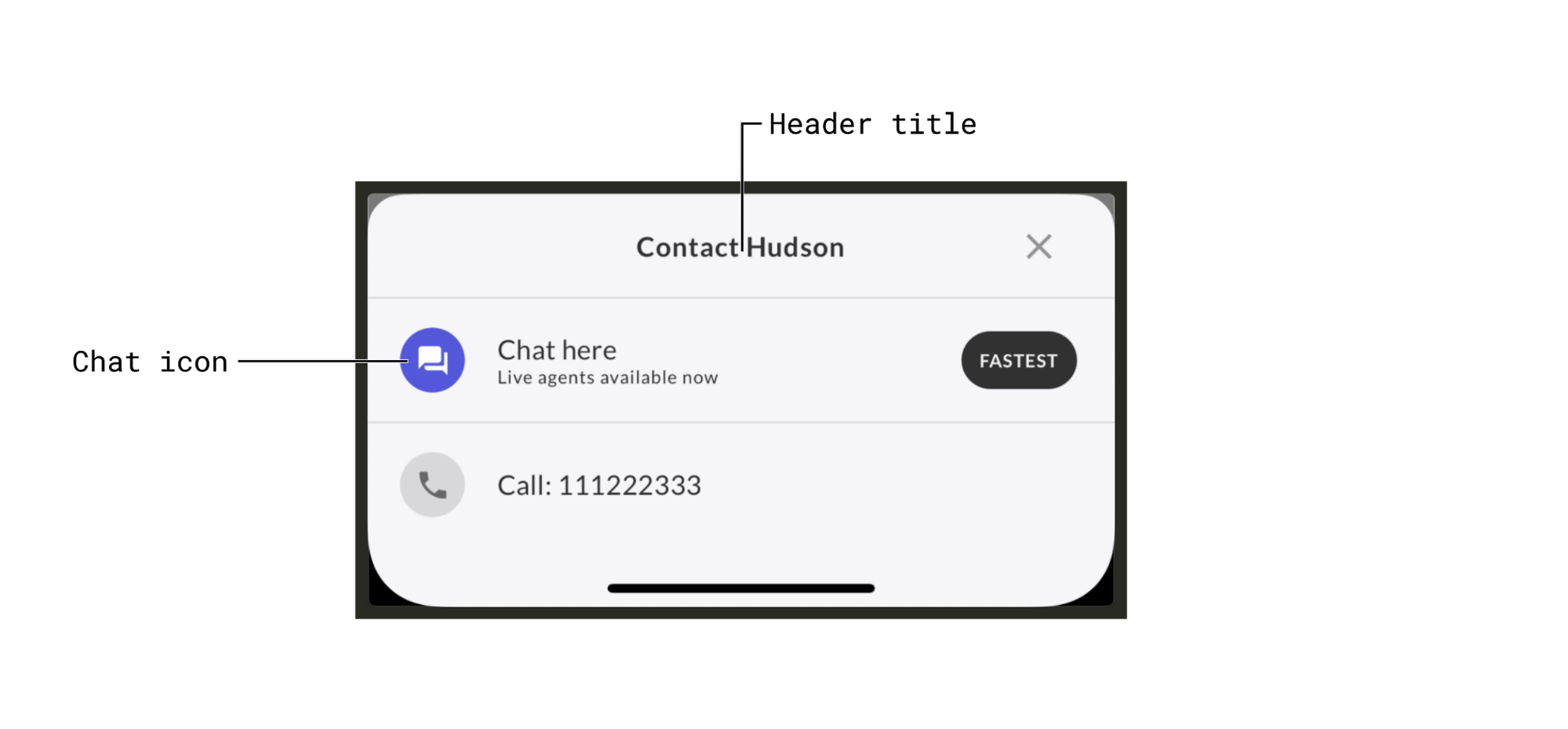
| title (optional) | A title (also called the "Chat Instead header title") which is displayed at the top of the Chat Instead UI. (See [Customization](#customization "Customization")) |
| image (optional) | A UI Image that will override the default image for the chat channel. (See [Customization](#customization "Customization")) |
2. Implement two functions that the `ASAPPChannelDelegate` requires:
```json theme={null}
func channel(_ channel: ASAPPChannel, didFailToOpenWithErrorDescription errorDescription: String?)
```
ASAPP calls this if an error occurs while trying to open a channel.
```json theme={null}
func didSelectASAPPChatChannel()
```
This opens the ASAPP chat.
You should use one of these methods:
```json theme={null}
ASAPP.createChatViewControllerForPresentingFromChatInstead()
```
or
```json theme={null}
ASAPP.createChatViewControllerForPushingFromChatInstead()
```
to present or push the view controller instance that ASAPP returned.
This means that you must present/push the ASAPP chat view controller inside `didSelectASAPPChatChannel()`.
ASAPP highly recommends initializing `ASAPPChatInsteadViewController` as early as possible for the best user experience.
Whenever a channel is selected, ASAPP handles everything by default (except for the chat channel), but you can also handle a channel by yourself by implementing `func shouldOpenChannel(_ channel: ASAPPChannel) -> Bool` and returning false.
3. Show the `chatInsteadViewController` instance by using:
```json theme={null}
present(chatInsteadViewController, animated: true)
```
Only presentation works. Pushing the `chatInsteadViewController` instance does not work and causes unexpected behavior.
## Support for iPad
For the best user experience, you should configure popover mode, which is used on iPad.
Use the `.popover` presentation style and set both the [sourceView](https://developer.apple.com/documentation/uikit/uipopoverpresentationcontroller/1622313-sourceview) and [sourceRect](https://developer.apple.com/documentation/uikit/uipopoverpresentationcontroller/1622324-sourcerect) properties following Apple's conventions:
```json theme={null}
chatInsteadViewController.modalPresentationStyle = .popover
chatInsteadViewController.popoverPresentationController?.sourceView = aView
chatInsteadViewController.popoverPresentationController?.sourceRect = aRect
```
This will only have an effect when your app is run on iPad.
If you set `modalPresentationStyle` to `.popover` and forget to set `sourceView` and `sourceRect`, the application will crash in runtime. So please be sure to set both if you're using the popover mode.
## Customization
You can customize the Chat Instead header title and the chat icon when creating the `ASAPPChatInsteadViewController` instance. (See [Getting Started](#getting-started "iOS").
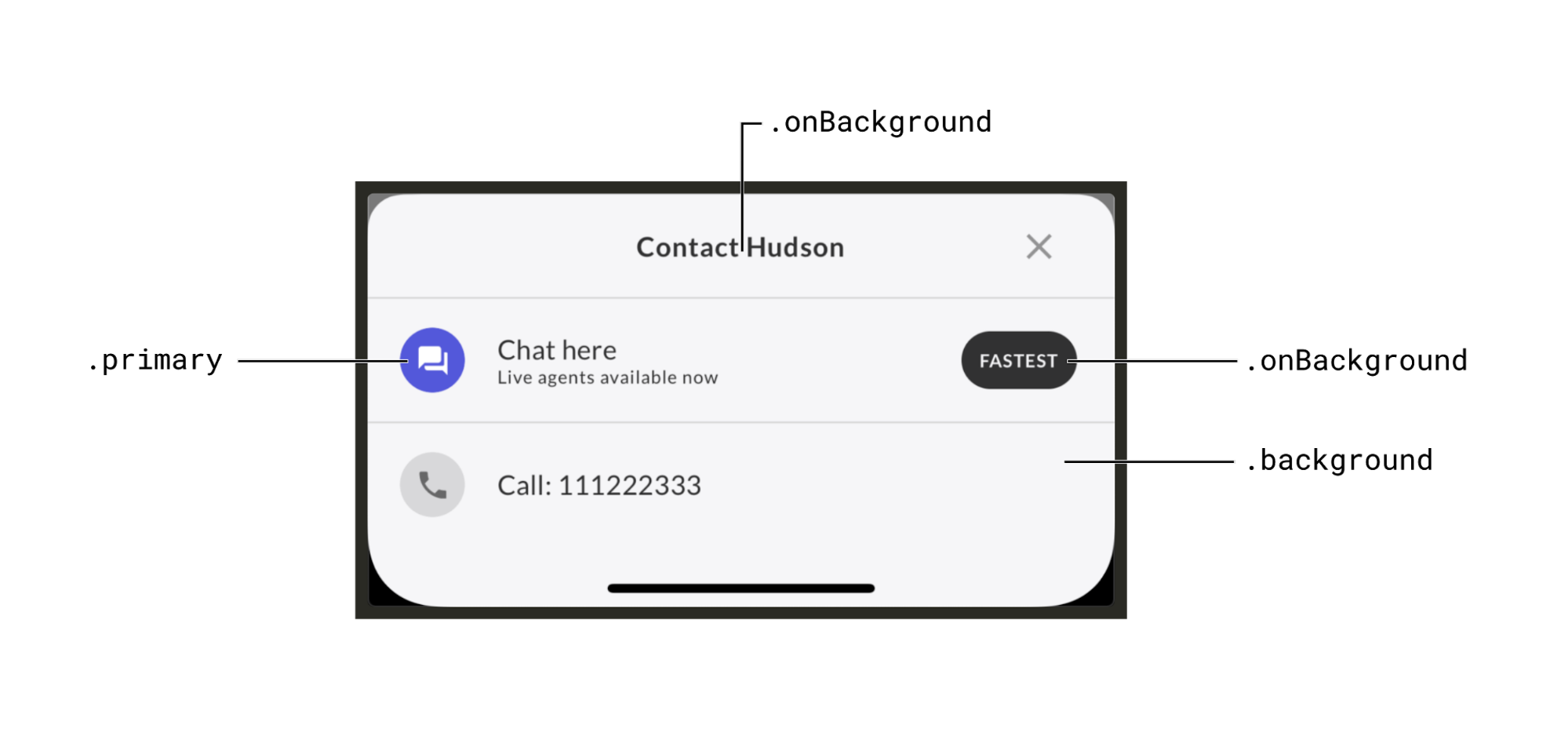
 `ASAPPChatInsteadViewController` uses [ASAPPColors](https://docs-sdk.asapp.com/api/chatsdk/ios/latest/Classes/ASAPPColors.html) for styling, so it will automatically use the colors set there (e.g. `primary`, `background`, `onBackground`, etc.), which are the same colors used for customizing the ASAPP chat interface. There is no way to independently change the styling of the Chat Instead UI.
 ASAPP supports [Dark Mode](../ios-sdk/customization#dark-mode-15935 "Dark Mode") by default as long as you enable it.
## Remote settings
When you create an instance of `ASAPPChatInsteadViewController`, it automatically fetches remote settings to indicate which channels to display. You can configure these settings.
These remote settings override local ones (i.e. the ones you pass in when creating the `ASAPPChatInsteadViewController` instance).
If an error occurs while fetching the settings and no local values were set, the system uses the defaults.
## Cache
When fetching succeeds, the SDK caches the remote settings for a short period of time. This cache references in lieu of repeated fetches. The cache remains valid across multiple app sessions.
ASAPP supports [Dark Mode](../ios-sdk/customization#dark-mode-15935 "Dark Mode") by default as long as you enable it.
## Remote settings
When you create an instance of `ASAPPChatInsteadViewController`, it automatically fetches remote settings to indicate which channels to display. You can configure these settings.
These remote settings override local ones (i.e. the ones you pass in when creating the `ASAPPChatInsteadViewController` instance).
If an error occurs while fetching the settings and no local values were set, the system uses the defaults.
## Cache
When fetching succeeds, the SDK caches the remote settings for a short period of time. This cache references in lieu of repeated fetches. The cache remains valid across multiple app sessions.