> ## Documentation Index
> Fetch the complete documentation index at: https://docs.asapp.com/llms.txt
> Use this file to discover all available pages before exploring further.
# AI Compose
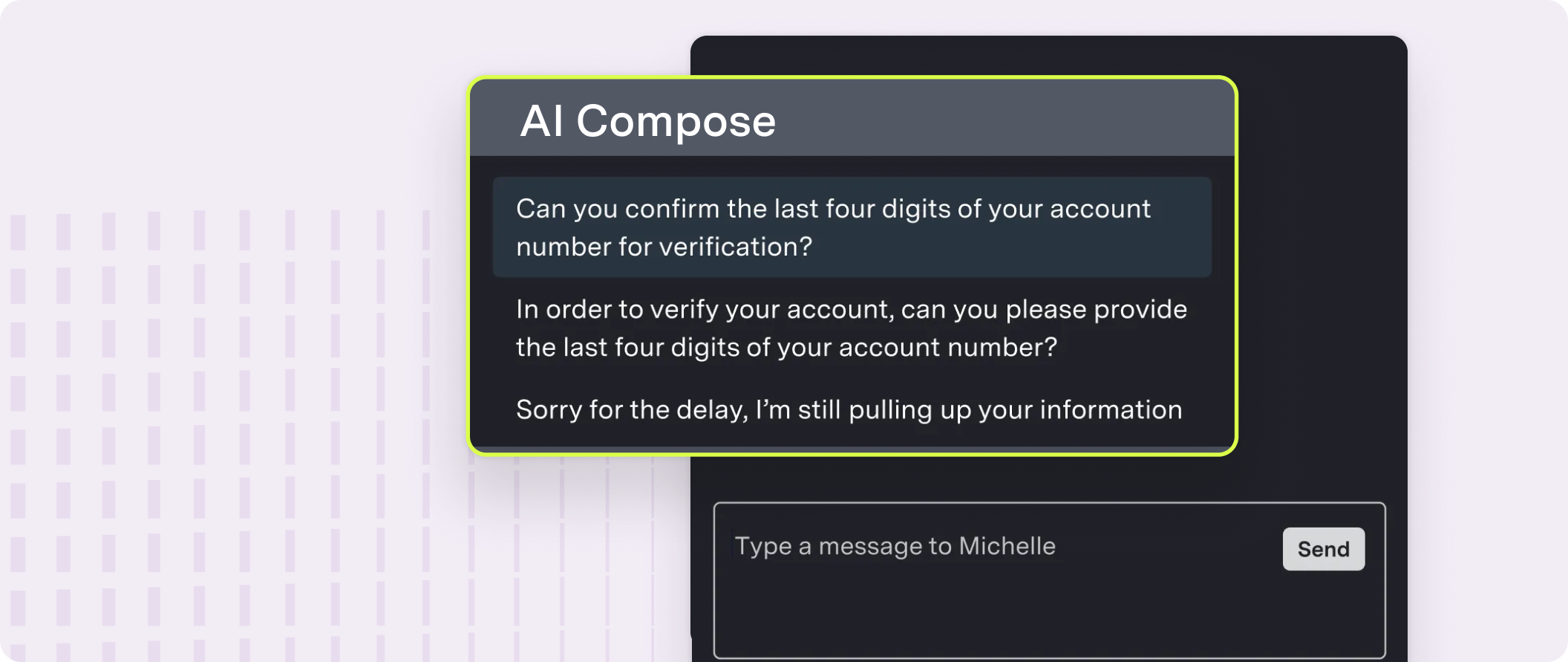 ASAPP AI Compose helps agents compose the best response to customers, using machine learning techniques to suggest complete responses, partial sentences, key phrases and spelling fixes in real-time based on both the context of the conversation and past agent behavior.
## Features
AI Compose provides the following features:
| Feature | Description |
| :----------------------- | :------------------------------------------------------------------------------------------------------------------------ |
| **Autosuggest** | Provides up to three suggestions that appear in a suggestion drawer above the typing field before the agent begins typing |
| **Autocomplete** | Provides up to three suggestions that appear in a suggestion drawer above the typing field after the agent starts typing |
| **Phrase autocomplete** | Provides in-line phrase suggestions that appear while an agent is typing |
| **Response quicksearch** | Allows in-line search of global and custom responses |
| **Fluency correction** | Applies automatic grammar corrections that agents can undo |
| **Profanity blocking** | Prevents agents from sending messages containing profanity to customers |
| **Custom response list** | Enables management of an individual agent's custom responses in a simple library interface |
| **Global response list** | Enables management of global responses in a simple tooling interface |
The core AI Compose features of Autosuggest, Autocomplete, Fluency Correction, and Profanity Blocking offers Multi-Lingual support. In addition to English, these features are also available in Spanish and French.
They can detect the language of the conversation and provide suggestions and corrections accordingly, enhancing agent productivity across different languages.
## How it works
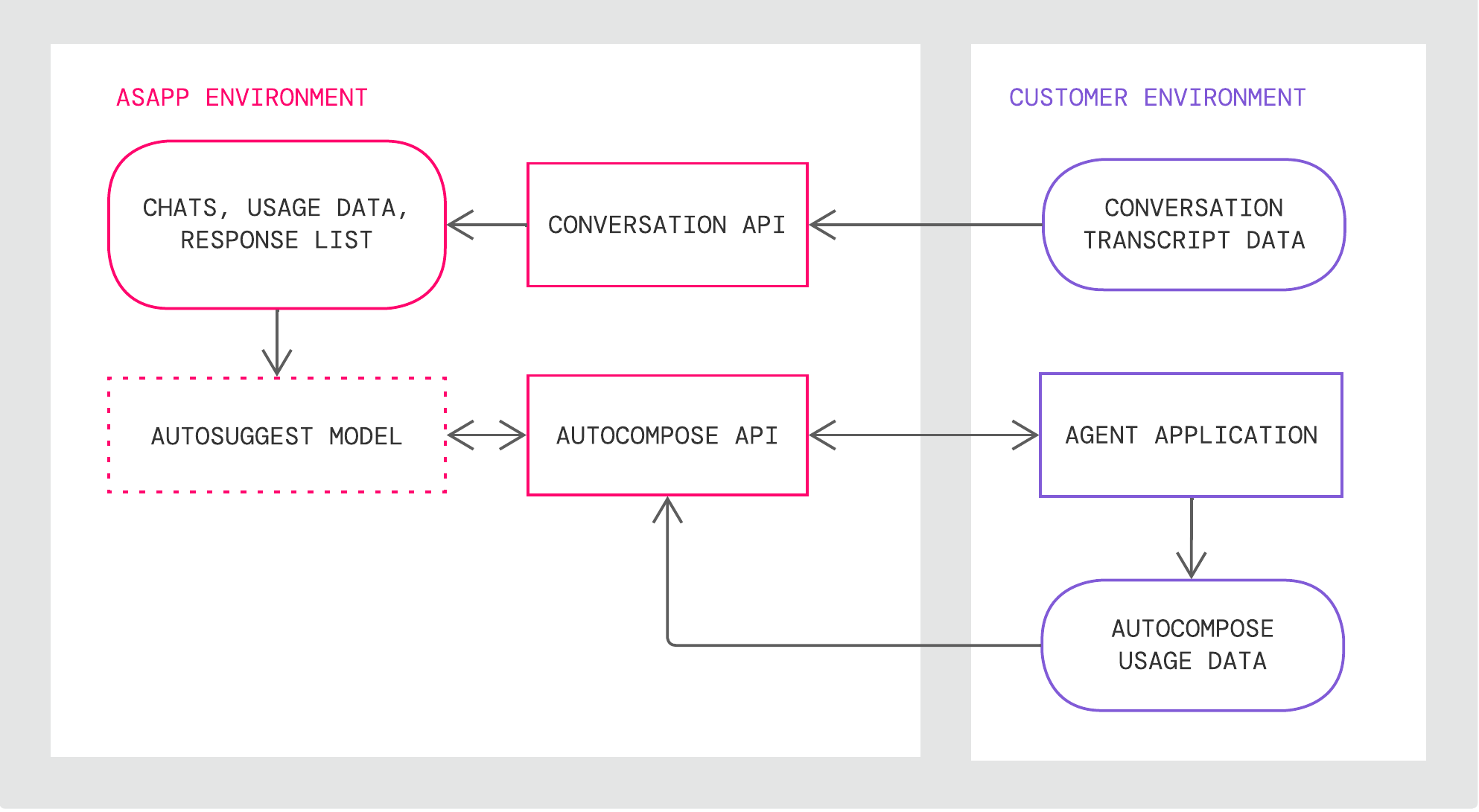
AI Compose takes in a live feed of your agents' conversations and then uses our various AI models to return a list of changes or suggested responses based on the state of the conversation and the currently typed message.
1. Provide conversation data via the Conversation API.
2. In your Agent Application, call the AI Compose APIs to retrieve the list of changes or suggested responses.
3. Show the potential changes or responses to your agents for them to incorporate.
This streamlines your agents' efficiency while still allowing agents to review changes, ensuring only the highest quality of responses reach your customers.
AI Compose has the following technical components:
| Component | Description |
| :--------------------- | :------------------------------------------------------------------------------------------------------------------------------------ |
| **Autosuggest model** | LLM that ASAPP retrains with agent usage data |
| **Data Storage** | Storage for historical conversations, global response lists, and agent historical feature usage that ASAPP uses for weekly retraining |
| **Conversation API**\* | An API for creating and updating conversations and conversation data |
ASAPP AI Compose helps agents compose the best response to customers, using machine learning techniques to suggest complete responses, partial sentences, key phrases and spelling fixes in real-time based on both the context of the conversation and past agent behavior.
## Features
AI Compose provides the following features:
| Feature | Description |
| :----------------------- | :------------------------------------------------------------------------------------------------------------------------ |
| **Autosuggest** | Provides up to three suggestions that appear in a suggestion drawer above the typing field before the agent begins typing |
| **Autocomplete** | Provides up to three suggestions that appear in a suggestion drawer above the typing field after the agent starts typing |
| **Phrase autocomplete** | Provides in-line phrase suggestions that appear while an agent is typing |
| **Response quicksearch** | Allows in-line search of global and custom responses |
| **Fluency correction** | Applies automatic grammar corrections that agents can undo |
| **Profanity blocking** | Prevents agents from sending messages containing profanity to customers |
| **Custom response list** | Enables management of an individual agent's custom responses in a simple library interface |
| **Global response list** | Enables management of global responses in a simple tooling interface |
The core AI Compose features of Autosuggest, Autocomplete, Fluency Correction, and Profanity Blocking offers Multi-Lingual support. In addition to English, these features are also available in Spanish and French.
They can detect the language of the conversation and provide suggestions and corrections accordingly, enhancing agent productivity across different languages.
## How it works
AI Compose takes in a live feed of your agents' conversations and then uses our various AI models to return a list of changes or suggested responses based on the state of the conversation and the currently typed message.
1. Provide conversation data via the Conversation API.
2. In your Agent Application, call the AI Compose APIs to retrieve the list of changes or suggested responses.
3. Show the potential changes or responses to your agents for them to incorporate.
This streamlines your agents' efficiency while still allowing agents to review changes, ensuring only the highest quality of responses reach your customers.
AI Compose has the following technical components:
| Component | Description |
| :--------------------- | :------------------------------------------------------------------------------------------------------------------------------------ |
| **Autosuggest model** | LLM that ASAPP retrains with agent usage data |
| **Data Storage** | Storage for historical conversations, global response lists, and agent historical feature usage that ASAPP uses for weekly retraining |
| **Conversation API**\* | An API for creating and updating conversations and conversation data |
 ## Get Started
Integrate AI Compose into your applications and scale up your agent response rates.
### Integrate AI Compose
AI Compose is available both as an integration into leading messaging applications and as an API for custom-built messaging interfaces.
For technical instructions on how to implement the service for each approach, refer to the deployment guides below:
Learn more on the use of AI Compose API
Deploy AI Compose via LivePerson
Deploy AI Compose on your Salesforce solution
### Use AI Compose
For a functional breakdown and walkthrough of effective use cases and configurations, refer to the guides below:
Learn more on the use of AI Compose
Check the tooling options for AI Compose
### Feature Releases
Visit the feature releases for new additions to AI Compose functionality
The system will update Product and Deployment Guides as new features become available in production.
## Enhance AI Compose
## Get Started
Integrate AI Compose into your applications and scale up your agent response rates.
### Integrate AI Compose
AI Compose is available both as an integration into leading messaging applications and as an API for custom-built messaging interfaces.
For technical instructions on how to implement the service for each approach, refer to the deployment guides below:
Learn more on the use of AI Compose API
Deploy AI Compose via LivePerson
Deploy AI Compose on your Salesforce solution
### Use AI Compose
For a functional breakdown and walkthrough of effective use cases and configurations, refer to the guides below:
Learn more on the use of AI Compose
Check the tooling options for AI Compose
### Feature Releases
Visit the feature releases for new additions to AI Compose functionality
The system will update Product and Deployment Guides as new features become available in production.
## Enhance AI Compose
 ASAPP AI Summary is a recommended pairing with AI Compose, generating conversation summaries of key events for 100% of customer interactions.
Note-taking and disposition questions take call time and agent focus, both of which can have a negative impact on agent performance. Removing summarization tasks from agents through automation can keep agents focused on messaging with customers and yield higher summary data coverage than manual agent notes.
Head to AI Summary Overview to learn more.
Learn more about AI Summary on ASAPP.com
ASAPP AI Summary is a recommended pairing with AI Compose, generating conversation summaries of key events for 100% of customer interactions.
Note-taking and disposition questions take call time and agent focus, both of which can have a negative impact on agent performance. Removing summarization tasks from agents through automation can keep agents focused on messaging with customers and yield higher summary data coverage than manual agent notes.
Head to AI Summary Overview to learn more.
Learn more about AI Summary on ASAPP.com