> ## Documentation Index
> Fetch the complete documentation index at: https://docs.asapp.com/llms.txt
> Use this file to discover all available pages before exploring further.

# Deploying AI Compose API

> Communicate with AI Compose via API.

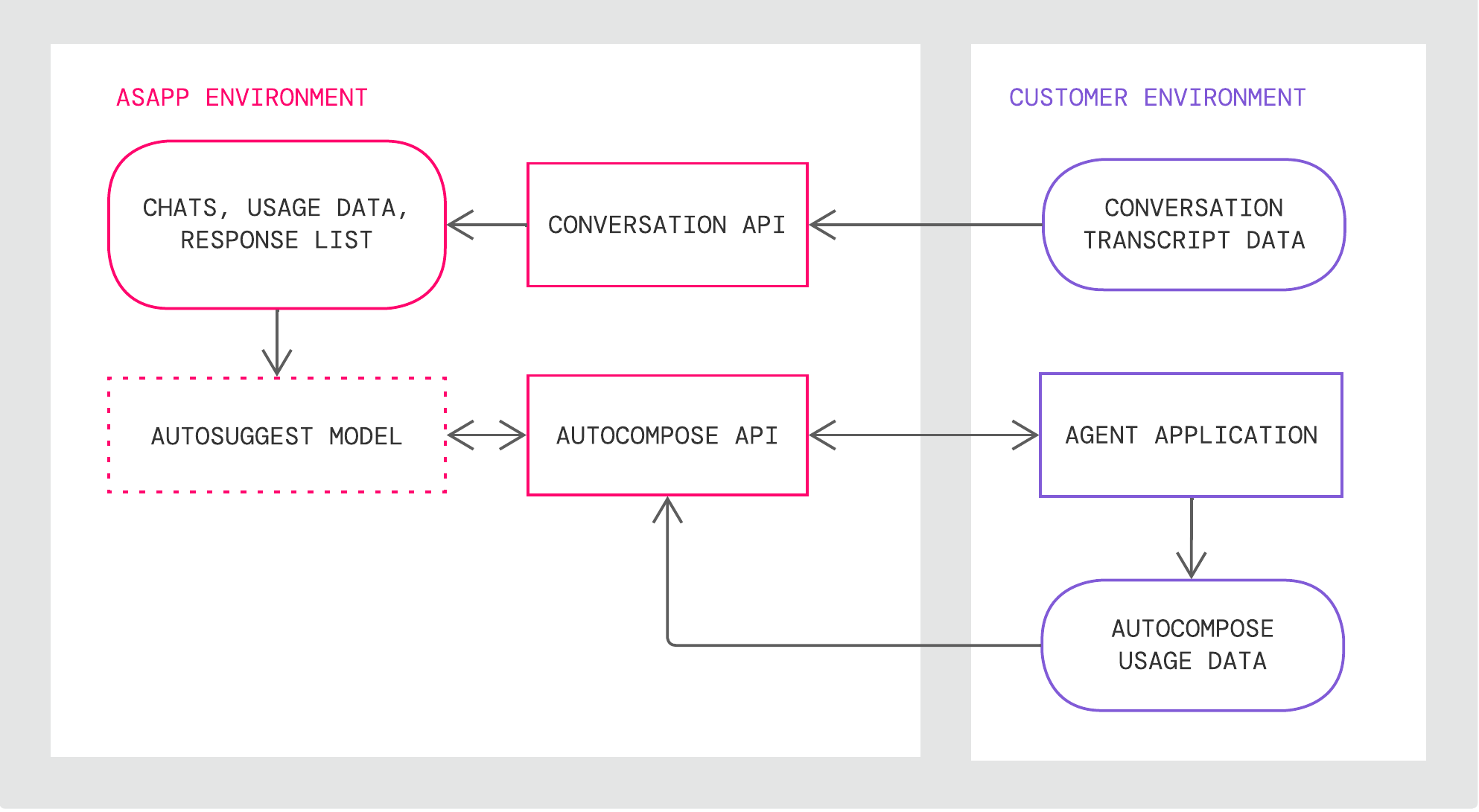
AI Compose has the following technical components:

* **An autosuggest model** that ASAPP retrains weekly with [agent usage data you provide through the `/analytics/message-sent` endpoint](#sending-agent-usage-data "Sending Agent Usage Data")
* **Data storage** for historical conversations, global response lists, and agent historical feature usage that ASAPP uses for weekly retraining
* The **Conversation API** for creating and updating conversation data and the **AI Compose API** that interfaces with the application with which agents interact and receives agent usage data in the form of message analytics events

<Frame>
  <img src="https://mintcdn.com/asapp/AXwA7-nbwQCJ8xte/image/uuid-efcbb75b-b38e-3cc1-4f44-1630dbe3c68b.png?fit=max&auto=format&n=AXwA7-nbwQCJ8xte&q=85&s=11aff522949940bc1ab8369aa5849d73" width="1986" height="1091" data-path="image/uuid-efcbb75b-b38e-3cc1-4f44-1630dbe3c68b.png" />
</Frame>

### Setup

ASAPP provides an AI Services [Developer Portal](/getting-started/developers). Within the portal, developers can do the following:

* Access relevant API documentation (e.g. OpenAPI reference schemas)
* Access API keys for authorization
* Manage user accounts and apps

In order to use ASAPP's APIs, all apps must be registered through the portal. Once registered, each app will be provided unique API keys for ongoing use.
<Tip>
  Visit the [Get Started](/getting-started/developers) page on the Developer Portal for instructions on creating a developer account, managing teams and apps, and setting up AI Service APIs.
</Tip>

## Usage

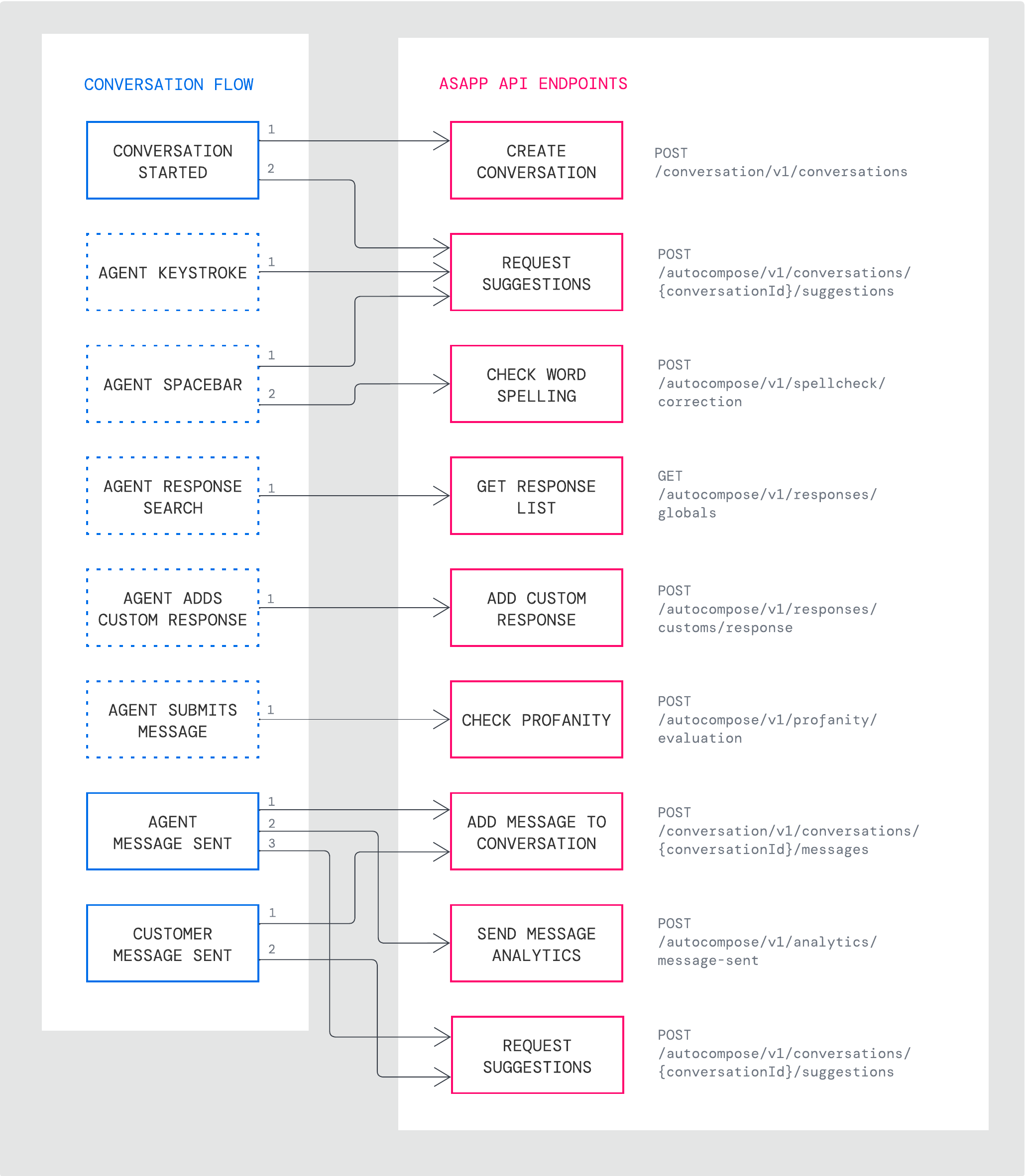
ASAPP AI Compose exposes API endpoints that each enable distinct features in the course of an agent's message composition workflow. You should send requests to each endpoint based on events in the conversation and actions taken by the agent in their interface.

For example, the sequence below shows requests made for a typical new conversation in which the agent begins creating their first message, sends the first message and receives one message in return from an end-customer:

<Note>
  This example is not comprehensive of every possible endpoint request supported by AI Compose. Refer to the [Endpoints](#endpoints-25843 "Endpoints") section for a full listing of endpoints.
</Note>

<Frame>
  <img src="https://mintcdn.com/asapp/BoXlOITRW7VjgmOG/image/uuid-257e4c08-d22a-8244-277c-e2a2024a1eb3.png?fit=max&auto=format&n=BoXlOITRW7VjgmOG&q=85&s=15a7762fe5812e519775dd3c4cb57635" width="2061" height="2363" data-path="image/uuid-257e4c08-d22a-8244-277c-e2a2024a1eb3.png" />
</Frame>

**In this example:**

<table class="informaltable frame-void rules-rows">
  <thead>
    <tr>
      <th class="th"><p>Conversation Event</p></th>
      <th class="th"><p>API Request</p></th>
    </tr>
  </thead>

  <tbody>
    <tr>
      <td class="td"><p>Conversation starts</p></td>

      <td class="td">
        <p>1. Create a new ASAPP conversation record</p>
        <p>2. Request first set of response suggestions</p>
      </td>
    </tr>

    <tr>
      <td class="td"><p>Agent keystroke</p></td>
      <td class="td"><p>1. Request updated response suggestions</p></td>
    </tr>

    <tr>
      <td class="td"><p>Agent uses the spacebar</p></td>

      <td class="td">
        <p>1. Request updated response suggestions</p>
        <p>2. Check the spelling of the most recent word</p>
      </td>
    </tr>

    <tr>
      <td class="td"><p>Agent searches for a response</p></td>
      <td class="td"><p>1. Get the response list that pertains to their search</p></td>
    </tr>

    <tr>
      <td class="td"><p>Agent saves a custom response</p></td>
      <td class="td"><p>1. Add the new response to their personal library</p></td>
    </tr>

    <tr>
      <td class="td"><p>Agent submits their message</p></td>
      <td class="td"><p>1. Check if any profanity is present in the message</p></td>
    </tr>

    <tr>
      <td class="td"><p>Agent message is sent</p></td>

      <td class="td">
        <p>1. Add the message to ASAPP’s conversation record</p>
        <p>2. Create analytics event for the message that details how the agent used AI Compose </p>
        <p>3. Request updated response suggestions</p>
      </td>
    </tr>

    <tr>
      <td class="td"><p>Customer message is sent</p></td>

      <td class="td">
        <p>1. Add the message to ASAPP’s conversation record</p>
        <p>2. Request updated response suggestions</p>
      </td>
    </tr>
  </tbody>
</table>

The [Endpoints](#endpoints-25843 "Endpoints") section below outlines how to use each endpoint.

### Endpoints Listing

<Note>
  For all requests, you must provide a header containing the `asapp-api-id` API Key and the `asapp-api-secret`. You can find them under your Apps in the [AI Services Developer Portal](https://developer.asapp.com/).
  All requests to ASAPP sandbox and production APIs must use `HTTPS` protocol. Traffic using `HTTP` will not be redirected to `HTTPS`.
</Note>

Use the links below to skip to information about the relevant fields and parameters for the corresponding endpoint(s):

**[Conversations](#conversations-api-25843 "Conversations API")**

* `POST /conversation/v1/conversations`
* `POST /conversation/v1/conversations/\{conversationId\}/messages`

[**Requesting Suggestions**](#requesting-suggestions "Requesting Suggestions")

* `POST /autocompose/v1/conversations/\{conversationId\}/suggestions`

[**Checking Profanity & Spelling**](#check-profanity-spelling "Check Profanity & Spelling")

* `POST /autocompose/v1/profanity/evaluation`
* `POST /autocompose/v1/spellcheck/correction`

[**Sending Agent Usage Data**](#sending-agent-usage-data "Sending Agent Usage Data")

* `POST /autocompose/v1/analytics/message-sent`

[**Getting Response Lists**](#getting-response-lists "Getting Response Lists")

* `GET /autocompose/v1/responses/globals`
* `GET /autocompose/v1/responses/customs`

[**Updating Custom Response Lists**](#updating-custom-response-lists "Updating Custom Response Lists")

* `POST /autocompose/v1/responses/customs/response`
* `PUT /autocompose/v1/responses/customs/response/\{responseId\}`
* `DELETE /autocompose/v1/responses/customs/response/\{responseId\}`
* `POST /autocompose/v1/responses/customs/folder`
* `PUT /autocompose/v1/responses/customs/folder/\{folderId\}`
* `DELETE /autocompose/v1/responses/customs/folder/\{folderId\}`

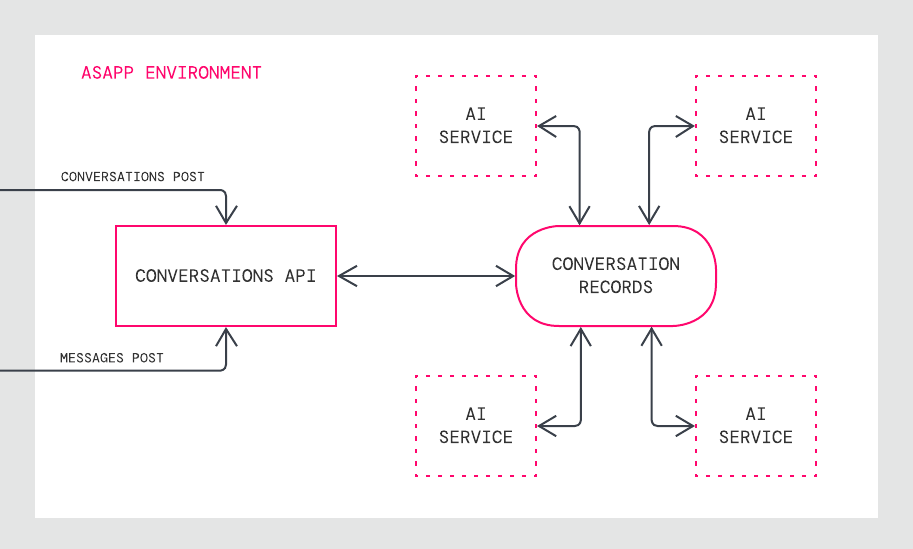
### Conversations API

ASAPP receives conversations through POST requests to the Conversations API. This service creates a record of conversations referenced as a source of truth by all ASAPP services.

<Frame>
  <img src="https://mintcdn.com/asapp/aK0YOQVZSULmKYJl/image/uuid-807868bf-ee29-0cb8-4cc9-e97fabf3a8f8.png?fit=max&auto=format&n=aK0YOQVZSULmKYJl&q=85&s=637799980f04efacfff5595becb4d1df" width="913" height="549" data-path="image/uuid-807868bf-ee29-0cb8-4cc9-e97fabf3a8f8.png" />
</Frame>

By promptly sending conversation and message data to this API, you ensure that ASAPP's conversation records match your own and that ASAPP services use the most current information available.

[`POST /conversation/v1/conversations`](/apis/conversations/create-or-update-a-conversation)

Use this endpoint to create a new conversation record or update an existing conversation record.

**When to Call**

This service should be called when a conversation starts or when something about the conversation changes (e.g. a conversation is reassigned to a different agent).

**Request Details**

Requests must include a conversation identifier from your system of record (external to ASAPP) and a timestamp (formatted in RFC3339 micro second date-time expressed in UTC) for when the conversation started.

Requests to create a conversation record must also include identifying information about the human participants. Two types of requests are supported to create a new conversation:

1. **Conversations started with an agent:** Provide both the `agent` and `customer` objects in the request when the conversation begins.
2. **Conversations started with a virtual agent:** Provide only the `customer` object in the initial request when the conversation with the virtual agent begins; you must send a subsequent request that includes both the `agent` and `customer` objects once the agent joins the conversation.

Requests may also include key-value pair metadata for the conversation that can be used either (1) to insert values into templated responses for agents or (2) as filter criteria to determine whether a conversation is eligible for specific response suggestions.

<Note>
  To support inserting the customer's time of day (morning, afternoon, evening) into templated agent responses, conversation metadata key-value pairs should take the format of `CUSTOMER_TIMEZONE: <IANA time zone name>`
</Note>

**Response Details**

When successful, this endpoint responds with a unique ASAPP identifier (`id`) for the conversation. This identifier should be used whenever referencing this conversation in the future. For example, adding new messages to this conversation record will require use of this identifier so that ASAPP knows to which conversation messages should be added.

[`POST /conversation/v1/conversations/\{conversationId\}/messages`](/apis/messages/create-a-message)

Use this endpoint to add a message to an existing conversation record.

**When to Call**

This service should be called after each sent message by a participant in the conversation.

<Note>
  If a conversation begins with messages between a customer and virtual agent/bot, ensure the conversation record is updated once the agent joins the conversation, prior to posting messages to this endpoint for the agent.
</Note>

**Request Details**

The path parameter for this request is the unique ASAPP conversation ID that was provided in the response body when the conversation record was initially created.
Requests must include the message's text and the message's sent timestamp (formatted in RFC3339 micro second date-time expressed in UTC).
Requests must also include identifying information about the sender of the message, including their `role`; supported values include `agent`, `customer`, or `system` for virtual agent messages.

**Response Details**

When successful, this endpoint responds with a unique ASAPP identifier (`id`) for the message. This identifier should be used if a need arises to reference this message in the future.

<Note>
  When a conversation message is posted, ASAPP applies redaction to the message text to prevent storage of sensitive information. 
  Visit the [Data Redaction](/security/data-redaction "Data Redaction") section to learn more.
  Reach out to your ASAPP account contact for information on available redaction capabilities to configure for your implementation.
</Note>

### Requesting Suggestions

ASAPP provides suggestions through one POST request to the AI Compose API.

[`POST /autocompose/v1/conversations/\{conversationId\}/suggestions`](/apis/autocompose/generate-suggestions)

Use this endpoint to get suggestions for the next agent message in the conversation.

**When to Call**

This service should be called when an agent joins the conversation, after every agent keystroke, and after a message is sent by either the customer or the agent. In each of these instances, AI Compose takes into account new conversation context (e.g. the next letter the agent typed) and will return suggestions suitable for that context.

<Note>
  If a conversation begins with messages between a customer and virtual agent/bot, ensure the conversation record is updated once the agent joins the conversation. Suggestion requests to this endpoint will fail if no agent is associated with a conversation.
</Note>

While making a request for a suggestion, a new sent message by either the customer or agent can be posted to the conversation record by including it in the request body. This optional approach to updating the conversation record is in lieu of sending a separate request to the `/messages` endpoint.

<Note>
  New messages cannot be added to the conversation record using the suggestions endpoint if no agent is associated with the conversation.
</Note>

**Request Details**

The path parameter for this request is the unique ASAPP conversation ID that was provided in the response body when the conversation record was initially created.

Requests must include any text that the agent has already typed (called the `query`).

To add a message to the conversation record during a suggestion request, you must also include a message object that contains the text of the sent message, the sender role and ID, and the timestamp for the sent message.

**Response Details**

When successful, this endpoint responds with a set of suggestions or phrase completions, and a unique ASAPP identifier (`id`) that corresponds to this set of suggestions.

Full suggestions will be returned when the agent has not yet typed and early in the composition of their typed message. Once the agent's typed message is sufficiently complete, no suggestions will be returned.

Phrase completions are only provided when a high-confidence phrase is available to complete a partially typed message with several words. If no such phrases fit the message, phrase completions will not be returned.

If a message object was included in the request body, the response will include a message object with a unique message identifier.

**Metadata Inserts**

Suggestions will always include messages with `text` and `templateText` fields. `Text` fields contain the message as it should be shown in the end-user interface, whereas `templateText` indicates where metadata was inserted into a templated part of the message.

For example, `text` would read `"Sure John"`and `templateText` would read `"Sure \{NAME\}"`. AI Compose currently supports inserting metadata about a customer name or agent name into a templated suggestion.

<Note>
  `templateText` will be returned even if there are no metadata elements being inserted into the suggestion `text`. In these cases, the `templateText` and `text` will be identical.
</Note>

### Check Profanity & Spelling

[`POST /autocompose/v1/profanity/evaluation`](/apis/autocompose/evaluate-profanity)

Use this endpoint to receive an evaluation of a text string to verify if it contains a word present on ASAPP's profanity blocklist.

**When to Call**

This service should be called when a carriage return or "enter" is used to send an agent message in order to prevent sending profanities in the chat.

**Request Details**

Requests need only specify the text required to be checked for profanity

**Response Details**

When successful, this endpoint responds with a boolean indicating whether or not the submitted text contains profanity.

[`POST /autocompose/v1/spellcheck/correction`](/apis/autocompose/check-for-spelling-mistakes)

Use this endpoint to get a spelling correction for a message as it is being typed.

**When to Call**

This service should be called after a space character is entered, checking  the most recently completed word in the sentence.

**Request Details**

Requests must include the text the agent has typed and the position of the cursor to indicate which word the agent has just typed to be checked for spelling.

The request may also specify a user dictionary of any words that should not be corrected if present.

**Response Details**

When successful and a spelling mistake is present, this endpoint identifies the misspelled text, the correct spelling of the word and start position of the cursor where the misspelled word begins so that it can be replaced.

### Sending Agent Usage Data

[`POST /autocompose/v1/analytics/message-sent`](/apis/autocompose/create-a-messagesent-analytics-event)

Use this endpoint to create an analytics event describing the agent's usage of AI Compose for a given message. ASAPP uses these events to train AI Compose, identifying which forms of augmentation should be credited for contributing to the final sent message.

**When to Call**

This service should be called after both of the following have occurred:

1. A message has been submitted by an agent
2. A successful request has been made to add this message to ASAPP's record of the conversation

<Note>
  Message sent analytics events should be posted after every agent message regardless of whether any AI Compose capabilities were used.
</Note>

**Request Details**

Requests must include the ASAPP identifiers for the conversation and the specific message about which the analytics data is about.

Requests must also include an array called `augmentationType` that describes the agent's sequence of AI Compose usage before sending the message. Valid `augmentationType` values are described below:

| augmentationType     | When to Use                                                                                          |
| :------------------- | :--------------------------------------------------------------------------------------------------- |
| AUTOSUGGEST          | When agent uses a full response suggestion with no text in the composer                              |
| AUTOCOMPLETE         | When agent uses a full response suggestion with text already in the composer                         |
| PHRASE\_AUTOCOMPLETE | When agent uses a phrase completion rather than a full response suggestion                           |
| CUSTOM\_DRAWER       | When agent inserts a custom message from a drawer menu in the composer                               |
| CUSTOM\_INSERT       | When agent inserts a custom message from a response panel                                            |
| GLOBAL\_INSERT       | When agent inserts a global message from a response panel                                            |
| FLUENCY\_APPLY       | When a fluency correction is applied to a word                                                       |
| FLUENCY\_UNDO        | When a fluency correction is undone                                                                  |
| FREEHAND             | When the agent types the entire message themselves and does not use any augmentation from AI Compose |

Requests should include identifiers for the initial set of suggestions shown to the agent and the last set of suggestions where the agent made a selection (if any selections were made). If a selection was made, the index of the selected message (from the list of three) should also be specified.

Requests may also include further metadata describing the agents editing keystrokes after selecting a suggestion, their time crafting and waiting to send the message, the time between the last sent message and their first action, and their interactions with phrase completion suggestions (if relevant).

**Response Details**

When successful, this endpoint confirms the analytics message event was received and returns no response body.

### Getting Response Lists

ASAPP provides access to the global response list and agent-specific custom response lists through GET requests to two endpoints. Each endpoint is designed to be used to show an agent the contents of the response list in a user interface as they browse or search the list.

[`GET /autocompose/v1/responses/globals`](/apis/autocompose/list-the-global-responses)

Use this endpoint to retrieve the global responses and associated folder organization.

**When to Call**

This service should be called to show an agent the global response list - the list of responses available to all agents - in a user interface in response to an action taken by the agent, such as clicking on a response panel icon or searching for a specific response.

**Request Details**

Requests must include the agent's unique identifier from your system - this is the same identifier used to create conversation and conversation message records.

* Only values within a specific folder
* Only responses, only folders, or both
* Only values that match an agent search term

Requests can be returned in multiple pages based on a maximum per page parameter set to ensure a user interface only receives the number responses it can support. This endpoint can be called again with the same query parameters and a pageToken to indicate which page to retrieve in a multi-page list.

**Response Details**

When successful, this endpoint responds with a response list (if requested) that fits the criteria of the request query parameters, including the id of the response along with the text, title, corresponding folder to which it belongs and any key-value pair metadata associated with the response.

As discussed previously in Metadata Inserts, responses can be templated to insert metadata into specific parts of the message, such as the customer or agent's name. ASAPP can also use metadata associated with a response (e.g. agent skills for which that response is allowed) to filter out that response from suggestions for a given conversation.

If there is a next page to the response list, a pageToken is provided in the response for use in a subsequent call to show the next page to the user.

This endpoint also responds with a folder list (if requested) including the identifier of the folder, its name, and parent folder (if one exists), and version information about the global list of responses from which this list is sourced.

<Note>
  Global responses are returned in alphabetical order, sorted on the text of the response. Folders are sorted by folder name.
</Note>

[`GET /autocompose/v1/responses/customs`](/apis/autocompose/get-custom-responses)

Use this endpoint to retrieve the custom responses and associated folder organization.

**When to Call**

This service should be called to show an agent their custom response list - the list of responses available to only that agent - in a user interface in response to an action taken by the agent, such as clicking on a response panel icon or searching for a specific response.

**Request Details**

Requests must include the agent's unique identifier from your system - this is the same identifier used to create conversation and conversation message records.

Requests may include parameters about what values the returned list should contain based on the context of the request:

* Only values within a specific folder
* Only responses, only folders, or both
* Only values that match an agent search term

Requests can be returned in multiple pages based on a maximum per page parameter set to ensure a user interface only receives the number responses it can support. This endpoint can be called again with the same query parameters and a pageToken to indicate which page to retrieve in a multi-page list.

**Response Details**

When successful, this endpoint responds with a response list (if requested) that fits the criteria of the request query parameters, including the identifier of the response along with the text, title, corresponding folder to which it belongs and any key-value pair metadata associated with the response.

As discussed previously in Metadata Inserts, responses can be templated to insert metadata into specific parts of the message, such as the customer or agent's name. ASAPP can also use metadata associated with a response (e.g. agent skills/queues for which that response is allowed) to filter out that response from suggestions for a given conversation.

If there is a next page to the response list, a pageToken is provided in the response for use in a subsequent call to show the next page to the user.

This endpoint also responds with a folder list (if requested) including the identifier of the folder, its name, and parent folder (if one exists).

<Note>
  Custom responses are returned in alphabetical order, sorted on the title of the response. Folders are sorted by folder name.
</Note>

### Updating Custom Response Lists

Each agent's custom responses and the related folders can be added, updated and deleted using six endpoints. These endpoints are designed to carry out actions taken by agents in their personal list management interface.

#### For Responses

[`POST /autocompose/v1/responses/customs/response`](/apis/autocompose/create-a-custom-response)

Use this endpoint to add a single custom response for an agent.

**When to Call**

This service should be called when an agent creates a new custom response.

**Request Details**

Requests must include the agent's unique identifier from your system - this is the same identifier used to create conversation and conversation message records.

Requests must also include the text of the custom response and its title.

Requests may include the identifier of the folder in which the response should be stored; if not provided, the response is created at the \_\_root folder level.

Requests may also specify metadata to be inserted into specific parts of the message, such as the customer or agent's name.

**Response Details**

When successful, the endpoint responds with a unique ASAPP identifier for the response. This value should be used to update and delete the same response.

[`PUT /autocompose/v1/responses/customs/response/\{responseId\}`](/apis/autocompose/update-a-custom-response)

Use this endpoint to update a specific custom response for an agent.

**When to Call**

This service should be called once an agent edits a custom response.

**Request Details**

The path parameter for this request is the unique ASAPP response ID provided in the response body when creating the response.

Requests must also include the text and title values of the updated custom response.

Requests may include the identifier of the folder in which the response should be stored and may also specify metadata to be inserted into specific parts of the message, such as the customer or agent's name.

**Response Details**

When successful, this endpoint confirms the update and returns no response body.

[`DELETE /autocompose/v1/responses/customs/response/\{responseId\}`](/apis/autocompose/delete-a-custom-response)

Use this endpoint to delete a specific custom response for an agent.

**When to Call**

This service should be called when an agent deletes a response.

**Request Details**

The path parameter for this request is the unique ASAPP response ID provided in the response body when creating the response.

Requests must also include the agent's unique identifier from your system.

**Response Details**

When successful, this endpoint confirms the deletion and returns no response body.

#### For Folders

[`POST /autocompose/v1/responses/customs/folder`](/apis/autocompose/create-a-response-folder)

Use this endpoint to add a single folder for an agent.

**When to Call**

This service should be called when an agent creates a new custom response folder.

**Request Details**

Requests must include the agent's unique identifier from your system - this is the same identifier used to create conversation and conversation message records.

Requests must also include the name of the custom response folder.

Requests may include the identifier of the parent folder in which to create the new folder.

**Response Details**

When successful, the endpoint responds with a unique ASAPP identifier for the folder. This value should be used to update and delete the same folder.

[`PUT /autocompose/v1/responses/customs/folder/\{folderId\}`](/apis/autocompose/update-a-response-folder)

Use this endpoint to update a specific folder for an agent.

**When to Call**

This service should be called once an agent edits the name or hierarchy location of the folder.

**Request Details**

The path parameter for this request is the unique ASAPP folder ID provided in the response body when creating the folder.

Requests must include the agent's unique identifier from your system and the name of the folder once updated.

Requests may include the identifier of the folder in which the response should be stored if that parent folder has been updated.

**Response Details**

When successful, this endpoint confirms the update and returns no response body.

[`DELETE /autocompose/v1/responses/customs/folder/\{folderId\}`](/apis/autocompose/delete-a-response-folder)

Use this endpoint to delete a specific folder for an agent.

**When to Call**

This service should be called when an agent deletes a folder.

**Request Details**

The path parameter for this request is the unique ASAPP folder ID provided in the folder body when creating the folder.

Requests must include the agent's unique identifier from your system.

**Response Details**

When successful, this endpoint confirms the deletion and returns no response body.

## Certification

Before providing credentials for applications to use production services, ASAPP reviews your completed integration in the sandbox environment to certify that your application is ready.

The following criteria are used to certify that the integration is ready to use the AI Compose API in a production environment:

* Under normal conditions, the integration is free of errors
* Under abnormal conditions, the integration provides the correct details in order to troubleshoot the issue
* The correct analytics events are being provided for agent messages that are sent

To test these criteria, an ASAPP Solution Architect will review these AI Compose functionalities:

* Load a new customer conversation onto the agent desktop/view (with existing customer messages)
* Present the agent with suggestions and enable them to select an option and send
* Enable the agent to modify or add to a selected suggestion, and then send
* Enable the agent to freely type and use a phrase completion
* Enable the agent to use the spell check and profanity functionality
* Verify that correct analytics details are sent to ASAPP when an agent sends a message
* Disable API Keys in developer.asapp.com and generate an error message

The following are the test scenarios and accompanying sequence of expected API requests:

<table class="informaltable frame-void rules-rows">
  <thead>
    <tr>
      <th class="th" colspan="2"><p>Scenario</p></th>
      <th class="th"><p>Expected Requests</p></th>
    </tr>
  </thead>

  <tbody>
    <tr>
      <td class="td"><p>A</p></td>
      <td class="td"><p>Start new chat for agent with pre-existing customer messages</p></td>

      <td class="td">
        <p>POST /conversation</p>
        <p>POST /messages</p>
        <p>POST /suggestions</p>
      </td>
    </tr>

    <tr>
      <td class="td"><p>B</p></td>
      <td class="td"><p>Populate suggestions, select a suggestion and send</p></td>

      <td class="td">
        <p>POST /suggestions</p>
        <p>POST /spellcheck</p>
        <p>POST /profanity</p>
        <p>POST /messages</p>
        <p>POST /message-sent</p>
      </td>
    </tr>

    <tr>
      <td class="td"><p>C</p></td>
      <td class="td"><p>Populate suggestions, don’t choose one and type “Hello” and send message</p></td>

      <td class="td">
        <p>POST /suggestions</p>
        <p>POST /suggestions per keystroke</p>
        <p>POST /spellcheck</p>
        <p>POST /profanity</p>
        <p>POST /messages</p>
        <p>POST /message-sent</p>
      </td>
    </tr>

    <tr>
      <td class="td"><p>D</p></td>
      <td class="td"><p>Choose a suggestion and edit suggestion and select a phrase completion</p></td>

      <td class="td">
        <p>POST /suggestions</p>
        <p>POST /suggestions per keystroke</p>
        <p>POST /spellcheck</p>
        <p>POST /profanity</p>
        <p>POST /messages</p>
        <p>POST /message-sent</p>
      </td>
    </tr>

    <tr>
      <td class="td"><p>E</p></td>
      <td class="td"><p>Choose a suggestion and add to it, purposely misspelling a word and undoing the spelling correction</p></td>

      <td class="td">
        <p>POST /suggestions</p>
        <p>POST /suggestions per keystroke</p>
        <p>POST /spellcheck</p>
        <p>POST /profanity</p>
        <p>POST /messages</p>
        <p>POST /message-sent</p>
      </td>
    </tr>

    <tr>
      <td class="td"><p>F</p></td>
      <td class="td"><p>Choose a suggestion and edit with profanity</p></td>

      <td class="td">
        <p>POST /suggestions</p>
        <p>POST /suggestions per keystroke</p>
        <p>POST /spellcheck</p>
        <p>POST /profanity</p>
        <p>POST /messages</p>
        <p>POST /message-sent</p>
      </td>
    </tr>
  </tbody>
</table>

## Use Case Examples

### 1. Create a Conversation and Ask for Suggestions

The example below is a conversation post request with one customer message. Notice that the `id` value provided in the `/conversations` response is used as the `conversationId` path parameter in subsequent calls.

The conversation and message calls are followed by a suggestion request and response for the agent's reply which includes two suggestions without a title and one suggestion with a title. The `phraseCompletion` field is not returned, as the agent has only just begun typing their message with `"query": "Sure"` when this suggestion request was made.

**POST** `/conversation/v1/conversations`

**Request**

```json theme={null}
{
  "externalId": "33411121",
  "agent": {
    "externalId": "671",
    "name": "agentname"
  },
  "customer": {
    "externalId": "11462",
    "name": "Sarah Jones"
  },
  "metadata": {
    "organizationalGroup": "some-group",
    "subdivision": "some-division",
    "queue": "some-queue"
  },
  "timestamp": "2021-11-23T12:13:14.55Z"
}
```

**Response**

*STATUS 200: Successfully created or updated conversation*

```json theme={null}
{
  "id": "5544332211"
}
```

**POST** `/conversation/v1/conversations/5544332211/messages`

**Request**

```json theme={null}
{
  "text": "Hello, I would like to upgrade my internet plan to GOLD.",
  "sender": {
    "role": "customer",
    "externalId": "3455123"
  },
  "timestamp": "2021-11-23T12:13:18.55Z"
}
```

**Response**
*STATUS 200: Successfully created message in conversation*

```json theme={null}
{
  "id": "099455443322115544332211"
}
```

**POST** `/autocompose/v1/conversations/5544332211/suggestions`
**Request**

```json theme={null}
{
  "query": "Sure"
}
```

**Response**
*STATUS 200: Successfully fetched suggestions for the conversation*

```json theme={null}
{
  "id": "453466732233",
  "suggestions": [
    {
      "text": "Sure, can I get your account number for verification please?",
      "templateText": "Sure, can I get your account number for verification please?",
      "title": ""
    },    
    {
      "text": "Sure Sarah, I can certainly help you with that.",
      "templateText": "Sure {NAME}, I can certainly help you with that.",
      "title": ""
    },
    {
      "text": "The GOLD plan is a great choice",
      "templateText": "The GOLD plan is a great choice",
      "title": "Gold plan great choice"
    }
  ]
}
```

### 2. Check Profanity

The example below is of a profanity check request and response for a text string that does not contain any words found in the profanity blocklist:

**POST** `/autocompose/v1/profanity/evaluation`

**Request**

```json theme={null}
{
  "text": "This is a perfectly decent sentence."
}
```

**Response**

*STATUS 200: Successfully fetched an evaluation result of the sentence.*

```json theme={null}
{
  "hasProfanity": false
}
```

### 3. Check Spelling

The example below is of a spell check request and response for a text string that contains a misspelling in the last typed word of the string:

**POST** `/autocompose/v1/spellcheck/correction`

**Request**

```json theme={null}
{
  {
  "text": "How is tihs ",
  "typingEvent": {
    "cursorStart": 11,
    "cursorEnd": 12
  },
  "userDictionary": [
    "Hellooo"
  ]
}
```

**Response**

*STATUS 200: Successfully checked for a spelling mistake.*

```json theme={null}
{
  "misspelledText": "tihs",
  "correctedText": "this",
  "position": 7
}
```

### 4. Send an Analytics Message Event

The example below is of an analytics message event being sent to ASAPP that provides metadata about how an agent used AI Compose for a given message.
For this message example, the agent used a spelling correction, selected the first response suggestion offered, and subsequently used the first phrase completion presented to finish the sentence, in that order.
**POST** `/autocompose/v1/analytics/message-sent`
**Request**

```json theme={null}
{
  "conversationId": "5544332211",
  "messageId": "ee675e6576c0faf40dbb92d0d5993f5f",
  "augmentationType": [
    "FLUENCY_APPLY",
    "AUTOSUGGEST",
    "PHRASE_AUTOCOMPLETE"
  ],
  "numEdits": 2,
  "selectedSuggestionText": "How can I help you today?",
  "selectedSuggestionsId": "5e9491b203e6ecccfef964e26fb1a5d3",
  "selectedSuggestionIndex": 1,
  "initialSuggestionsId": "5e9491b203e6ecccfef964e26fb1a5d3",
  "timeToAction": 1.891412,
  "craftingTime": 10.9472,
  "dwellTime": 4.132985,
  "phraseAutocompletePresentedCt": 1,
  "phraseAutocompleteSelectedCt": 1
}
```

**Response**
*STATUS 200: Successfully created a MessageSent event.*
In this example, the agent typed a message and sent it without using any assistance from AI Compose:
**Request**

```json theme={null}
 {
  "messageId": "ee675e6576c0faf40dbb92d0d5993e2q",
  "augmentationType": [
    "FREEHAND"
  ],
  "initialSuggestionsId": "5e9491b303e6ecccfef164e26fb1afq9",
  "timeToAction": 2.891412,
  "craftingTime": 20.9472,
  "dwellTime": 5.132985
}
```

**Response**

*STATUS 200: Successfully created a MessageSent event.*

In this example, the agent typed "hel", selected the second suggestion presented to them and sent it:

**Request**

```json theme={null}
 {
  "messageId": "ee675e1236c0faf40dcb92h0e5y93e2p",
  "augmentationType": [
    "AUTOCOMPLETE"
  ],
  "selectedSuggestionText": "Hello there, welcome to customer support chat!",
  "selectedSuggestionsId": "4d2fd982640c311394008259594399a1",
  "selectedSuggestionIndex": 2,
  "initialSuggestionsId": "4d2fd982640c311394008259594399a1",
  "timeToAction": 1.891412,
  "craftingTime": 11.9472,
  "dwellTime": 2.132985
}
```

**Response**
*STATUS 200: Successfully created a MessageSent event.*
In this example, the agent typed "htis", hit the space bar, and spellcheck corrected the text to "this". Then the agent accidentally reversed the spell check and sent the message to the customer without using any other AI Compose assistance:
**Request**

```json theme={null}
 {
  "messageId": "fe675e1236c0fbf40dcb33h0e5y93e1d",
  "augmentationType": [
    "FLUENCY_APPLY",
    "FLUENCY_UNDO"
  ],
  "initialSuggestionsId": "2d2fd982640c311146008259594399a2",
  "timeToAction": 1.891412,
  "craftingTime": 11.9472,
  "dwellTime": 2.132985
}
```

**Response**

*STATUS 200: Successfully created a MessageSent event.*

### 5. Show an Agent Global Responses

The example below is of a request to show global responses only to an agent who is searching the greetings folder for a particular response. **NOTE**: The response below is shortened to show two responses.

**GET** `/autocompose/v1/responses/globals`

**Request**

*Query Parameters:*

```json theme={null}
        folderId: "9923599"
        resourceType: "responses"
        searchTerm: "transfer"
```

**Response**

*STATUS 200: The global responses for this company*

```json theme={null}
{
  "responses": {
    "responsesList": [
      {
        "id": "425523523599",
        "text": "I’d be happy to transfer you to my supervisor.",
        "title": "Sup Transfer 2",
        "folderId": "9923599",
      },
      {
        "id": "425523523598",
        "text": "No problem {NAME}, I’d be happy to transfer you to my supervisor.",
        "title": "Sup Transfer 1",
        "folderId": "9923599 ",
        "metadata": [
          {
            "name": "NAME",
            "allowedValues": [
              "customer.name"
            ]
          }
        ]
      }
    ],
  },
  "version": {
    "id": "12134",
    "description": "June 5 2022 Update"
  }
}
```

### 6. Creating a New Custom Response Folder and Response

The example below shows the calls that would accompany an agent creating a new greeting custom response without a folder, then adding it to an existing folder.

**POST** `/autocompose/v1/responses/customs/response`

**Request**

```json theme={null}
{
  "text": "Howdy, how can I help you today?",
  "title": "Howdy Help"
}
```

**Response**

*STATUS 200: Acknowledgement that the response was successfully added*

```json theme={null}
{
  "id": "425523523523",
  "text": "Howdy, how can I help you today?",
  "title": "Howdy Help",
  "folderId": "__root"
}

```

**PUT** `/autocompose/v1/responses/customs/response/425523523523`

**Request**

```json theme={null}
{
  "text": "Howdy, how can I help you today?",
  "title": "Howdy Help",
  "folderId": "9923523"
}
```

**Response**

*STATUS 201: Acknowledgement that the custom response was successfully updated*

## Data Security

ASAPP's security protocols protect data at each point of transmission, from first user authentication, to secure communications, to our auditing and logging system, all the way to securing the environment when data is at rest in the data logging system. Access to data by ASAPP teams is tightly constrained and monitored. Strict security protocols protect both ASAPP and our customers.

The following security controls are particularly relevant to AI Compose:

1. Client sessions are controlled using a time-limited authorization token. Privileges for each active session are controlled server-side to mitigate potential elevation-of-privilege and information disclosure risks.
2. To avoid unauthorized disclosure of information, unique, non-guessable IDs are used to identify conversations. These conversations can only be accessed using a valid client session.
3. Requests to API endpoints that can potentially receive sensitive data are put through a round of redaction to strip the request of sensitive data (like SSNs and phone numbers).

## Additional Considerations

### Historical Conversation Data for Generating a Response List

ASAPP uses past agent conversations to generate a customized response list tailored to a given use case. In order to create an accurate and relevant list, ASAPP requires a minimum of 200,000 historical transcripts to be supplied ahead of implementing AI Compose.

For more information on how to transmit the conversation data, reach out to your ASAPP account contact.

Visit [Transmitting Data to SFTP](/reporting/send-sftp "Transmitting Data to SFTP") for instructions on how to send historical transcripts to ASAPP.