> ## Documentation Index
> Fetch the complete documentation index at: https://docs.asapp.com/llms.txt
> Use this file to discover all available pages before exploring further.
# AI Summary Sandbox
> Learn how to use the AI Summary Sandbox to test and validate summary generation.
The AI Summary Sandbox is a testing environment accessible through AI-Console that allows administrators and developers to:
* Generate and visualize free-text summaries and structured data
* Test summary generation on voice and messaging conversations
* Validate summary outputs before deploying to production
* Simulate conversations or upload existing transcripts
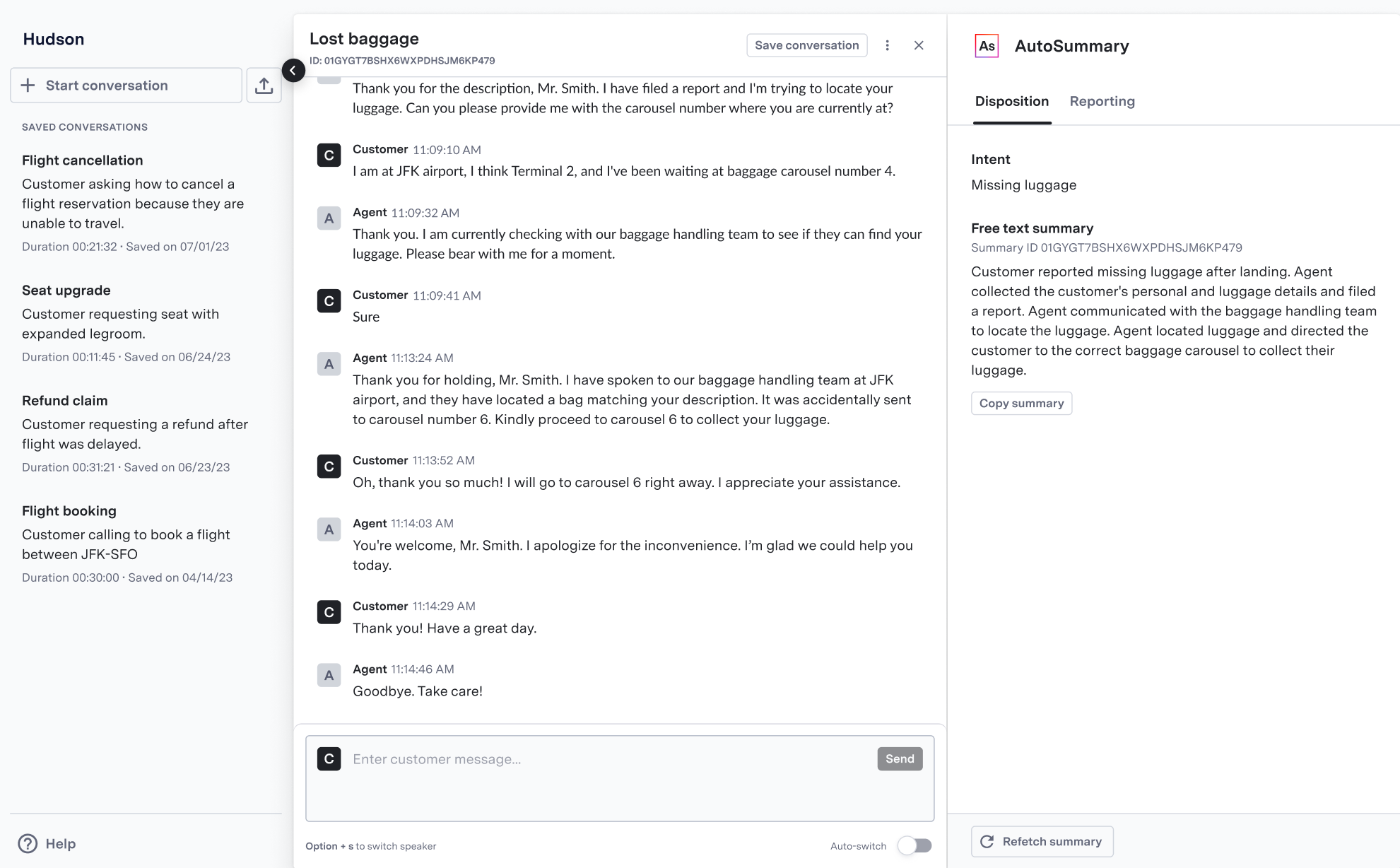 ## Creating Test Conversations
The AI Summary Sandbox supports two methods for testing summary generation:
**Simulate Conversations**
* Create new conversations by switching between customer and agent roles
* Test voice conversations using real-time transcription via AI Transcribe
* Validate summary generation on different conversation types and scenarios
**Upload Transcripts**
* Load existing conversation transcripts
* Test summary generation on historical conversations
* Validate model performance on real customer interactions
## Available Summary Types
The Sandbox generates summaries based on your environment's configuration:
| Type | Description | Availability |
| :---------------- | :-------------------------------------------------------- | :------------------------------------------------------------- |
| Free Text Summary | Concise narrative summary of the conversation | Always available |
| Intent | Topic-level categorization of customer's primary issue | Available after custom model training |
| Structured Data | Extracted data points and answers to predefined questions | Available after customizing your structured data configuration |
You must configure intent and structured data capabilities for your specific business needs. Contact your ASAPP account team to enable these features.
## Using the Sandbox
Depending on the type of conversation you want to test, you can use one of the following methods:
When testing voice conversations in the Sandbox:
* AI Transcribe powers real-time transcription
* If no custom AI Transcribe model exists, the system uses a baseline contact center model
* The system generates transcripts in real-time as you speak
For messaging conversations, you can:
* Switch between customer and agent roles to simulate a chat
* Type messages directly in the interface
* Upload existing chat transcripts
### Generating Summaries
1. Create or upload a conversation using one of the methods above
2. Click "Generate Summary" to process the conversation
3. View the generated free-text summary and any enabled structured data
4. Use the conversation ID to retrieve summaries via API if needed
## Creating Test Conversations
The AI Summary Sandbox supports two methods for testing summary generation:
**Simulate Conversations**
* Create new conversations by switching between customer and agent roles
* Test voice conversations using real-time transcription via AI Transcribe
* Validate summary generation on different conversation types and scenarios
**Upload Transcripts**
* Load existing conversation transcripts
* Test summary generation on historical conversations
* Validate model performance on real customer interactions
## Available Summary Types
The Sandbox generates summaries based on your environment's configuration:
| Type | Description | Availability |
| :---------------- | :-------------------------------------------------------- | :------------------------------------------------------------- |
| Free Text Summary | Concise narrative summary of the conversation | Always available |
| Intent | Topic-level categorization of customer's primary issue | Available after custom model training |
| Structured Data | Extracted data points and answers to predefined questions | Available after customizing your structured data configuration |
You must configure intent and structured data capabilities for your specific business needs. Contact your ASAPP account team to enable these features.
## Using the Sandbox
Depending on the type of conversation you want to test, you can use one of the following methods:
When testing voice conversations in the Sandbox:
* AI Transcribe powers real-time transcription
* If no custom AI Transcribe model exists, the system uses a baseline contact center model
* The system generates transcripts in real-time as you speak
For messaging conversations, you can:
* Switch between customer and agent roles to simulate a chat
* Type messages directly in the interface
* Upload existing chat transcripts
### Generating Summaries
1. Create or upload a conversation using one of the methods above
2. Click "Generate Summary" to process the conversation
3. View the generated free-text summary and any enabled structured data
4. Use the conversation ID to retrieve summaries via API if needed