> ## Documentation Index
> Fetch the complete documentation index at: https://docs.asapp.com/llms.txt
> Use this file to discover all available pages before exploring further.
# AI Transcribe via Direct Websocket
> Use a websocket URL to send audio media to AI Transcribe
Your organization can use AI Transcribe to transcribe voice interactions between contact center agents and their customers, in support of a broad range of use cases including analysis, coaching, and quality management.
ASAPP AI Transcribe is a streaming speech-to-text transcription service that works both with live streams and with audio recordings of completed calls. Integrating your voice system with GenerativeAgent using the AI Transcribe Websocket enables real-time communication, allowing for seamless interaction between your voice platform and GenerativeAgent's services.
A speech recognition model powers the AI Transcribe service and transforms spoken form to written forms in real-time, along with punctuation and capitalization. To optimize performance, you can customize the model to support domain-specific needs by training on historical call audio and adding custom vocabulary to further boost recognition accuracy.
Some benefits of using Websocket to Stream events include:
* Websocket Connection: Establish a persistent connection between your voice system and the GenerativeAgent server.
* API Streaming: All audio streaming, call signaling, and returned transcripts use a WebSocket API, preceded by an authentication mechanism using a REST API
* Real-time Data Exchange: Messages are exchanged in real time, ensuring quick responses and efficient handling of user queries.
* Bi-directional Communication: Websockets facilitate bi-directional communication, making the interaction smooth and responsive.
### Implementation Steps
1. Step 1: Authenticate with ASAPP
2. Step 2: Open a Connection
3. Step 3: Start an Audio Stream
4. Step 4: Send the Audio Stream
5. Step 5: Receive the Free-Text Transcriptions from AI Transcribe
6. Step 6: Stop the Audio Stream
Finalize the audio stream when the conversation is over or escalates to a human agent
### How it works
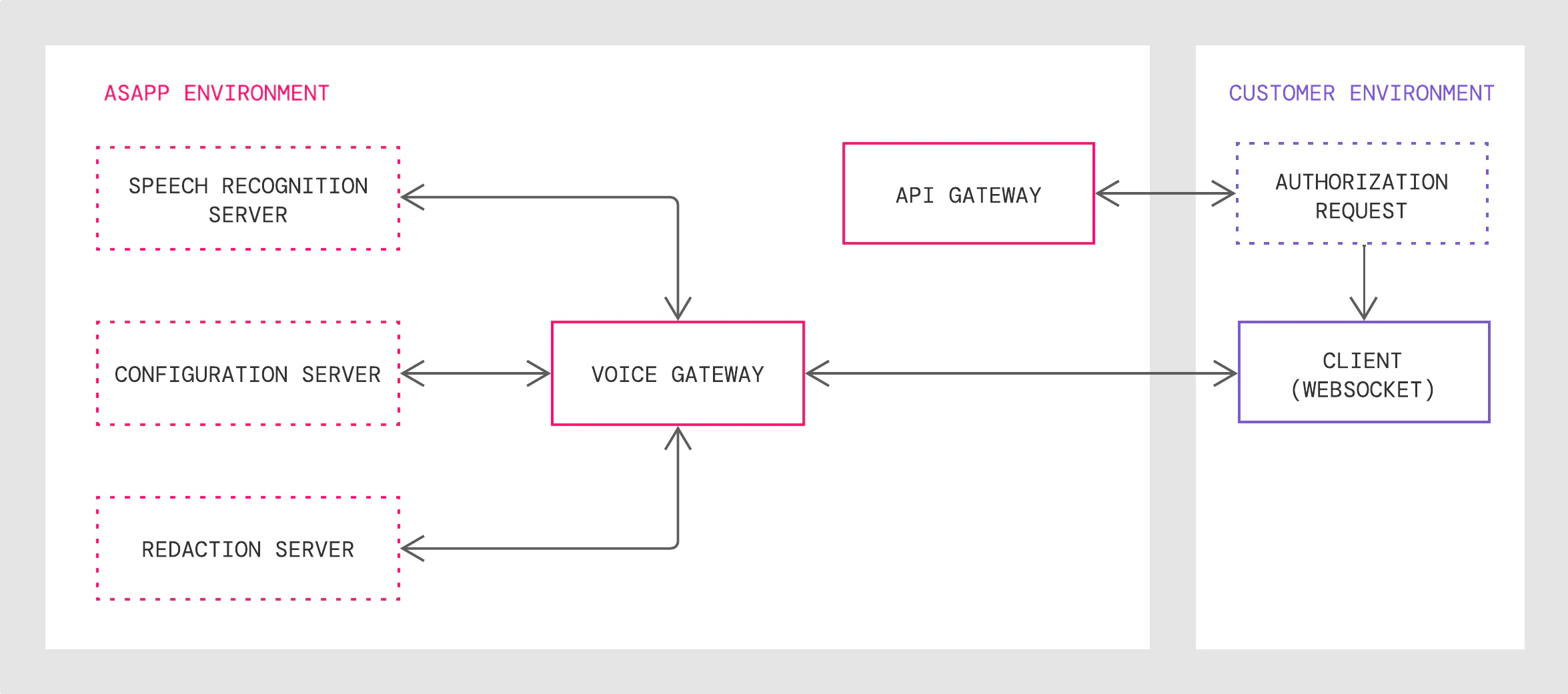
1. The API Gateway authenticates customer requests and returns a WebSocket URL, which points to the Voice Gateway with secure protocol.
2. The Voice Gateway validates the client connection request, translates public WebSocket API calls to internal protocols and sends live audio streams to the Speech Recognition Server
3. The Redaction Server redacts the transcribed texts with given customizable redaction rules if you request redaction.
4. AI Transcribe receives the texts, analyzes them, and sends back a reply
This guide covers the **WebSocket API** solution pattern, which consists of an API Gateway, Voice Gateway, Speech Recognition Server and Redaction Server, where:
 ### Integration Steps
Here's a high level overview of how to work with AI Transcribe:
1. Authenticate with ASAPP to gain access to the AI Transcribe API.
2. Establish a WebSocket connection with the ASAPP Voice Gateway.
3. Send a `startStream` message with appropriate feature parameters specified.
4. Once the request is accepted by the ASAPP Voice Gateway, stream audio as binary data.
5. The ASAPP voice server will return transcripts in multiple messages.
6. Once the audio streaming is completed, send a `finishStream` to indicate to the Voice server that there is no more audio to send for this stream request.
7. Upon completion of all audio processing, the server sends a `finalResponse` which contains a summary of the stream request.
### Requirements
**Audio Stream Format**
In order to be transcribed properly, audio sent to ASAPP AI Transcribe must be in mono or single-channel for each speaker.
You send audio as binary format through the WebSocket; you should provide the audio encoding (sample rate and encoding format) in the `startStream` message.
For real-time live streaming, ASAPP recommends that you stream audio chunk-by-chunk in a real-time streaming format, by sending every 20ms or 100ms of audio as one binary message and sending the next chunk after a 20ms or 100ms interval.
If the chunk is too small, it will require more audio binary messages and more downstream message handling; if the chunk is too big, it increases buffering pressure and slows down the server responsiveness.
Exceptionally large chunks may result in WebSocket transport errors such as timeouts.
When supplying recorded audio to ASAPP for AI Transcribe model training prior to implementation, send uncompressed `.WAV` media files with speaker-separated channels.
Recordings for training and real-time streams should have both the same sample rate (8000 samples/sec) and audio encoding (16-bit PCM).
See the [Customization section of the AI Transcribe Product Guide](/ai-productivity/ai-transcribe/product-guide#customization) for more on data requirements for transcription model training.
**Developer Portal**
ASAPP provides an AI Services [Developer Portal](/getting-started/developers). Within the portal, developers can do the following:
* Access relevant API documentation (e.g. OpenAPI reference schemas)
* Access API keys for authorization
* Manage user accounts and apps
Visit the [Get Started](/getting-started/developers) for instructions on creating a developer account, managing teams and apps, and setting up AI Service APIs.
## Step 1 : Authenticate with ASAPP and Obtain an Access URL
All requests to ASAPP sandbox and production APIs must use `HTTPS` protocol. Traffic using `HTTP` will not be redirected to `HTTPS`.
The following HTTPS REST API enables authentication with the ASAPP API Gateway:
* `asapp-api-id` and `asapp-api-secret` are required header parameters, both of which ASAPP will provide to you.
* We recommend that you send a unique conversation ID in the request body as `externalId`. ASAPP refers to this identifier from the client's system in real-time streaming use cases to redact utterances using context from other utterances in the same conversation (e.g., reference to a credit card in an utterance from 20s earlier). It is the client's responsibility to ensure `externalId` is unique.
[`POST /autotranscribe/v1/streaming-url`](/apis/autotranscribe/get-streaming-url)
Headers (required)
```json theme={null}
{
"asapp-api-id": ,
"asapp-api-secret":
}
```
Request body (optional)
```json theme={null}
{
"externalId": ""
}
```
If the authentication succeeds, the HTTP response body will return a secure WebSocket short-lived access URL. Default TTL (time-to-live) for this URL is 5 minutes.
```json theme={null}
{
"streamingUrl": ""
}
```
## Step 2: Open a Connection
Before sending any message, create a WebSocket connection with the access URL obtained from previous step:
`wss://?token=`
The system will establish a WebSocket connection if it validates the `short_lived_access_token`. Otherwise, the system will reject the requested connection.
## Step 3: Start an Audio Stream
AI Transcribe uses the following message sequence for streaming audio, sending transcripts, and ending streaming:
| | **Send Your Request** | **Receive ASAPP Response** |
| :- | :--------------------- | :------------------------- |
| 1 | `startStream` message | `startResponse` message |
| 2 | Stream audio | `transcript` message |
| 3 | `finishStream` message | `finalResponse` message |
WebSocket protocol request messages in the sequence must be formatted as text (UTF-8 encoded string data); only the audio stream should be formatted in binary. All response messages will also be formatted as text.
### Send startStream message
Once you establish the connection, send a `startStream` message with information about the speaker including their `role` (customer, agent) and their unique identifier (`externalId`) from your system before sending any audio packets.
```json theme={null}
{
"message":"startStream",
"sender": {
"role": "customer",
"externalId": "JD232442"
}
}
```
Provide additional [optional fields](#fields-and-parameters) in the `startStream` message to adjust default transcription settings.
For example, the default `language` transcription setting is `en-US` if not denoted in the `startStream` message. To set the language to Spanish, the `language` field should be set with value `es-US`. Once set, AI Transcribe will expect a Spanish conversation in the audio stream and return transcribed message text in Spanish.
### Receive startResponse message
For any `startStream` message, the server will respond with a `startResponse` if the request is granted:
```json theme={null}
{
"message": "startResponse",
"streamID": "128342213",
"status": {
"code": "1000",
"description": "OK"
}
}
```
The `streamID` is a unique identifier that the ASAPP server assigns to the connection.
The status code and description may contain additional useful information.
If there is an application status code error with the request, the ASAPP server sends a `finalResponse` message with an error description, and the server then closes the connection.
## Step 4: Send the audio stream
You can start to stream audio as soon as you send the `startStream` message without the need to wait for the `startResponse`. However, the system could reject a request either due to an invalid `startStream` or internal server errors. If that is the case, the server notifies with a `finalResponse` message, and the server will drop any streamed audio packets.
Audio must be sent as binary data of WebSocket protocol:
`ws.send()`
The server does not acknowledge receiving individual audio packets. The summary in the `finalResponse` message can be used to verify if any audio packet was not received by the server.
If audio can be transcribed, the server sends back `transcript` messages asynchronously.
For real-time live streaming, we recommend that audio streams are sent chunk-by-chunk, sending every 20ms or 100ms of audio as one binary message. Exceptionally large chunks may result in WebSocket transport errors such as timeouts.
### Receive transcript messages
The server sends back the `transcript` message, which contains one complete utterance.
Example of a `transcript` message:
```json theme={null}
{
"message": "transcript",
"start": 0,
"end": 1000,
"utterance":
[
{"text": "Hi, my ID is 123."}
]
}
```
## Step 5: Receive Transcriptions from AI Transcribe
Now you must call `GET /messages` to receive all the transcript messages for a completed call.
Conversation transcripts are available for seven days after they are completed.
```json theme={null}
curl -X GET 'https://api.sandbox.asapp.com/conversation/v1/conversation/messages' \
--header 'asapp-api-id: ' \
--header 'asapp-api-secret: ' \
--header 'Content-Type: application/json' \
--data '{
"externalId": "Your GUID/UCID of the SPIREC Call"
}'
```
A successful response returns a 200 and the Call Transcripts
```json theme={null}
{
"type": "transcript",
"externalConversationId": "",
"streamId": "",
"sender": {
"externalId": "",
"role": "customer", // or "agent"
},
"autotranscribeResponse": {
"message": "transcript",
"start": 0,
"end": 1000,
"utterance": [
{"text": ""}
]
}
}
```
## Step 6: Stop the Streaming Audio Message
### Send finishStream message
When you complete the audio stream, send a `finishStream` message. The service will drop any audio message sent after `finishStream`.
```json theme={null}
{
"message": "finishStream"
}
```
Any other non-audio messages sent after `finishStream` will be dropped, the service will send a `finalResponse` with error code 4056 (Wrong message order) and the connection will close.
### Receive finalResponse message
The server sends a `finalResponse` at the end of the streaming session and closes the connection, after which it will stop processing incoming messages for the stream. It is safe to close the WebSocket connection when you receive the `finalResponse` message.
The server will end a given stream session if any of following are true:
* Server receives `finishStream` and has processed all audio received
* Server detects connection idle timeout (at 60 seconds)
* Server internal errors occur (unable to recover)
* Request message is invalid (note: if the access token is invalid, the WebSocket will close with a WebSocket error code)
* A critical requested feature is not supported, for example, redaction
* Service maintenance
* Streaming duration over limit (default is 3 hours)
In case of non-application WebSocket errors, the WebSocket layer closes the connection, and the server may not get an opportunity to send a `finalResponse` message.
The `finalResponse`message has a summary of the stream along with the status code, which you can use to verify if there are any missing audio packets or transcript messages:
```json theme={null}
{
"message": "finalResponse",
"streamId": "128342213",
"status": {
"code": "1000",
"description": "OK"
},
"summary": {
"totalAudioBytes": 300, // number of audio bytes received
"audioDurationMs": 6000, // audio length in milliseconds processed by the server
"streamingSeconds": 6,
"transcripts": 10 // number of transcripts recognized
}
```
## Fields & Parameters
### StartStream Request Fields
| Field | Description | Default | Supported Values |
| :--------------------------- | :------------------------------------------------------------------------------------------------------------------------------------------------------------------------------------------------------------------------------------------------------------------------------------------------------------------------------------------------------------------------------ | :------- | :--------------------------------------------------- |
| sender.role (required) | A participant role, usually the customer or an agent for human participants. | n/a | "agent", "customer" |
| sender.externalId (required) | Participant ID from the external system, it should be the same for all interactions of the same individual | n/a | "BL2341334" |
| language | IETF language tag | en-US | "en-US", "es-US" |
| samplingRate | Audio samples/sec | 8000 | 8000 |
| encoding | 'L16': PCM data with 16 bit/sample | L16 | "L16" |
| smartFormatting | Request for post processing: Inverse Text Normalization (convert spoken form to written form), e.g., 'twenty two --> 22'. Auto punctuation and capitalization | true | true, false |
| detailedToken | If true, outputs word-level details like word content, timestamp and word type. | false | true, false |
| audioRecordingAllowed | false: ASAPP will not record the audio; true: ASAPP may record and store the audio for this conversation | false | true, false |
| redactionOutput | If detailedToken is true along with value 'redacted' or 'redacted\_and\_unredacted', the system will reject the request. If the client has not configured redaction rules for 'redacted' or 'redacted\_and\_unredacted', the system will reject the request. If smartFormatting is False, the system will reject requests with value 'redacted' or 'redacted\_and\_unredacted'. | redacted | "redacted", "unredacted","redacted\_and\_unredacted" |
### Transcript Message Response Fields
| Field | Description | Format | Example Syntax |
| :------------- | :---------------------------------------------------------------------------------------------------------------------------------------------------------------------------------------------------------- | :------ | :------------------ |
| start | Start time (millisecond) of the utterance (in milliseconds) relative to the start of the audio input | integer | 0 |
| end | End time (millisecond) of the utterance (in milliseconds) relative to the start of the audio input | integer | 300 |
| utterance.text | The written text of the utterance. While an utterance can have multiple alternatives (e.g., 'me two' vs. 'me too') ASAPP provides only the most probable alternative, based on model prediction confidence. | array | "Hi, my ID is 123." |
If the `detailedToken` in `startStream` request is set to true, additional fields are provided within the `utterance` array for each `token`:
| Field | Description | Format | Example Syntax |
| :---------------------- | :------------------------------------------------------------------------------------------------------------------------------------------------------------------------------------------------- | :------ | :------------- |
| token.content | Text or punctuation | string | "is", "?" |
| token.start | Start time (millisecond) of the token relative to the start of the audio input | integer | 170 |
| token.end | End time (millisecond) audio boundary of the token relative to the start of the audio input, there may be silence after that, so it does not necessarily match with the startMs of the next token. | integer | 200 |
| token.punctuationAfter | Optional, punctuation attached after the content | string | '.' |
| token.punctuationBefore | Optional, punctuation attached in front of the content | string | '"' |
### Custom Vocabulary
The ASAPP speech server can boost specific word accuracy if you provide a target list of vocabulary words before recognition starts, using an `updateVocabulary` message.
You can send the `updateVocabulary` service multiple times during a session. Vocabulary is additive, which means the system appends the new vocabulary words to the previous ones. If you send vocabulary in between sent audio packets, it will take effect only after the end of the current utterance being processed.
All `updateVocabulary` changes are valid only for the current WebSocket session.
The following fields are part of a `updateVocabulary` message:
| Field | Description | Mandatory | Example Syntax |
| :--------- | :------------------------------------------------------------------------------------------------------------------------------------------------------------------------------------------------------------------------------------------------------------------------------------------------------------------------- | :-------- | :------------------------------------------------- |
| phrase | Phrase which needs to be boosted. Prevent adding longer phrases, instead add them as separate entries. | Yes | "IEEE" |
| soundsLike | This provides the ways in which a phrase can be said/pronounced. Certain rules: - Spell out numbers (25 -> 'two five' and/or 'twenty five') - Spell out acronyms (WHO -> 'w h o') - Use lowercase letters for everything - Limit phrases to English and Spanish-language letters (accented consonants and vowels accepted) | No | "i triple e" |
| category | Supported Categories: 'address', 'name', 'number'. Categories help the AI Transcribe service normalize the provided phrase so it can guess certain ways in which a phrase can be pronounced. e.g., '717 N Blvd' with 'address' category will help the service normalize the phrase to 'seven one seven North Boulevard' | No | "address", "name", "number", "company", "currency" |
Example request and response:
**Request**
```json theme={null}
{
"message": "updateVocabulary",
"phrases":
[
{
"phrase": "IEEE",
"category": "company",
"soundsLike":
[
"I triple E"
]
},
{
"phrase": "25.00",
"category": "currency",
"soundsLike":
[
"twenty five dollars"
]
},
{
"phrase": "HHilton",
"category": "company",
"soundsLike":
[
"H Hilton",
"Hilton Honors"
]
},
{
"phrase": "Jon Snow",
"category": "name",
"soundsLike":
[
"John Snow"
],
},
{
"phrase": "717 N Shoreline Blvd",
"category": "address"
}
]
}
```
**Response**
```json theme={null}
{
"message": "vocabularyResponse",
"status": {
"code": "1000",
"description": "OK"
}
```
### Application Status Codes
| Status code | Description |
| :---------- | :-------------------------------------------------------------------------------------------------------------------- |
| 1000 | OK |
| 1008 | Invalid or expired access token |
| 2002 | Error in fetching conversationId. This error code is only possible when integration with other AI Services is enabled |
| 4040 | Message format incorrect |
| 4050 | Language not supported |
| 4051 | Encoding not supported |
| 4053 | Sample rate not supported |
| 4056 | Wrong message order or missing required message |
| 4080 | Unable to transcribe the audio |
| 4082 | Audio decode failure |
| 4083 | Connection idle timeout. Try streaming audio in real-time |
| 4084 | Custom vocabulary phrase exceeds limit |
| 4090 | Streaming duration over limit |
| 4091 | Invalid vocabulary format |
| 4092 | Redact only smart formatted text |
| 4093 | Redaction only supported if detailedTokens in True |
| 4094 | RedactionOutput cannot be unredacted or redacted\_and\_unredacted because of global config being to always redact |
| 5000 | Internal service error |
| 5001 | Service shutting down |
| 5002 | No instances available |
## Retrieving Transcript Data
In addition to real-time transcription messages via WebSocket, AI Transcribe also can output transcripts through two other mechanisms:
* **After-call**: GET endpoint responds to your requests for a designated call with the full set of utterances from that completed conversation
* **Batch**: File Exporter service responds to your request for a designated time interval with a link to a data feed file that includes all utterances from that interval's conversations
### After-Call via GET Request
[`GET /conversation/v1/conversation/messages`](/apis/messages/list-messages-with-an-externalid)
Use this endpoint to retrieve all the transcript messages for a completed call.
**When to Call**
Once the conversation is complete. Conversation transcripts are available for seven days after they are completed.
For conversations that include transfers, the endpoint will provide transcript messages for all call legs that correspond to the call's identifier.
**Request Details**
Requests must include a call identifier with the GUID/UCID of the SIPREC call.
**Response Details**
When successful, this endpoint responds with an array of objects, each of which corresponds to a single message. Each object contains the text of the message, the sender's role and identifier, a unique message identifier, and timestamps.
You set transcription settings (e.g., language, detailed tokens, redaction) for a given call with [the `startStream` websocket message](#startstream-request-fields) when you initiate call transcription. All transcripts retrieved after the call will reflect the initially requested settings in the `startStream` message.
**Message Limit**
This endpoint responds with up to 1,000 transcribed messages per conversation, approximately a two-hour continuous call. You receive all messages in a single response without any pagination.
To retrieve all messages for calls that exceed this limit, use either a real-time mechanism or File Exporter for transcript retrieval.
### Batch via File Exporter
AI Transcribe makes full transcripts for batches of calls available using the File Exporter service's `utterances` data feed.
You can use the File Exporter service as a batch mechanism for exporting data to your data warehouse, either on a scheduled basis (e.g., nightly, weekly) or for ad hoc analyses. Data that populates feeds for the File Exporter service updates once daily at 2:00AM UTC.
Visit [Retrieving Data for AI Services](/reporting/file-exporter) for a guide on how to interact with the File Exporter service.
### Integration Steps
Here's a high level overview of how to work with AI Transcribe:
1. Authenticate with ASAPP to gain access to the AI Transcribe API.
2. Establish a WebSocket connection with the ASAPP Voice Gateway.
3. Send a `startStream` message with appropriate feature parameters specified.
4. Once the request is accepted by the ASAPP Voice Gateway, stream audio as binary data.
5. The ASAPP voice server will return transcripts in multiple messages.
6. Once the audio streaming is completed, send a `finishStream` to indicate to the Voice server that there is no more audio to send for this stream request.
7. Upon completion of all audio processing, the server sends a `finalResponse` which contains a summary of the stream request.
### Requirements
**Audio Stream Format**
In order to be transcribed properly, audio sent to ASAPP AI Transcribe must be in mono or single-channel for each speaker.
You send audio as binary format through the WebSocket; you should provide the audio encoding (sample rate and encoding format) in the `startStream` message.
For real-time live streaming, ASAPP recommends that you stream audio chunk-by-chunk in a real-time streaming format, by sending every 20ms or 100ms of audio as one binary message and sending the next chunk after a 20ms or 100ms interval.
If the chunk is too small, it will require more audio binary messages and more downstream message handling; if the chunk is too big, it increases buffering pressure and slows down the server responsiveness.
Exceptionally large chunks may result in WebSocket transport errors such as timeouts.
When supplying recorded audio to ASAPP for AI Transcribe model training prior to implementation, send uncompressed `.WAV` media files with speaker-separated channels.
Recordings for training and real-time streams should have both the same sample rate (8000 samples/sec) and audio encoding (16-bit PCM).
See the [Customization section of the AI Transcribe Product Guide](/ai-productivity/ai-transcribe/product-guide#customization) for more on data requirements for transcription model training.
**Developer Portal**
ASAPP provides an AI Services [Developer Portal](/getting-started/developers). Within the portal, developers can do the following:
* Access relevant API documentation (e.g. OpenAPI reference schemas)
* Access API keys for authorization
* Manage user accounts and apps
Visit the [Get Started](/getting-started/developers) for instructions on creating a developer account, managing teams and apps, and setting up AI Service APIs.
## Step 1 : Authenticate with ASAPP and Obtain an Access URL
All requests to ASAPP sandbox and production APIs must use `HTTPS` protocol. Traffic using `HTTP` will not be redirected to `HTTPS`.
The following HTTPS REST API enables authentication with the ASAPP API Gateway:
* `asapp-api-id` and `asapp-api-secret` are required header parameters, both of which ASAPP will provide to you.
* We recommend that you send a unique conversation ID in the request body as `externalId`. ASAPP refers to this identifier from the client's system in real-time streaming use cases to redact utterances using context from other utterances in the same conversation (e.g., reference to a credit card in an utterance from 20s earlier). It is the client's responsibility to ensure `externalId` is unique.
[`POST /autotranscribe/v1/streaming-url`](/apis/autotranscribe/get-streaming-url)
Headers (required)
```json theme={null}
{
"asapp-api-id": ,
"asapp-api-secret":
}
```
Request body (optional)
```json theme={null}
{
"externalId": ""
}
```
If the authentication succeeds, the HTTP response body will return a secure WebSocket short-lived access URL. Default TTL (time-to-live) for this URL is 5 minutes.
```json theme={null}
{
"streamingUrl": ""
}
```
## Step 2: Open a Connection
Before sending any message, create a WebSocket connection with the access URL obtained from previous step:
`wss://?token=`
The system will establish a WebSocket connection if it validates the `short_lived_access_token`. Otherwise, the system will reject the requested connection.
## Step 3: Start an Audio Stream
AI Transcribe uses the following message sequence for streaming audio, sending transcripts, and ending streaming:
| | **Send Your Request** | **Receive ASAPP Response** |
| :- | :--------------------- | :------------------------- |
| 1 | `startStream` message | `startResponse` message |
| 2 | Stream audio | `transcript` message |
| 3 | `finishStream` message | `finalResponse` message |
WebSocket protocol request messages in the sequence must be formatted as text (UTF-8 encoded string data); only the audio stream should be formatted in binary. All response messages will also be formatted as text.
### Send startStream message
Once you establish the connection, send a `startStream` message with information about the speaker including their `role` (customer, agent) and their unique identifier (`externalId`) from your system before sending any audio packets.
```json theme={null}
{
"message":"startStream",
"sender": {
"role": "customer",
"externalId": "JD232442"
}
}
```
Provide additional [optional fields](#fields-and-parameters) in the `startStream` message to adjust default transcription settings.
For example, the default `language` transcription setting is `en-US` if not denoted in the `startStream` message. To set the language to Spanish, the `language` field should be set with value `es-US`. Once set, AI Transcribe will expect a Spanish conversation in the audio stream and return transcribed message text in Spanish.
### Receive startResponse message
For any `startStream` message, the server will respond with a `startResponse` if the request is granted:
```json theme={null}
{
"message": "startResponse",
"streamID": "128342213",
"status": {
"code": "1000",
"description": "OK"
}
}
```
The `streamID` is a unique identifier that the ASAPP server assigns to the connection.
The status code and description may contain additional useful information.
If there is an application status code error with the request, the ASAPP server sends a `finalResponse` message with an error description, and the server then closes the connection.
## Step 4: Send the audio stream
You can start to stream audio as soon as you send the `startStream` message without the need to wait for the `startResponse`. However, the system could reject a request either due to an invalid `startStream` or internal server errors. If that is the case, the server notifies with a `finalResponse` message, and the server will drop any streamed audio packets.
Audio must be sent as binary data of WebSocket protocol:
`ws.send()`
The server does not acknowledge receiving individual audio packets. The summary in the `finalResponse` message can be used to verify if any audio packet was not received by the server.
If audio can be transcribed, the server sends back `transcript` messages asynchronously.
For real-time live streaming, we recommend that audio streams are sent chunk-by-chunk, sending every 20ms or 100ms of audio as one binary message. Exceptionally large chunks may result in WebSocket transport errors such as timeouts.
### Receive transcript messages
The server sends back the `transcript` message, which contains one complete utterance.
Example of a `transcript` message:
```json theme={null}
{
"message": "transcript",
"start": 0,
"end": 1000,
"utterance":
[
{"text": "Hi, my ID is 123."}
]
}
```
## Step 5: Receive Transcriptions from AI Transcribe
Now you must call `GET /messages` to receive all the transcript messages for a completed call.
Conversation transcripts are available for seven days after they are completed.
```json theme={null}
curl -X GET 'https://api.sandbox.asapp.com/conversation/v1/conversation/messages' \
--header 'asapp-api-id: ' \
--header 'asapp-api-secret: ' \
--header 'Content-Type: application/json' \
--data '{
"externalId": "Your GUID/UCID of the SPIREC Call"
}'
```
A successful response returns a 200 and the Call Transcripts
```json theme={null}
{
"type": "transcript",
"externalConversationId": "",
"streamId": "",
"sender": {
"externalId": "",
"role": "customer", // or "agent"
},
"autotranscribeResponse": {
"message": "transcript",
"start": 0,
"end": 1000,
"utterance": [
{"text": ""}
]
}
}
```
## Step 6: Stop the Streaming Audio Message
### Send finishStream message
When you complete the audio stream, send a `finishStream` message. The service will drop any audio message sent after `finishStream`.
```json theme={null}
{
"message": "finishStream"
}
```
Any other non-audio messages sent after `finishStream` will be dropped, the service will send a `finalResponse` with error code 4056 (Wrong message order) and the connection will close.
### Receive finalResponse message
The server sends a `finalResponse` at the end of the streaming session and closes the connection, after which it will stop processing incoming messages for the stream. It is safe to close the WebSocket connection when you receive the `finalResponse` message.
The server will end a given stream session if any of following are true:
* Server receives `finishStream` and has processed all audio received
* Server detects connection idle timeout (at 60 seconds)
* Server internal errors occur (unable to recover)
* Request message is invalid (note: if the access token is invalid, the WebSocket will close with a WebSocket error code)
* A critical requested feature is not supported, for example, redaction
* Service maintenance
* Streaming duration over limit (default is 3 hours)
In case of non-application WebSocket errors, the WebSocket layer closes the connection, and the server may not get an opportunity to send a `finalResponse` message.
The `finalResponse`message has a summary of the stream along with the status code, which you can use to verify if there are any missing audio packets or transcript messages:
```json theme={null}
{
"message": "finalResponse",
"streamId": "128342213",
"status": {
"code": "1000",
"description": "OK"
},
"summary": {
"totalAudioBytes": 300, // number of audio bytes received
"audioDurationMs": 6000, // audio length in milliseconds processed by the server
"streamingSeconds": 6,
"transcripts": 10 // number of transcripts recognized
}
```
## Fields & Parameters
### StartStream Request Fields
| Field | Description | Default | Supported Values |
| :--------------------------- | :------------------------------------------------------------------------------------------------------------------------------------------------------------------------------------------------------------------------------------------------------------------------------------------------------------------------------------------------------------------------------ | :------- | :--------------------------------------------------- |
| sender.role (required) | A participant role, usually the customer or an agent for human participants. | n/a | "agent", "customer" |
| sender.externalId (required) | Participant ID from the external system, it should be the same for all interactions of the same individual | n/a | "BL2341334" |
| language | IETF language tag | en-US | "en-US", "es-US" |
| samplingRate | Audio samples/sec | 8000 | 8000 |
| encoding | 'L16': PCM data with 16 bit/sample | L16 | "L16" |
| smartFormatting | Request for post processing: Inverse Text Normalization (convert spoken form to written form), e.g., 'twenty two --> 22'. Auto punctuation and capitalization | true | true, false |
| detailedToken | If true, outputs word-level details like word content, timestamp and word type. | false | true, false |
| audioRecordingAllowed | false: ASAPP will not record the audio; true: ASAPP may record and store the audio for this conversation | false | true, false |
| redactionOutput | If detailedToken is true along with value 'redacted' or 'redacted\_and\_unredacted', the system will reject the request. If the client has not configured redaction rules for 'redacted' or 'redacted\_and\_unredacted', the system will reject the request. If smartFormatting is False, the system will reject requests with value 'redacted' or 'redacted\_and\_unredacted'. | redacted | "redacted", "unredacted","redacted\_and\_unredacted" |
### Transcript Message Response Fields
| Field | Description | Format | Example Syntax |
| :------------- | :---------------------------------------------------------------------------------------------------------------------------------------------------------------------------------------------------------- | :------ | :------------------ |
| start | Start time (millisecond) of the utterance (in milliseconds) relative to the start of the audio input | integer | 0 |
| end | End time (millisecond) of the utterance (in milliseconds) relative to the start of the audio input | integer | 300 |
| utterance.text | The written text of the utterance. While an utterance can have multiple alternatives (e.g., 'me two' vs. 'me too') ASAPP provides only the most probable alternative, based on model prediction confidence. | array | "Hi, my ID is 123." |
If the `detailedToken` in `startStream` request is set to true, additional fields are provided within the `utterance` array for each `token`:
| Field | Description | Format | Example Syntax |
| :---------------------- | :------------------------------------------------------------------------------------------------------------------------------------------------------------------------------------------------- | :------ | :------------- |
| token.content | Text or punctuation | string | "is", "?" |
| token.start | Start time (millisecond) of the token relative to the start of the audio input | integer | 170 |
| token.end | End time (millisecond) audio boundary of the token relative to the start of the audio input, there may be silence after that, so it does not necessarily match with the startMs of the next token. | integer | 200 |
| token.punctuationAfter | Optional, punctuation attached after the content | string | '.' |
| token.punctuationBefore | Optional, punctuation attached in front of the content | string | '"' |
### Custom Vocabulary
The ASAPP speech server can boost specific word accuracy if you provide a target list of vocabulary words before recognition starts, using an `updateVocabulary` message.
You can send the `updateVocabulary` service multiple times during a session. Vocabulary is additive, which means the system appends the new vocabulary words to the previous ones. If you send vocabulary in between sent audio packets, it will take effect only after the end of the current utterance being processed.
All `updateVocabulary` changes are valid only for the current WebSocket session.
The following fields are part of a `updateVocabulary` message:
| Field | Description | Mandatory | Example Syntax |
| :--------- | :------------------------------------------------------------------------------------------------------------------------------------------------------------------------------------------------------------------------------------------------------------------------------------------------------------------------- | :-------- | :------------------------------------------------- |
| phrase | Phrase which needs to be boosted. Prevent adding longer phrases, instead add them as separate entries. | Yes | "IEEE" |
| soundsLike | This provides the ways in which a phrase can be said/pronounced. Certain rules: - Spell out numbers (25 -> 'two five' and/or 'twenty five') - Spell out acronyms (WHO -> 'w h o') - Use lowercase letters for everything - Limit phrases to English and Spanish-language letters (accented consonants and vowels accepted) | No | "i triple e" |
| category | Supported Categories: 'address', 'name', 'number'. Categories help the AI Transcribe service normalize the provided phrase so it can guess certain ways in which a phrase can be pronounced. e.g., '717 N Blvd' with 'address' category will help the service normalize the phrase to 'seven one seven North Boulevard' | No | "address", "name", "number", "company", "currency" |
Example request and response:
**Request**
```json theme={null}
{
"message": "updateVocabulary",
"phrases":
[
{
"phrase": "IEEE",
"category": "company",
"soundsLike":
[
"I triple E"
]
},
{
"phrase": "25.00",
"category": "currency",
"soundsLike":
[
"twenty five dollars"
]
},
{
"phrase": "HHilton",
"category": "company",
"soundsLike":
[
"H Hilton",
"Hilton Honors"
]
},
{
"phrase": "Jon Snow",
"category": "name",
"soundsLike":
[
"John Snow"
],
},
{
"phrase": "717 N Shoreline Blvd",
"category": "address"
}
]
}
```
**Response**
```json theme={null}
{
"message": "vocabularyResponse",
"status": {
"code": "1000",
"description": "OK"
}
```
### Application Status Codes
| Status code | Description |
| :---------- | :-------------------------------------------------------------------------------------------------------------------- |
| 1000 | OK |
| 1008 | Invalid or expired access token |
| 2002 | Error in fetching conversationId. This error code is only possible when integration with other AI Services is enabled |
| 4040 | Message format incorrect |
| 4050 | Language not supported |
| 4051 | Encoding not supported |
| 4053 | Sample rate not supported |
| 4056 | Wrong message order or missing required message |
| 4080 | Unable to transcribe the audio |
| 4082 | Audio decode failure |
| 4083 | Connection idle timeout. Try streaming audio in real-time |
| 4084 | Custom vocabulary phrase exceeds limit |
| 4090 | Streaming duration over limit |
| 4091 | Invalid vocabulary format |
| 4092 | Redact only smart formatted text |
| 4093 | Redaction only supported if detailedTokens in True |
| 4094 | RedactionOutput cannot be unredacted or redacted\_and\_unredacted because of global config being to always redact |
| 5000 | Internal service error |
| 5001 | Service shutting down |
| 5002 | No instances available |
## Retrieving Transcript Data
In addition to real-time transcription messages via WebSocket, AI Transcribe also can output transcripts through two other mechanisms:
* **After-call**: GET endpoint responds to your requests for a designated call with the full set of utterances from that completed conversation
* **Batch**: File Exporter service responds to your request for a designated time interval with a link to a data feed file that includes all utterances from that interval's conversations
### After-Call via GET Request
[`GET /conversation/v1/conversation/messages`](/apis/messages/list-messages-with-an-externalid)
Use this endpoint to retrieve all the transcript messages for a completed call.
**When to Call**
Once the conversation is complete. Conversation transcripts are available for seven days after they are completed.
For conversations that include transfers, the endpoint will provide transcript messages for all call legs that correspond to the call's identifier.
**Request Details**
Requests must include a call identifier with the GUID/UCID of the SIPREC call.
**Response Details**
When successful, this endpoint responds with an array of objects, each of which corresponds to a single message. Each object contains the text of the message, the sender's role and identifier, a unique message identifier, and timestamps.
You set transcription settings (e.g., language, detailed tokens, redaction) for a given call with [the `startStream` websocket message](#startstream-request-fields) when you initiate call transcription. All transcripts retrieved after the call will reflect the initially requested settings in the `startStream` message.
**Message Limit**
This endpoint responds with up to 1,000 transcribed messages per conversation, approximately a two-hour continuous call. You receive all messages in a single response without any pagination.
To retrieve all messages for calls that exceed this limit, use either a real-time mechanism or File Exporter for transcript retrieval.
### Batch via File Exporter
AI Transcribe makes full transcripts for batches of calls available using the File Exporter service's `utterances` data feed.
You can use the File Exporter service as a batch mechanism for exporting data to your data warehouse, either on a scheduled basis (e.g., nightly, weekly) or for ad hoc analyses. Data that populates feeds for the File Exporter service updates once daily at 2:00AM UTC.
Visit [Retrieving Data for AI Services](/reporting/file-exporter) for a guide on how to interact with the File Exporter service.