> ## Documentation Index
> Fetch the complete documentation index at: https://docs.asapp.com/llms.txt
> Use this file to discover all available pages before exploring further.
# Custom Code API Connections
> Create custom API connections using JavaScript code
Code-based API connections allow you to create custom integrations with any external API using JavaScript. This enables you to support any authentication flow or API structure that your external systems require.
You will implement a function that takes a request as input and returns the response that GenerativeAgent will receive. This allows you to transform data, handle complex authentication flows, and integrate with any external system.
## Before You Begin
Before you begin, you will need:
* An ASAPP Dashboard account with Edit permissions for Code based API Connections.
Your Admin should be able to enable this for you. Reach out to your ASAPP account team if you need help.
* A basic understanding of JavaScript.
## Using Code Based API Connections
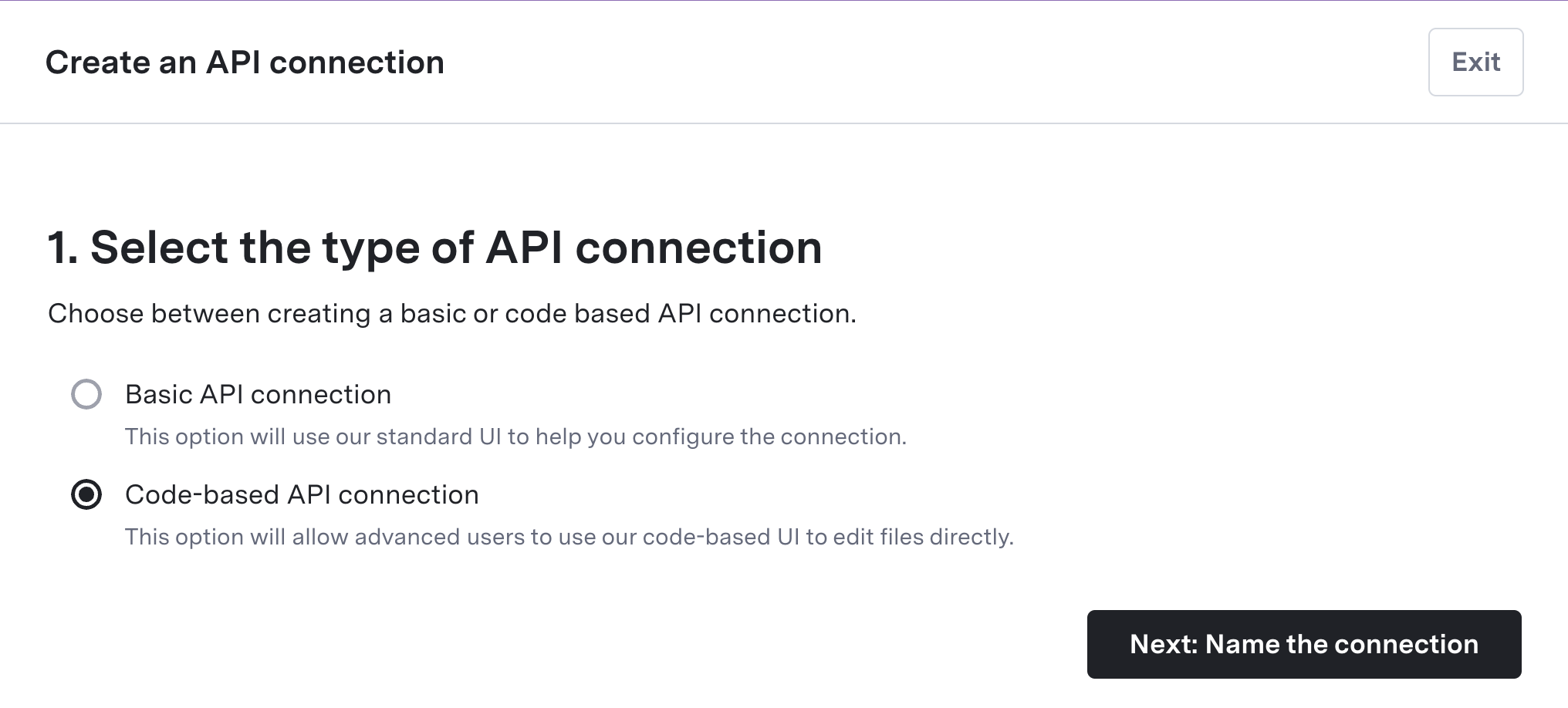
1. Navigate to **API Integration HUB** > **API Connections**
2. Click **Create Connection**
3. Select **Code-based API Connection** from the dropdown
4. Enter a **Name** and optional **Description**.
5. Click **Create connection**
This creates a new, unimplemented API connection. You will be dropped into the **Settings** tab.
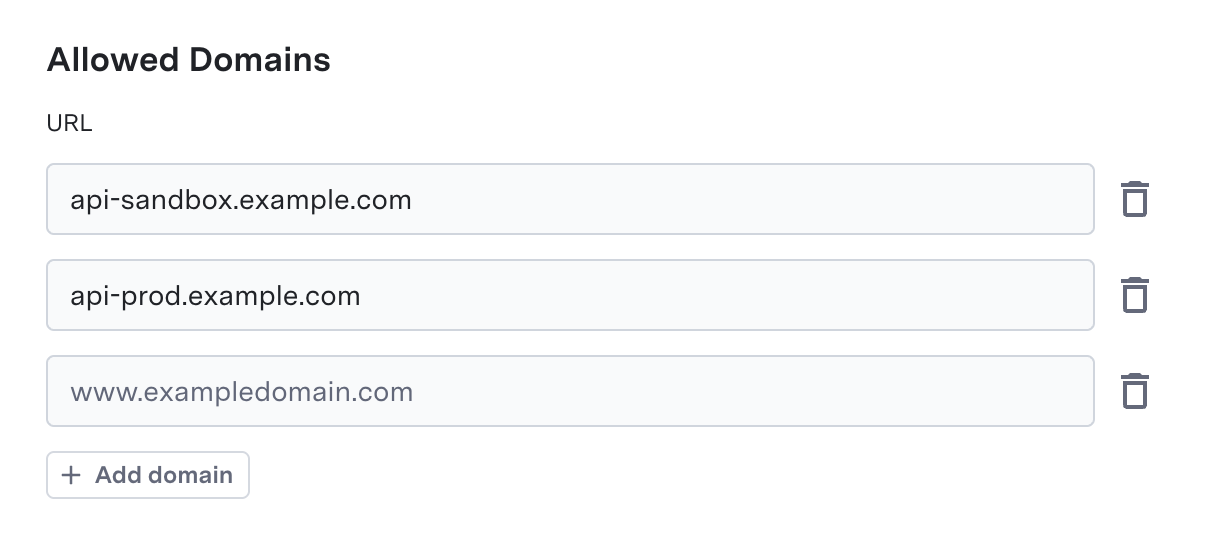
 Code-based API connections restrict access to an explicit whitelist of domains as a security measure. You need to add each domain that your code will reach out to.
1. In the **Basic Settings** tab, specify allowed domains for any API calls your code needs to make
2. Click **Add Domain** and enter URLs (e.g., `api.example.com`)
3. Wildcards (`*`) are supported for subdomains
4. Your code only calls URLs specified in the allowed domains using `asappUtilities.callAPI(url, apiRequest)`
Code-based API connections restrict access to an explicit whitelist of domains as a security measure. You need to add each domain that your code will reach out to.
1. In the **Basic Settings** tab, specify allowed domains for any API calls your code needs to make
2. Click **Add Domain** and enter URLs (e.g., `api.example.com`)
3. Wildcards (`*`) are supported for subdomains
4. Your code only calls URLs specified in the allowed domains using `asappUtilities.callAPI(url, apiRequest)`
 If your code will call [adapters](/generativeagent/configuring/connect-apis/adapters) via `asappUtilities.getAdapter()`, add them in the **Basic Settings** tab:
1. In **Basic Settings**, find the **Import adapters** section
2. Click **Add adapters** and select the adapter(s) you need
3. The string you pass to `getAdapter()` in code must match the name of the adapter you added (e.g. `getAdapter("SalesforceAdapter")` requires an adapter named "SalesforceAdapter")
Store and manage environment variables to be used in your code. This is often used to store data that will change between environments, such as URLs for the API call you will be making.
Environment variables support storing **Secret** values which the system encrypts when stored in the database. However, for API credentials and authentication data, we strongly recommend using **Authentication Methods** instead, as they provide better security and easier management.
1. In the **Environment Variables** settings tab, add any variables your code needs.
2. Specify the value for Sandbox and Production environments.
3. Use the **Secret** checkbox to store encrypted environment variables (for configuration data, not API credentials)
4. Access environment variables in your code using `asappUtilities.getEnvVariable("VARIABLE_NAME")`
If your code will call [adapters](/generativeagent/configuring/connect-apis/adapters) via `asappUtilities.getAdapter()`, add them in the **Basic Settings** tab:
1. In **Basic Settings**, find the **Import adapters** section
2. Click **Add adapters** and select the adapter(s) you need
3. The string you pass to `getAdapter()` in code must match the name of the adapter you added (e.g. `getAdapter("SalesforceAdapter")` requires an adapter named "SalesforceAdapter")
Store and manage environment variables to be used in your code. This is often used to store data that will change between environments, such as URLs for the API call you will be making.
Environment variables support storing **Secret** values which the system encrypts when stored in the database. However, for API credentials and authentication data, we strongly recommend using **Authentication Methods** instead, as they provide better security and easier management.
1. In the **Environment Variables** settings tab, add any variables your code needs.
2. Specify the value for Sandbox and Production environments.
3. Use the **Secret** checkbox to store encrypted environment variables (for configuration data, not API credentials)
4. Access environment variables in your code using `asappUtilities.getEnvVariable("VARIABLE_NAME")`
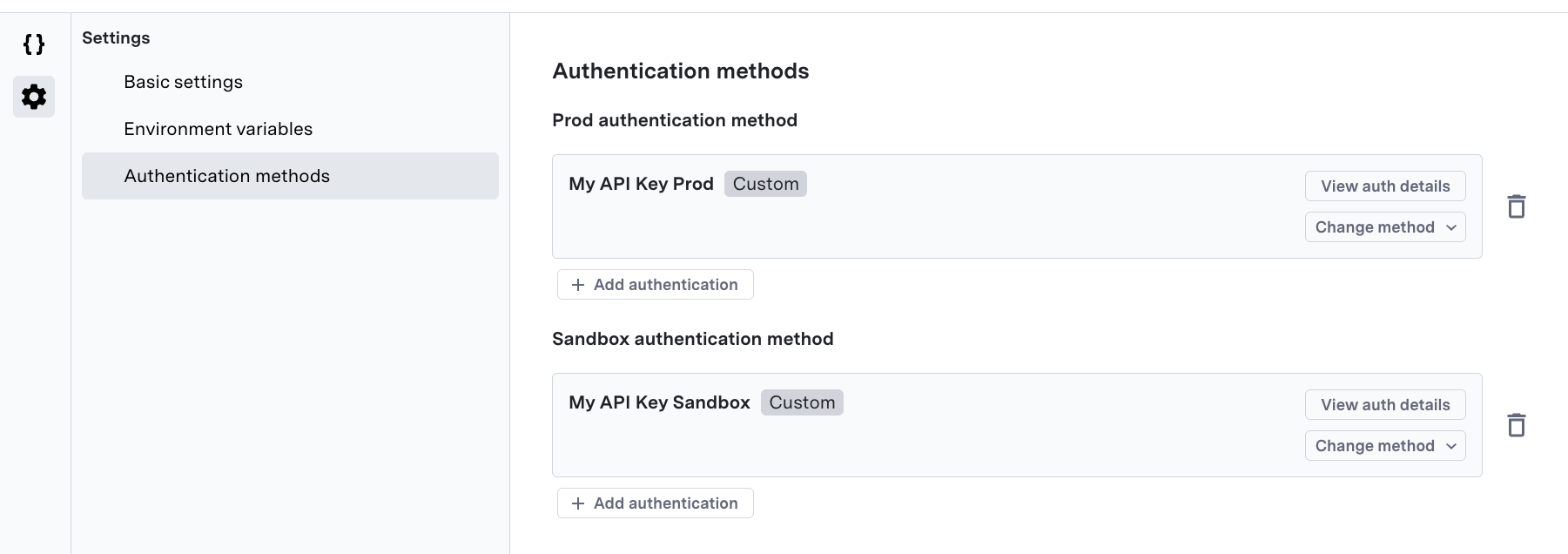
 If your API connection requires authentication, add authentication methods to your API connection.
1. Navigate to **Settings** → **Authentication Methods**
2. For each environment, click **Add Authentication** to add a new authentication method.
3. Create a new [authentication method](/generativeagent/configuring/connect-apis/authentication-methods) or select an existing one.
If your API connection requires authentication, add authentication methods to your API connection.
1. Navigate to **Settings** → **Authentication Methods**
2. For each environment, click **Add Authentication** to add a new authentication method.
3. Create a new [authentication method](/generativeagent/configuring/connect-apis/authentication-methods) or select an existing one.
 You need to define the structure of data that your API connection will receive and return:
1. **Request Schema** (`schemas/request.json`) - Define the request schema that your function will receive
2. **Response Schema** (`schemas/response.json`) - Define the response schema that your function will return
See the [Request Schema](#request-schema) and [Response Schema](#response-schema) sections below for detailed information on how to structure these schemas.
Implement the `handleRequest(request)` function in `src/index.js` that takes the request object and returns the response object.
See the [Implementing the Handle Function](#implementing-the-handle-function) section below for detailed information on how to implement your function.
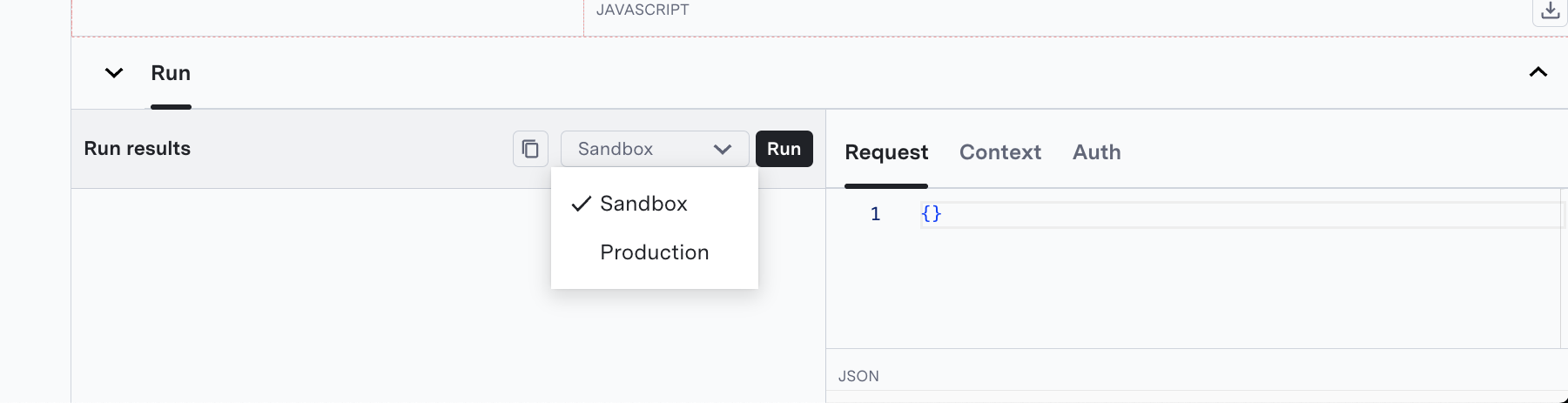
As you write code, test it to ensure it works as expected:
1. In the **Run** panel, define an example request that matches your `request.json` schema
2. Select which environment to run: **Sandbox** or **Production**
3. Click **Run**
4. Review the results in the left panel
You can not publish your code until you have successfully tested it.
Once you have successfully tested your API connection:
1. Publish the API connection. This will save your code and make it available as a new version.
The system does not provide separate Save vs Publish functionality. You must directly publish any changes to your code.
2. It will now be available for use in your GenerativeAgent tasks and functions. If you have an existing function that uses this API connection, you will need to update it to use the new version.
3. Test the integration end-to-end to ensure it works as expected
## Request Schema
The request schema (`schemas/request.json`) defines the structure of data that your function will receive. This JSON schema is both the request schema that your function will receive and the parameters shown to GenerativeAgent.
Add the variables you want as input. Ensure the name and description of each variable is easy for GenerativeAgent to understand.
GenerativeAgent works better with flat JSON object as an input with a reduced number of properties. The more complex the input, the harder it is for GenerativeAgent to understand the request.
By default, the request schema is empty.
```json theme={null}
{
"additionalProperties": false,
"type": "object"
}
```
### Example Request Schema
This example takes a last name and confirmation code as input for an airline rebooking function.
```json theme={null}
{
"type": "object",
"properties": {
"last_name": {
"type": "string",
"description": "The last name of the user"
},
"confirmation_code": {
"type": "string",
"description": "The flight confirmation code from the user"
}
},
"required": ["last_name", "confirmation_code"]
}
```
## Response Schema
The response schema (`schemas/response.json`) defines the structure of data that your function must return. This is the response that GenerativeAgent receives.
Add the variables you want as output. Ensure the name and description of each variable is easy for GenerativeAgent to understand.
GenerativeAgent can read complex JSON objects more effectively than on request. However, if you are seeing issues with GenerativeAgent not understanding the response, try reducing the number of properties in the response.
By default, the response schema is empty.
```json theme={null}
{
"additionalProperties": false,
"type": "object"
}
```
### Example Response Schema
```json theme={null}
{
"type": "object",
"properties": {
"response": {
"type": "string",
"description": "Human-readable response message"
},
"data": {
"type": "array",
"description": "Array of search results",
"items": {
"type": "object",
"properties": {
"id": { "type": "string" },
"title": { "type": "string" },
"description": { "type": "string" }
}
}
},
"metadata": {
"type": "object",
"description": "Additional metadata about the response",
"properties": {
"totalResults": { "type": "number" },
"query": { "type": "string" }
}
}
},
"required": ["response"]
}
```
## Implementing the Handle Function
The `handleRequest(request)` function in `src/index.js` is the core of your API connection. This function takes the request object and returns the response object.
When first created, your function looks like this:
```javascript theme={null}
export async function handleRequest(request) {
/*
Implement this function to handle the request. Return the result or throw an error.
> Success case
return {
"response": "Your response text",
"data": {},
"metadata": {}
};
> Failure case (throw an error)
throw new asappUtilities.APIConnectionError({
customErrorCode: "SOME_ERROR", // Codes make it easier to specify logic to GenerativeAgent around error handling
errorMessage: "Error message", // This is the human readable error message
error: [Optionally pass along error object]
});
*/
throw new asappUtilities.APIConnectionError({
customErrorCode: "NOT_IMPLEMENTED"
});
}
```
Replace the `NOT_IMPLEMENTED` error with your own implementation for the API connection.
### Function Parameters
The `request` parameter contains the data defined in your request schema.
### Return Value
Your function should return an object that matches your response schema.
The serialized response must not exceed **10 MB**. If your result exceeds this limit, the execution will fail with a validation error.
### Error Handling
We expose [`several error classes in the asappUtilities`](#asapp-utilities-errors) library. Always use one of these error classes for error handling to ensure proper error propagation to ASAPP:
```javascript theme={null}
try {
// Your API logic here
return {
response: "Success message",
data: resultData,
metadata: {}
};
} catch (error) {
throw new asappUtilities.APIConnectionError({
customErrorCode: "API_ERROR",
errorMessage: "API call failed",
error: error
});
}
```
## ASAPP Utilities
ASAPP Utilities is a library designed for integration of Code Driven API Connections. It provides tools for writing secure and efficient code.
### Making API Calls
The library provides a secure way to make API calls to allowed domains with the `callAPI` function. This function uses fetch under the hood and follows fetch's interface.
This is the only way to make external HTTP API calls from your code.
```javascript theme={null}
const response = await asappUtilities.callAPI(`${asappUtilities.getEnvVariable("API_URL")}/data`, {
method: "GET",
headers: {
"Content-Type": "application/json"
},
authMethods: {
prod: "Production API Auth",
sandbox: "Sandbox API Auth"
}
});
if (response.status === 200) { // Status codes must be check, non 2XX don't raise errors.
const data = await response.json();
console.log("Data received:", data);
} else {
throw new asappUtilities.APIConnectionError({
customErrorCode: `API_HTTP_STATUS_ERROR`,
errorMessage: `API call failed with HTTP status ${response.status}: ${response.statusText}`
});
}
```
### Environment Variables
Access environment variables configured during setup. Use environment variables for configuration data like API URLs. Do not use environment variables for sensitive credentials.
For API credentials and authentication data, use [Authentication Methods](#using-authentication-methods).
```javascript theme={null}
const apiUrl = asappUtilities.getEnvVariable("API_URL");
console.log(`Using API URL: ${apiUrl}`);
```
### ASAPP Utilities Errors
In order to properly propagate errors to ASAPP, you must throw an `asappUtilities` error:
This is a generic error that can be used to catch any error that occurs in your code.
```javascript theme={null}
try {
// Your business logic here
const result = await processUserData(request.userId);
if (!result) {
throw new asappUtilities.APIConnectionError({
customErrorCode: "USER_NOT_FOUND",
errorMessage: "User data could not be retrieved"
});
}
return result;
} catch (error) {
throw new asappUtilities.APIConnectionError({
customErrorCode: "PROCESSING_ERROR",
errorMessage: "An error occurred while processing the request",
error: error
});
}
```
This is an error that is thrown when a client authentication error occurs.
Raising this error will cause GenerativeAgent to send an [authentication\_required event](/generativeagent/integrate/handling-events#user-authentication-required) to the client.
```javascript theme={null}
const response = await asappUtilities.callAPI(url, request);
if (response.status === 401) {
throw new asappUtilities.ClientAuthenticationError({
customErrorCode: "TOKEN_EXPIRED",
errorMessage: "Token expired and user needs to re-authenticate"
});
}
```
This error is thrown when there is a problem with an authentication method, such as when the specified authentication method is not found or not provided.
```javascript theme={null}
try {
const authData = asappUtilities.getAuthMethod({
prod: "Production Auth",
sandbox: "Sandbox Auth"
});
} catch (error) {
// AuthMethodError is thrown automatically by getAuthMethod()
// when the specified auth method name doesn't match any configured method
console.error("Auth method lookup failed:", error);
throw error;
}
```
### Context Data
Use `getContextData()` and `setContextData()` to read and write conversation-scoped data within a Code Connection execution.
#### getContextData
Returns the current context object for the conversation. This includes ASAPP-provided identifiers, the active task name, the conversation's input and reference variables, and any custom data previously written via `setConversationData()`.
Reading input and reference variables here lets a connection use deterministic values directly, instead of relying on GenerativeAgent to pass them in as function parameters.
```javascript theme={null}
const contextData = asappUtilities.getContextData();
console.log(`Conversation ID: ${contextData.asapp.conversationId}`);
// Read input and reference variables directly
const policyNumber = contextData.inputVariables.policy_number;
const customerTier = contextData.referenceVariables.customer_tier;
const activeTask = contextData.taskName;
// Access custom data set earlier in the conversation
const cachedResult = contextData.conversation.myKey;
```
```json theme={null}
{
"externalCustomerId": "1234567890",
"asapp": {
"externalConversationId": "1234567890",
"conversationId": "1234567890"
},
"conversation": {
"myKey": "myValue"
},
"taskName": "schedule_appointment",
"inputVariables": {
"appointment_type": "annual"
},
"referenceVariables": {
"customer_tier": "gold"
}
}
```
The `externalCustomerId` and `asapp` fields are always present. `taskName` is the name of the task running the connection. `inputVariables` and `referenceVariables` hold the input and reference variables set on the conversation. Custom data written with `setConversationData()` is nested under the `conversation` key.
#### setConversationData
Writes custom key/value data into the `conversation` object. Values written here are available to subsequent Code Connection executions within the same conversation via `getContextData().conversation`. Set a key to `null` to delete it.
```javascript theme={null}
asappUtilities.setConversationData({
orderId: "ORD-98765",
lookupComplete: true
});
// Delete a key
asappUtilities.setConversationData({ orderId: null });
```
`setConversationData()` is only available in Code Connections.
### Encryption Utility
The encryption utility provides methods for secure data encryption and encoding operations.
```javascript theme={null}
// Check if a string is base64 encoded
const isBase64 = asappUtilities.encryptionUtility.isBase64("SGVsbG8gV29ybGQ=");
// Encode a string with buffer
const salt = asappUtilities.encryptionUtility.encodeWithBuffer("randomString");
// Encrypt data using PBKDF2
const encrypted = await asappUtilities.encryptionUtility.encryptPBKDF2(sensitiveData, salt, "base64");
```
### PDF Utility
The PDF utility allows you to extract structured text from PDF documents.
```javascript theme={null}
const { fullText } = await asappUtilities.pdfUtility.extractText(pdfBuffer);
console.log("Extracted text:", fullText);
```
### MCP (Model Context Protocol)
You can connect to MCP servers from your code to execute tools or discover available capabilities. MCP server endpoints must be included in your [allowed domains](#set-up-allowed-domains).
#### Execute an MCP Tool
```javascript theme={null}
const result = await asappUtilities.executeMCP({
endpoint: "https://mcp-server.example.com/mcp",
operation: "tools/call",
params: {
name: "get_weather",
arguments: { city: "San Francisco" }
}
});
console.log(result.content);
```
#### Discover MCP Server Capabilities
```javascript theme={null}
const discovery = await asappUtilities.discoverMCP({
endpoint: "https://mcp-server.example.com/mcp",
headers: { Authorization: "Bearer token" },
timeoutMs: 30000
});
console.log(`Server: ${discovery.serverInfo?.name}`);
console.log(`Tools available: ${discovery.tools.length}`);
discovery.tools.forEach(tool => {
console.log(`- ${tool.name}: ${tool.description}`);
});
```
### Fetch Authentication Method Data
To use authentication methods for an API call, provide them as part of the request to `asappUtilities.callAPI()`.
There may be times you want to pull out data from the authentication method, such grabbing claims from a JWT token. You can access the authentication methods you've configured in your code using the `asappUtilities.getAuthMethod()` function.
```javascript theme={null}
const authMethodResults = asappUtilities.getAuthMethod({
prod: "prod-auth-method-1",
sandbox: "sandbox-auth-method-2",
});
// returns object of type { headers: Record; authResultContext?: object; ttlSeconds?: number; }
console.log(`Current authMethodResults:`, authMethodResults);
```
## Using Authentication Methods
**Best Practice**: Always use authentication methods instead of storing API keys in environment variables. Authentication methods provide better security, easier management, and support for complex authentication flows like OAuth, JWT, and custom token management.
If your API connection requires authentication, first you must add the authentcation method in **Settings** > **Authentication Methods**. Then, when making API calls with `asappUtilities.callAPI()`, specify which authentication method to use by name for each environment:
```javascript theme={null}
const response = await asappUtilities.callAPI(
"https://api.example.com/data",
{
method: "GET",
headers: {
"Content-Type": "application/json"
},
authMethods: {
prod: "Your Production Auth Method Name",
sandbox: "Your Sandbox Auth Method Name",
},
}
);
```
The `authMethods` object maps environment names to the exact names of your configured authentication methods. ASAPP automatically applies the appropriate authentication (e.g. tokens, api keys, etc.) to the headers based on the method you've configured for each environment.
**Important**: The authentication method names in your code must exactly match the names you gave them when creating the authentication methods in the **Settings** → **Authentication Methods** section.
## Running your code
While developing your code-based API connection, you can test it by running it in the **Run** panel. This will allow you to test your code without having to publish it. Any `console.log` statements will be displayed in the **Run** panel.
To specify the data that will be passed to your function when running, in the right hand run panel, you need to specify:
* The **Request** object that will be passed to your function. This must match the `request.json` schema.
* The **Context** object that will be passed to your function.
* The **Auth** object that will be passed to your function. This is only used if the authentication method you are using uses [client authentication data](/generativeagent/configuring/connect-apis/authentication-methods#client-authentication-data).
Additionally, you can specify the **Environment** to run your code in in the Environment dropdown.
You need to define the structure of data that your API connection will receive and return:
1. **Request Schema** (`schemas/request.json`) - Define the request schema that your function will receive
2. **Response Schema** (`schemas/response.json`) - Define the response schema that your function will return
See the [Request Schema](#request-schema) and [Response Schema](#response-schema) sections below for detailed information on how to structure these schemas.
Implement the `handleRequest(request)` function in `src/index.js` that takes the request object and returns the response object.
See the [Implementing the Handle Function](#implementing-the-handle-function) section below for detailed information on how to implement your function.
As you write code, test it to ensure it works as expected:
1. In the **Run** panel, define an example request that matches your `request.json` schema
2. Select which environment to run: **Sandbox** or **Production**
3. Click **Run**
4. Review the results in the left panel
You can not publish your code until you have successfully tested it.
Once you have successfully tested your API connection:
1. Publish the API connection. This will save your code and make it available as a new version.
The system does not provide separate Save vs Publish functionality. You must directly publish any changes to your code.
2. It will now be available for use in your GenerativeAgent tasks and functions. If you have an existing function that uses this API connection, you will need to update it to use the new version.
3. Test the integration end-to-end to ensure it works as expected
## Request Schema
The request schema (`schemas/request.json`) defines the structure of data that your function will receive. This JSON schema is both the request schema that your function will receive and the parameters shown to GenerativeAgent.
Add the variables you want as input. Ensure the name and description of each variable is easy for GenerativeAgent to understand.
GenerativeAgent works better with flat JSON object as an input with a reduced number of properties. The more complex the input, the harder it is for GenerativeAgent to understand the request.
By default, the request schema is empty.
```json theme={null}
{
"additionalProperties": false,
"type": "object"
}
```
### Example Request Schema
This example takes a last name and confirmation code as input for an airline rebooking function.
```json theme={null}
{
"type": "object",
"properties": {
"last_name": {
"type": "string",
"description": "The last name of the user"
},
"confirmation_code": {
"type": "string",
"description": "The flight confirmation code from the user"
}
},
"required": ["last_name", "confirmation_code"]
}
```
## Response Schema
The response schema (`schemas/response.json`) defines the structure of data that your function must return. This is the response that GenerativeAgent receives.
Add the variables you want as output. Ensure the name and description of each variable is easy for GenerativeAgent to understand.
GenerativeAgent can read complex JSON objects more effectively than on request. However, if you are seeing issues with GenerativeAgent not understanding the response, try reducing the number of properties in the response.
By default, the response schema is empty.
```json theme={null}
{
"additionalProperties": false,
"type": "object"
}
```
### Example Response Schema
```json theme={null}
{
"type": "object",
"properties": {
"response": {
"type": "string",
"description": "Human-readable response message"
},
"data": {
"type": "array",
"description": "Array of search results",
"items": {
"type": "object",
"properties": {
"id": { "type": "string" },
"title": { "type": "string" },
"description": { "type": "string" }
}
}
},
"metadata": {
"type": "object",
"description": "Additional metadata about the response",
"properties": {
"totalResults": { "type": "number" },
"query": { "type": "string" }
}
}
},
"required": ["response"]
}
```
## Implementing the Handle Function
The `handleRequest(request)` function in `src/index.js` is the core of your API connection. This function takes the request object and returns the response object.
When first created, your function looks like this:
```javascript theme={null}
export async function handleRequest(request) {
/*
Implement this function to handle the request. Return the result or throw an error.
> Success case
return {
"response": "Your response text",
"data": {},
"metadata": {}
};
> Failure case (throw an error)
throw new asappUtilities.APIConnectionError({
customErrorCode: "SOME_ERROR", // Codes make it easier to specify logic to GenerativeAgent around error handling
errorMessage: "Error message", // This is the human readable error message
error: [Optionally pass along error object]
});
*/
throw new asappUtilities.APIConnectionError({
customErrorCode: "NOT_IMPLEMENTED"
});
}
```
Replace the `NOT_IMPLEMENTED` error with your own implementation for the API connection.
### Function Parameters
The `request` parameter contains the data defined in your request schema.
### Return Value
Your function should return an object that matches your response schema.
The serialized response must not exceed **10 MB**. If your result exceeds this limit, the execution will fail with a validation error.
### Error Handling
We expose [`several error classes in the asappUtilities`](#asapp-utilities-errors) library. Always use one of these error classes for error handling to ensure proper error propagation to ASAPP:
```javascript theme={null}
try {
// Your API logic here
return {
response: "Success message",
data: resultData,
metadata: {}
};
} catch (error) {
throw new asappUtilities.APIConnectionError({
customErrorCode: "API_ERROR",
errorMessage: "API call failed",
error: error
});
}
```
## ASAPP Utilities
ASAPP Utilities is a library designed for integration of Code Driven API Connections. It provides tools for writing secure and efficient code.
### Making API Calls
The library provides a secure way to make API calls to allowed domains with the `callAPI` function. This function uses fetch under the hood and follows fetch's interface.
This is the only way to make external HTTP API calls from your code.
```javascript theme={null}
const response = await asappUtilities.callAPI(`${asappUtilities.getEnvVariable("API_URL")}/data`, {
method: "GET",
headers: {
"Content-Type": "application/json"
},
authMethods: {
prod: "Production API Auth",
sandbox: "Sandbox API Auth"
}
});
if (response.status === 200) { // Status codes must be check, non 2XX don't raise errors.
const data = await response.json();
console.log("Data received:", data);
} else {
throw new asappUtilities.APIConnectionError({
customErrorCode: `API_HTTP_STATUS_ERROR`,
errorMessage: `API call failed with HTTP status ${response.status}: ${response.statusText}`
});
}
```
### Environment Variables
Access environment variables configured during setup. Use environment variables for configuration data like API URLs. Do not use environment variables for sensitive credentials.
For API credentials and authentication data, use [Authentication Methods](#using-authentication-methods).
```javascript theme={null}
const apiUrl = asappUtilities.getEnvVariable("API_URL");
console.log(`Using API URL: ${apiUrl}`);
```
### ASAPP Utilities Errors
In order to properly propagate errors to ASAPP, you must throw an `asappUtilities` error:
This is a generic error that can be used to catch any error that occurs in your code.
```javascript theme={null}
try {
// Your business logic here
const result = await processUserData(request.userId);
if (!result) {
throw new asappUtilities.APIConnectionError({
customErrorCode: "USER_NOT_FOUND",
errorMessage: "User data could not be retrieved"
});
}
return result;
} catch (error) {
throw new asappUtilities.APIConnectionError({
customErrorCode: "PROCESSING_ERROR",
errorMessage: "An error occurred while processing the request",
error: error
});
}
```
This is an error that is thrown when a client authentication error occurs.
Raising this error will cause GenerativeAgent to send an [authentication\_required event](/generativeagent/integrate/handling-events#user-authentication-required) to the client.
```javascript theme={null}
const response = await asappUtilities.callAPI(url, request);
if (response.status === 401) {
throw new asappUtilities.ClientAuthenticationError({
customErrorCode: "TOKEN_EXPIRED",
errorMessage: "Token expired and user needs to re-authenticate"
});
}
```
This error is thrown when there is a problem with an authentication method, such as when the specified authentication method is not found or not provided.
```javascript theme={null}
try {
const authData = asappUtilities.getAuthMethod({
prod: "Production Auth",
sandbox: "Sandbox Auth"
});
} catch (error) {
// AuthMethodError is thrown automatically by getAuthMethod()
// when the specified auth method name doesn't match any configured method
console.error("Auth method lookup failed:", error);
throw error;
}
```
### Context Data
Use `getContextData()` and `setContextData()` to read and write conversation-scoped data within a Code Connection execution.
#### getContextData
Returns the current context object for the conversation. This includes ASAPP-provided identifiers, the active task name, the conversation's input and reference variables, and any custom data previously written via `setConversationData()`.
Reading input and reference variables here lets a connection use deterministic values directly, instead of relying on GenerativeAgent to pass them in as function parameters.
```javascript theme={null}
const contextData = asappUtilities.getContextData();
console.log(`Conversation ID: ${contextData.asapp.conversationId}`);
// Read input and reference variables directly
const policyNumber = contextData.inputVariables.policy_number;
const customerTier = contextData.referenceVariables.customer_tier;
const activeTask = contextData.taskName;
// Access custom data set earlier in the conversation
const cachedResult = contextData.conversation.myKey;
```
```json theme={null}
{
"externalCustomerId": "1234567890",
"asapp": {
"externalConversationId": "1234567890",
"conversationId": "1234567890"
},
"conversation": {
"myKey": "myValue"
},
"taskName": "schedule_appointment",
"inputVariables": {
"appointment_type": "annual"
},
"referenceVariables": {
"customer_tier": "gold"
}
}
```
The `externalCustomerId` and `asapp` fields are always present. `taskName` is the name of the task running the connection. `inputVariables` and `referenceVariables` hold the input and reference variables set on the conversation. Custom data written with `setConversationData()` is nested under the `conversation` key.
#### setConversationData
Writes custom key/value data into the `conversation` object. Values written here are available to subsequent Code Connection executions within the same conversation via `getContextData().conversation`. Set a key to `null` to delete it.
```javascript theme={null}
asappUtilities.setConversationData({
orderId: "ORD-98765",
lookupComplete: true
});
// Delete a key
asappUtilities.setConversationData({ orderId: null });
```
`setConversationData()` is only available in Code Connections.
### Encryption Utility
The encryption utility provides methods for secure data encryption and encoding operations.
```javascript theme={null}
// Check if a string is base64 encoded
const isBase64 = asappUtilities.encryptionUtility.isBase64("SGVsbG8gV29ybGQ=");
// Encode a string with buffer
const salt = asappUtilities.encryptionUtility.encodeWithBuffer("randomString");
// Encrypt data using PBKDF2
const encrypted = await asappUtilities.encryptionUtility.encryptPBKDF2(sensitiveData, salt, "base64");
```
### PDF Utility
The PDF utility allows you to extract structured text from PDF documents.
```javascript theme={null}
const { fullText } = await asappUtilities.pdfUtility.extractText(pdfBuffer);
console.log("Extracted text:", fullText);
```
### MCP (Model Context Protocol)
You can connect to MCP servers from your code to execute tools or discover available capabilities. MCP server endpoints must be included in your [allowed domains](#set-up-allowed-domains).
#### Execute an MCP Tool
```javascript theme={null}
const result = await asappUtilities.executeMCP({
endpoint: "https://mcp-server.example.com/mcp",
operation: "tools/call",
params: {
name: "get_weather",
arguments: { city: "San Francisco" }
}
});
console.log(result.content);
```
#### Discover MCP Server Capabilities
```javascript theme={null}
const discovery = await asappUtilities.discoverMCP({
endpoint: "https://mcp-server.example.com/mcp",
headers: { Authorization: "Bearer token" },
timeoutMs: 30000
});
console.log(`Server: ${discovery.serverInfo?.name}`);
console.log(`Tools available: ${discovery.tools.length}`);
discovery.tools.forEach(tool => {
console.log(`- ${tool.name}: ${tool.description}`);
});
```
### Fetch Authentication Method Data
To use authentication methods for an API call, provide them as part of the request to `asappUtilities.callAPI()`.
There may be times you want to pull out data from the authentication method, such grabbing claims from a JWT token. You can access the authentication methods you've configured in your code using the `asappUtilities.getAuthMethod()` function.
```javascript theme={null}
const authMethodResults = asappUtilities.getAuthMethod({
prod: "prod-auth-method-1",
sandbox: "sandbox-auth-method-2",
});
// returns object of type { headers: Record; authResultContext?: object; ttlSeconds?: number; }
console.log(`Current authMethodResults:`, authMethodResults);
```
## Using Authentication Methods
**Best Practice**: Always use authentication methods instead of storing API keys in environment variables. Authentication methods provide better security, easier management, and support for complex authentication flows like OAuth, JWT, and custom token management.
If your API connection requires authentication, first you must add the authentcation method in **Settings** > **Authentication Methods**. Then, when making API calls with `asappUtilities.callAPI()`, specify which authentication method to use by name for each environment:
```javascript theme={null}
const response = await asappUtilities.callAPI(
"https://api.example.com/data",
{
method: "GET",
headers: {
"Content-Type": "application/json"
},
authMethods: {
prod: "Your Production Auth Method Name",
sandbox: "Your Sandbox Auth Method Name",
},
}
);
```
The `authMethods` object maps environment names to the exact names of your configured authentication methods. ASAPP automatically applies the appropriate authentication (e.g. tokens, api keys, etc.) to the headers based on the method you've configured for each environment.
**Important**: The authentication method names in your code must exactly match the names you gave them when creating the authentication methods in the **Settings** → **Authentication Methods** section.
## Running your code
While developing your code-based API connection, you can test it by running it in the **Run** panel. This will allow you to test your code without having to publish it. Any `console.log` statements will be displayed in the **Run** panel.
To specify the data that will be passed to your function when running, in the right hand run panel, you need to specify:
* The **Request** object that will be passed to your function. This must match the `request.json` schema.
* The **Context** object that will be passed to your function.
* The **Auth** object that will be passed to your function. This is only used if the authentication method you are using uses [client authentication data](/generativeagent/configuring/connect-apis/authentication-methods#client-authentication-data).
Additionally, you can specify the **Environment** to run your code in in the Environment dropdown.
 ## Examples
### Calling an adapter
Use `asappUtilities.getAdapter()` to call a pre-built [adapter](/generativeagent/configuring/connect-apis/adapters). First add the adapter in **Basic Settings** under **Import adapters** (click **Add adapters**); the string you pass to `getAdapter()` must match the adapter name exactly (e.g. `getAdapter("SalesforceAdapter")`). The second argument to `adapter.call()` is a timeout in milliseconds.
```javascript theme={null}
export async function handleRequest(request) {
const adapter = asappUtilities.getAdapter("SalesforceAdapter");
const result = await adapter.call("create_case", {
input: {
AccountId: "001Hn00001z6jgKIAQ",
ContactId: "003Hn00002ro3tOIAQ",
Description: "",
Origin: "",
Priority: "",
Reason: "",
Status: "",
Subject: "Pepito22",
Type: ""
}
}, 10000);
return result;
}
```
### Simple API Call
```javascript theme={null}
export async function handleRequest(request) {
const { query, context } = request;
try {
const response = await asappUtilities.callAPI(
`https://api.example.com/search?q=${encodeURIComponent(query)}`,
{
method: "GET",
headers: {
"Content-Type": "application/json"
},
authMethods: {
prod: "Production API Auth",
sandbox: "Sandbox API Auth"
}
}
);
if (!response.ok) {
throw new Error("API call failed");
}
const data = await response.json();
return {
response: `Found ${data.results.length} results for "${query}"`,
data: data.results,
metadata: {
totalResults: data.total,
query: query
}
};
} catch (error) {
throw new asappUtilities.APIConnectionError({
customErrorCode: "API_ERROR",
error: error
});
}
}
```
### Using JWT Claims from Authentication
```javascript theme={null}
export async function handleRequest(request) {
const { query, context } = request;
try {
// Get authentication method results to access JWT token
const authMethodResults = asappUtilities.getAuthMethod({
prod: "Production JWT Auth",
sandbox: "Sandbox JWT Auth"
});
// Extract user ID from JWT token (assuming it's in the Authorization header)
let userId = null;
if (authMethodResults && authMethodResults.headers) {
const authHeader = authMethodResults.headers['Authorization'] || authMethodResults.headers['authorization'];
if (authHeader && authHeader.startsWith('Bearer ')) {
const token = authHeader.substring(7);
// Decode JWT payload (this is a simplified example - in practice, you'd want proper JWT validation)
try {
const payload = JSON.parse(atob(token.split('.')[1]));
userId = payload.user_id || payload.sub;
} catch (e) {
console.log('Could not decode JWT token');
}
}
}
// Build API URL with user ID if available
let apiUrl = `https://api.example.com/data?customer=${context.externalCustomerId}`;
if (userId) {
apiUrl += `&user=${encodeURIComponent(userId)}`;
}
const response = await asappUtilities.callAPI(
apiUrl,
{
method: "GET",
headers: {
"Content-Type": "application/json"
},
authMethods: {
prod: "Production JWT Auth",
sandbox: "Sandbox JWT Auth"
}
}
);
const data = await response.json();
return {
response: `Customer data retrieved successfully${userId ? ` for user ${userId}` : ''}`,
data: data,
metadata: {
customerId: context.externalCustomerId,
userId: userId
}
};
} catch (error) {
throw new asappUtilities.APIConnectionError({
customErrorCode: "AUTH_ERROR",
error: error
});
}
}
```
## Additional Libraries
Code-based API connections do not support arbitrary third-party libraries; you cannot use `require()` or `import` statements in your code. However, the following libraries are pre-provided and available as globals:
| Library | Globals | Use Case |
| ------------------------------------------------------------------------- | ----------------------------------------- | ------------------------------------------------------------------------ |
| [OpenAI Node SDK](https://github.com/openai/openai-node) | `OpenAI` | Calling OpenAI-compatible APIs (e.g., `new OpenAI({ apiKey, baseURL })`) |
| [fast-xml-parser](https://github.com/NaturalIntelligence/fast-xml-parser) | `XMLParser`, `XMLBuilder`, `XMLValidator` | Parsing and building XML for SOAP APIs |
```javascript theme={null}
// OpenAI example
const client = new OpenAI({
apiKey: asappUtilities.getEnvVariable("OPENAI_API_KEY"),
});
const completion = await client.chat.completions.create({
model: "gpt-4o-mini",
messages: [{ role: "user", content: "Hello" }],
});
// XML parsing example (SOAP APIs)
const parser = new XMLParser();
const parsed = parser.parse(xmlString);
const builder = new XMLBuilder();
const xml = builder.build(jsonObject);
```
If you require additional third-party libraries or tools for your integration, reach out to your ASAPP account team to discuss your specific needs.
## Examples
### Calling an adapter
Use `asappUtilities.getAdapter()` to call a pre-built [adapter](/generativeagent/configuring/connect-apis/adapters). First add the adapter in **Basic Settings** under **Import adapters** (click **Add adapters**); the string you pass to `getAdapter()` must match the adapter name exactly (e.g. `getAdapter("SalesforceAdapter")`). The second argument to `adapter.call()` is a timeout in milliseconds.
```javascript theme={null}
export async function handleRequest(request) {
const adapter = asappUtilities.getAdapter("SalesforceAdapter");
const result = await adapter.call("create_case", {
input: {
AccountId: "001Hn00001z6jgKIAQ",
ContactId: "003Hn00002ro3tOIAQ",
Description: "",
Origin: "",
Priority: "",
Reason: "",
Status: "",
Subject: "Pepito22",
Type: ""
}
}, 10000);
return result;
}
```
### Simple API Call
```javascript theme={null}
export async function handleRequest(request) {
const { query, context } = request;
try {
const response = await asappUtilities.callAPI(
`https://api.example.com/search?q=${encodeURIComponent(query)}`,
{
method: "GET",
headers: {
"Content-Type": "application/json"
},
authMethods: {
prod: "Production API Auth",
sandbox: "Sandbox API Auth"
}
}
);
if (!response.ok) {
throw new Error("API call failed");
}
const data = await response.json();
return {
response: `Found ${data.results.length} results for "${query}"`,
data: data.results,
metadata: {
totalResults: data.total,
query: query
}
};
} catch (error) {
throw new asappUtilities.APIConnectionError({
customErrorCode: "API_ERROR",
error: error
});
}
}
```
### Using JWT Claims from Authentication
```javascript theme={null}
export async function handleRequest(request) {
const { query, context } = request;
try {
// Get authentication method results to access JWT token
const authMethodResults = asappUtilities.getAuthMethod({
prod: "Production JWT Auth",
sandbox: "Sandbox JWT Auth"
});
// Extract user ID from JWT token (assuming it's in the Authorization header)
let userId = null;
if (authMethodResults && authMethodResults.headers) {
const authHeader = authMethodResults.headers['Authorization'] || authMethodResults.headers['authorization'];
if (authHeader && authHeader.startsWith('Bearer ')) {
const token = authHeader.substring(7);
// Decode JWT payload (this is a simplified example - in practice, you'd want proper JWT validation)
try {
const payload = JSON.parse(atob(token.split('.')[1]));
userId = payload.user_id || payload.sub;
} catch (e) {
console.log('Could not decode JWT token');
}
}
}
// Build API URL with user ID if available
let apiUrl = `https://api.example.com/data?customer=${context.externalCustomerId}`;
if (userId) {
apiUrl += `&user=${encodeURIComponent(userId)}`;
}
const response = await asappUtilities.callAPI(
apiUrl,
{
method: "GET",
headers: {
"Content-Type": "application/json"
},
authMethods: {
prod: "Production JWT Auth",
sandbox: "Sandbox JWT Auth"
}
}
);
const data = await response.json();
return {
response: `Customer data retrieved successfully${userId ? ` for user ${userId}` : ''}`,
data: data,
metadata: {
customerId: context.externalCustomerId,
userId: userId
}
};
} catch (error) {
throw new asappUtilities.APIConnectionError({
customErrorCode: "AUTH_ERROR",
error: error
});
}
}
```
## Additional Libraries
Code-based API connections do not support arbitrary third-party libraries; you cannot use `require()` or `import` statements in your code. However, the following libraries are pre-provided and available as globals:
| Library | Globals | Use Case |
| ------------------------------------------------------------------------- | ----------------------------------------- | ------------------------------------------------------------------------ |
| [OpenAI Node SDK](https://github.com/openai/openai-node) | `OpenAI` | Calling OpenAI-compatible APIs (e.g., `new OpenAI({ apiKey, baseURL })`) |
| [fast-xml-parser](https://github.com/NaturalIntelligence/fast-xml-parser) | `XMLParser`, `XMLBuilder`, `XMLValidator` | Parsing and building XML for SOAP APIs |
```javascript theme={null}
// OpenAI example
const client = new OpenAI({
apiKey: asappUtilities.getEnvVariable("OPENAI_API_KEY"),
});
const completion = await client.chat.completions.create({
model: "gpt-4o-mini",
messages: [{ role: "user", content: "Hello" }],
});
// XML parsing example (SOAP APIs)
const parser = new XMLParser();
const parsed = parser.parse(xmlString);
const builder = new XMLBuilder();
const xml = builder.build(jsonObject);
```
If you require additional third-party libraries or tools for your integration, reach out to your ASAPP account team to discuss your specific needs.