> ## Documentation Index
> Fetch the complete documentation index at: https://docs.asapp.com/llms.txt
> Use this file to discover all available pages before exploring further.
# API Design Best Practices for GenerativeAgent
> Learn how to design APIs that integrate smoothly with GenerativeAgent.
As AI agents become the primary interface for many business operations, traditional API design patterns are failing. **Poorly designed APIs can reduce AI agent accuracy** and create frustrating user experiences. The solution? APIs designed specifically for AI consumption.
Most AI agents use middleware to expose functions to the LLM and call underlying HTTP APIs, such as [MCP](https://modelcontextprotocol.io/docs/getting-started/intro) or custom solutions.
To streamline this process with GenerativeAgent, we built [API Connections](/generativeagent/configuring/connect-apis) to enable your GenerativeAgent to work with any API, regardless of how it's designed.
Many customers still desire to revamp or redesign their APIs to make them more LLM and GenerativeAgent friendly. We've found several best practices that help you design APIs that are easily interpreted by GenerativeAgent and other AI agents.
## API for Humans vs AI Agents
Most APIs are designed for human consumption, which relies on implicit dependencies like documentation, trial and error, training, and technical support.
Real-time AI agents (like GenerativeAgent) must perform API calls in one shot. They rely exclusively on specifications to determine how to call the API. We recommend using OpenAPI specifications for this purpose.
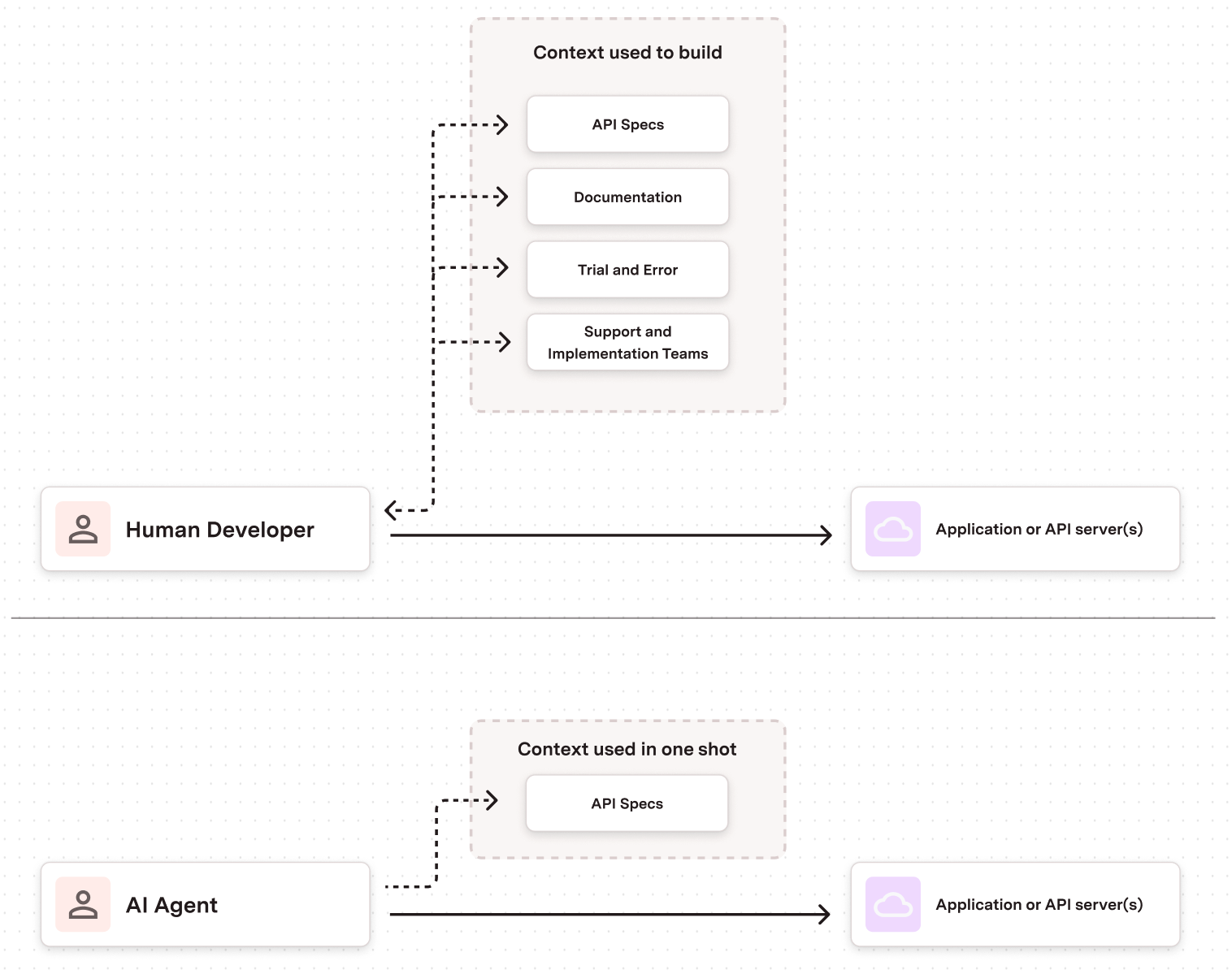 To design APIs that are easily interpreted by GenerativeAgent or any other AI agent, you must prioritize **machine-readability** and **explicit semantic context** over human-centric documentation. AI agents can't infer intent from documentation prose. They need structured, self-describing contracts that eliminate ambiguity.
Treat the API's specification not as documentation about the API, but as an integral, machine-readable part of the API itself.
## HTTP API and LLM Tools
In virtually all AI Agent use cases, middleware (such as MCP) handles transforming LLM requests to API calls.
This need is critical as LLMs work best with targeted, RPC-like tool calls (such as `update_address` or `refund_order` with parameters for the ID or fields to update). They are not as successful with constructing actual HTTP API requests (such as a `call_api` function with parameters for verb, path, body, etc.).
When you decide to update your APIs for AI agents, there are two approaches to consider:
1. **Expose an API that is entirely focused on AI agents** and let human developers work around it
* Your APIs will be focused on RPC-like tool calls
2. **Expose an API that is designed for both human developers and AI agents**
* Ideally this is a RESTful API where the middleware can convert RESTful actions into RPC-like tool calls
Most customers choose the second approach to maximize API usage by both human developers and AI agents. Our guidance below focuses on this approach, though it's applicable if you opt for RPC-like API calls.
Guidance and best practices for designing HTTP APIs that will be used by AI agents.
Guidance and best practices for designing tool calls that will be used by AI agents.
## API Design Principles
Being consistent and using common schema patterns makes it easier for AI agents. We show examples using OpenAPI specifications.
There are many good general API design guides out there such as [Google's API design guide](https://cloud.google.com/apis/design).
Here are the design principles that will help your APIs be AI-ready:
### Simplify Field Names
Use clear, descriptive, and simple field names. Avoid abbreviations that are not immediately clear.
```json Good - Clear and descriptive theme={null}
{
"type": "object",
"properties": {
"customer_name": {
"type": "string"
},
"order_date": {
"type": "string"
}
}
}
```
```json Avoid - Cryptic or complex theme={null}
{
"type": "object",
"properties": {
"cust_nm_001": {
"type": "string"
},
"ord_dt_timestamp": {
"type": "string"
}
}
}
```
### Use Intuitive, Human-Friendly Concepts
Design APIs that work for both humans and AI agents by balancing technical primitives with human-friendly concepts. Esoteric terms like "record", "details", or "session" are difficult for humans to understand without context—AI agents will struggle even more.
Instead, design around resources that can express their current state and requirements clearly. This makes it easier for AI agents to understand what data is needed and how to provide it. This will make your APIs easier to expand and map to [RPC-like tool calls](#tool-call-design-best-practices) that work well with GenerativeAgent.
### Be Verbose in Descriptions
Use the summary and description fields in OpenAPI for each endpoint and parameter. Describe the purpose in clear, simple language. GenerativeAgent can use this text to map a user's natural language request (e.g., "find a customer by their email") to the correct API call.
```json theme={null}
{
"properties": {
"order_status": {
"type": "string",
"description": "Current status of the order (pending, shipped, delivered)",
"enum": ["pending", "shipped", "delivered"]
}
}
}
```
### Define Strict Schemas
Meticulously define the data structures for every request and response using JSON Schema within the OpenAPI document. Specify data types (`string`, `integer`), formats (`date-time`, `email`), and constraints (`minLength`, `maximum`). This is how an agent knows exactly what to send and how to parse the result.
### Standardize Data Formats
Use universal standards for common data types:
* **Timestamps**: ISO 8601 format (`2024-01-15T10:30:00Z`)
* **Currency**: ISO 4217 codes (`USD`, `EUR`)
* **Phone numbers**: E.164 format (`+1234567890`)
### Consistent Naming Conventions
Use a predictable naming schema for your API endpoints such as plural nouns for collections (`/users`, `/orders`). Maintain consistent case style (e.g., `camelCase` for JSON properties).
### Provide Rich Context
Don't just return an ID. If you have a userId, also include a userName or userEmail. Design API responses to be self-contained and descriptive.
```json theme={null}
{
"status": {
"code": "A",
"label": "Active"
}
}
```
### Ensure Idempotency
For operations like `PUT` and `DELETE`, ensure they can be called multiple times with the same input and produce the same result. GenerativeAgent may need to retry operations, and idempotency makes this safe.
### Design Structured Errors
Provide detailed error information that AI systems can understand. Provide a structured JSON error payload that an agent can parse.
```json theme={null}
{
"error": {
"code": "InvalidParameter",
"message": "The 'email' parameter is not a valid email address.",
"target": "email",
"details": "https://developer.example.com/errors#InvalidParameter"
}
}
```
### Cursor Pagination
Implement cursor-based pagination for list endpoints. Include metadata for navigating to next/previous pages. Provide total count when possible.
### Essential OpenAPI Elements
We recommend using OpenAPI specifications for your APIs. Here are some essential elements to consider:
#### Descriptive Documentation
* Use clear `summary` and `description` fields for each endpoint
* Describe parameters and responses in simple language
* Include examples that show expected usage
#### Unique Operation IDs
* Provide descriptive `operationId` values (e.g., `getUserById`, `createOrder`)
* Use consistent naming conventions across your API
* Avoid generic names like `getData` or `processRequest`
## Tool Call Design Best Practices
### Granular Tool Names for Specific Use Cases
GenerativeAgent and other LLMs work best with targeted, RPC-like tool calls. If you want to have GenerativeAgent update a user's address, instead of directly calling a generic `update_user` tool, you can create a tool called `update_user_address`.
**Start Simple, Expand as Needed**
You can start with basic CRUD tools based on your existing APIs, but expand on them to be more specific to the task. A basic exposing of RESTful API results in tools like `create_user`, `update_user` which may be okay for some use cases, but often you'll end up exposing specific tools for a specific task.
### Flatten Complex Structures
Often a good RESTful design has logical nesting for different entities within a given resource. But LLMs can have a hard time understanding deeply nested objects.
Flatten nested objects into a single level. Avoid deep nesting of objects.
```json Good - Flat structure theme={null}
{
"type": "object",
"properties": {
"shipping_street": {
"type": "string"
},
"shipping_city": {
"type": "string"
},
"shipping_country": {
"type": "string"
}
}
}
```
```json Avoid - Deep nesting theme={null}
{
"type": "object",
"properties": {
"shipping": {
"type": "object",
"properties": {
"address": {
"type": "object",
"properties": {
"street": {
"type": "string"
},
"city": {
"type": "string"
},
"country": {
"type": "string"
}
}
}
}
}
}
}
```
### Focus on Essential Data
* Remove optional or additional fields that are not directly needed for the specific task
* Only expose the specific fields from the API that are needed for the specific task
* The more fields, the more likely GenerativeAgent may make a mistake in providing unnecessary information or getting confused by a large API response
### Schema Consistency Across Tools
When exposing multiple tools to GenerativeAgent, ensure you expose consistent naming to GenerativeAgent regardless of the underlying system.
If you have a person called a `user` in one API and an `account` in another, it may confuse GenerativeAgent. You should use a consistent naming convention across all the APIs and ensure you use that same naming in the task instructions.
### Cross Field Relationships
AI agents need explicit guidance about how fields relate to each other. Document field dependencies, constraints, and interactions clearly in your schema descriptions.
Use descriptive field names that indicate relationships and explicitly document when one field's value affects another field.
```json theme={null}
{
"type": "object",
"properties": {
"payment_method": {
"type": "string",
"description": "Payment method type. When set to 'credit_card', the 'card_details' field becomes required.",
"enum": ["credit_card", "bank_transfer", "paypal"]
},
"card_details": {
"type": "object",
"description": "Required when payment_method is 'credit_card'. Ignored for other payment methods.",
"properties": {
"card_number": {"type": "string"},
"expiry_date": {"type": "string"}
}
}
}
}
```
To design APIs that are easily interpreted by GenerativeAgent or any other AI agent, you must prioritize **machine-readability** and **explicit semantic context** over human-centric documentation. AI agents can't infer intent from documentation prose. They need structured, self-describing contracts that eliminate ambiguity.
Treat the API's specification not as documentation about the API, but as an integral, machine-readable part of the API itself.
## HTTP API and LLM Tools
In virtually all AI Agent use cases, middleware (such as MCP) handles transforming LLM requests to API calls.
This need is critical as LLMs work best with targeted, RPC-like tool calls (such as `update_address` or `refund_order` with parameters for the ID or fields to update). They are not as successful with constructing actual HTTP API requests (such as a `call_api` function with parameters for verb, path, body, etc.).
When you decide to update your APIs for AI agents, there are two approaches to consider:
1. **Expose an API that is entirely focused on AI agents** and let human developers work around it
* Your APIs will be focused on RPC-like tool calls
2. **Expose an API that is designed for both human developers and AI agents**
* Ideally this is a RESTful API where the middleware can convert RESTful actions into RPC-like tool calls
Most customers choose the second approach to maximize API usage by both human developers and AI agents. Our guidance below focuses on this approach, though it's applicable if you opt for RPC-like API calls.
Guidance and best practices for designing HTTP APIs that will be used by AI agents.
Guidance and best practices for designing tool calls that will be used by AI agents.
## API Design Principles
Being consistent and using common schema patterns makes it easier for AI agents. We show examples using OpenAPI specifications.
There are many good general API design guides out there such as [Google's API design guide](https://cloud.google.com/apis/design).
Here are the design principles that will help your APIs be AI-ready:
### Simplify Field Names
Use clear, descriptive, and simple field names. Avoid abbreviations that are not immediately clear.
```json Good - Clear and descriptive theme={null}
{
"type": "object",
"properties": {
"customer_name": {
"type": "string"
},
"order_date": {
"type": "string"
}
}
}
```
```json Avoid - Cryptic or complex theme={null}
{
"type": "object",
"properties": {
"cust_nm_001": {
"type": "string"
},
"ord_dt_timestamp": {
"type": "string"
}
}
}
```
### Use Intuitive, Human-Friendly Concepts
Design APIs that work for both humans and AI agents by balancing technical primitives with human-friendly concepts. Esoteric terms like "record", "details", or "session" are difficult for humans to understand without context—AI agents will struggle even more.
Instead, design around resources that can express their current state and requirements clearly. This makes it easier for AI agents to understand what data is needed and how to provide it. This will make your APIs easier to expand and map to [RPC-like tool calls](#tool-call-design-best-practices) that work well with GenerativeAgent.
### Be Verbose in Descriptions
Use the summary and description fields in OpenAPI for each endpoint and parameter. Describe the purpose in clear, simple language. GenerativeAgent can use this text to map a user's natural language request (e.g., "find a customer by their email") to the correct API call.
```json theme={null}
{
"properties": {
"order_status": {
"type": "string",
"description": "Current status of the order (pending, shipped, delivered)",
"enum": ["pending", "shipped", "delivered"]
}
}
}
```
### Define Strict Schemas
Meticulously define the data structures for every request and response using JSON Schema within the OpenAPI document. Specify data types (`string`, `integer`), formats (`date-time`, `email`), and constraints (`minLength`, `maximum`). This is how an agent knows exactly what to send and how to parse the result.
### Standardize Data Formats
Use universal standards for common data types:
* **Timestamps**: ISO 8601 format (`2024-01-15T10:30:00Z`)
* **Currency**: ISO 4217 codes (`USD`, `EUR`)
* **Phone numbers**: E.164 format (`+1234567890`)
### Consistent Naming Conventions
Use a predictable naming schema for your API endpoints such as plural nouns for collections (`/users`, `/orders`). Maintain consistent case style (e.g., `camelCase` for JSON properties).
### Provide Rich Context
Don't just return an ID. If you have a userId, also include a userName or userEmail. Design API responses to be self-contained and descriptive.
```json theme={null}
{
"status": {
"code": "A",
"label": "Active"
}
}
```
### Ensure Idempotency
For operations like `PUT` and `DELETE`, ensure they can be called multiple times with the same input and produce the same result. GenerativeAgent may need to retry operations, and idempotency makes this safe.
### Design Structured Errors
Provide detailed error information that AI systems can understand. Provide a structured JSON error payload that an agent can parse.
```json theme={null}
{
"error": {
"code": "InvalidParameter",
"message": "The 'email' parameter is not a valid email address.",
"target": "email",
"details": "https://developer.example.com/errors#InvalidParameter"
}
}
```
### Cursor Pagination
Implement cursor-based pagination for list endpoints. Include metadata for navigating to next/previous pages. Provide total count when possible.
### Essential OpenAPI Elements
We recommend using OpenAPI specifications for your APIs. Here are some essential elements to consider:
#### Descriptive Documentation
* Use clear `summary` and `description` fields for each endpoint
* Describe parameters and responses in simple language
* Include examples that show expected usage
#### Unique Operation IDs
* Provide descriptive `operationId` values (e.g., `getUserById`, `createOrder`)
* Use consistent naming conventions across your API
* Avoid generic names like `getData` or `processRequest`
## Tool Call Design Best Practices
### Granular Tool Names for Specific Use Cases
GenerativeAgent and other LLMs work best with targeted, RPC-like tool calls. If you want to have GenerativeAgent update a user's address, instead of directly calling a generic `update_user` tool, you can create a tool called `update_user_address`.
**Start Simple, Expand as Needed**
You can start with basic CRUD tools based on your existing APIs, but expand on them to be more specific to the task. A basic exposing of RESTful API results in tools like `create_user`, `update_user` which may be okay for some use cases, but often you'll end up exposing specific tools for a specific task.
### Flatten Complex Structures
Often a good RESTful design has logical nesting for different entities within a given resource. But LLMs can have a hard time understanding deeply nested objects.
Flatten nested objects into a single level. Avoid deep nesting of objects.
```json Good - Flat structure theme={null}
{
"type": "object",
"properties": {
"shipping_street": {
"type": "string"
},
"shipping_city": {
"type": "string"
},
"shipping_country": {
"type": "string"
}
}
}
```
```json Avoid - Deep nesting theme={null}
{
"type": "object",
"properties": {
"shipping": {
"type": "object",
"properties": {
"address": {
"type": "object",
"properties": {
"street": {
"type": "string"
},
"city": {
"type": "string"
},
"country": {
"type": "string"
}
}
}
}
}
}
}
```
### Focus on Essential Data
* Remove optional or additional fields that are not directly needed for the specific task
* Only expose the specific fields from the API that are needed for the specific task
* The more fields, the more likely GenerativeAgent may make a mistake in providing unnecessary information or getting confused by a large API response
### Schema Consistency Across Tools
When exposing multiple tools to GenerativeAgent, ensure you expose consistent naming to GenerativeAgent regardless of the underlying system.
If you have a person called a `user` in one API and an `account` in another, it may confuse GenerativeAgent. You should use a consistent naming convention across all the APIs and ensure you use that same naming in the task instructions.
### Cross Field Relationships
AI agents need explicit guidance about how fields relate to each other. Document field dependencies, constraints, and interactions clearly in your schema descriptions.
Use descriptive field names that indicate relationships and explicitly document when one field's value affects another field.
```json theme={null}
{
"type": "object",
"properties": {
"payment_method": {
"type": "string",
"description": "Payment method type. When set to 'credit_card', the 'card_details' field becomes required.",
"enum": ["credit_card", "bank_transfer", "paypal"]
},
"card_details": {
"type": "object",
"description": "Required when payment_method is 'credit_card'. Ignored for other payment methods.",
"properties": {
"card_number": {"type": "string"},
"expiry_date": {"type": "string"}
}
}
}
}
```