> ## Documentation Index
> Fetch the complete documentation index at: https://docs.asapp.com/llms.txt
> Use this file to discover all available pages before exploring further.
# Handoff
> Learn how to configure availability-aware routing from GenerativeAgent to human agent queues.
A Handoff defines how and when GenerativeAgent routes a conversation to a human agent queue. Unlike a raw system transfer, a Handoff is availability-aware: it resolves agent availability and provides GenerativeAgent with the appropriate instructions for the current state, covering both the agent-available and agent-unavailable cases.
Handoffs can be triggered from a Topic article or from inside a Task. Use a Handoff any time a conversation should reach a human agent queue.
## How Handoffs Work
When a Topic article with an associated Handoff is relevant to the conversation, the Handoff provides GenerativeAgent with the appropriate instructions. If agents are available, GenerativeAgent receives the agent-available block (e.g., collect context and confirm the transfer). If agents are not available, GenerativeAgent receives the agent-unavailable block (e.g., inform the caller of business hours, offer a callback).
Availability is resolved by the Handoff before GenerativeAgent is invoked. GenerativeAgent does not check the schedule itself. It only sees the instruction set for the current availability state.
You can configure the transfer destination for each Handoff and decide which Handoff to associate with each Topic article.
## Configure Handoffs
To create a handoff, select **Handoffs** in the left-hand menu of the AI Console. Then click **Create Handoff** and follow the steps below.
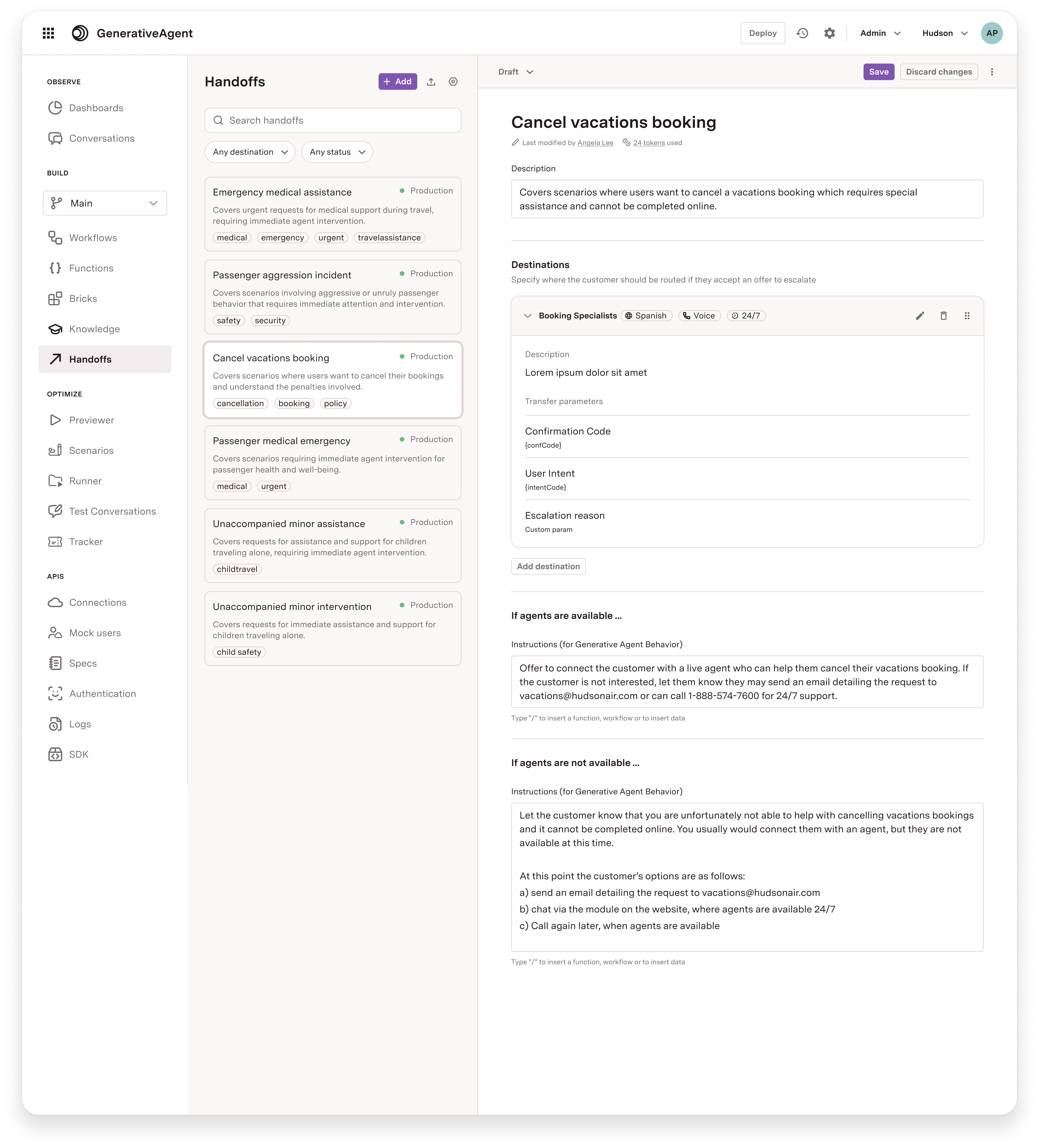 Provide a name and description for the handoff. The description should help GenerativeAgent understand when this handoff should be triggered.
Click **Generate handoff** to create it.
These instructions tell GenerativeAgent what to do when the destination queue has agents available. You can instruct GenerativeAgent to:
* Transfer immediately
* Ask the caller for confirmation before transferring
* Collect specific information before the transfer
The instructions reference a proxy function named `handoff_[handoff_name]` (e.g., a handoff named "Billing Support" produces the function `handoff_billing_support`). You do not need to create this function manually; it is generated from the handoff configuration.
These instructions tell GenerativeAgent what to say when agents are not available. For example:
"I apologize, there are no agents available at this time. Please try calling back another time. I would be happy to help you with anything else. Is there anything I can assist you with now?"
The destination defines where the conversation will be routed and when agents are available. Configure it as a JSON object.
The destination JSON is an array of queue objects. The AI Console provides example templates via the **Examples** dropdown.
```json Example: Queue open 24/7 theme={null}
[
{
"name": "Billing Support",
"type": "Agent_queue",
"enabled": true,
"open_24": true,
"timezone": "America/New_York",
"transfer_function_name": "default_transfer"
}
]
```
```json Example: Queue with business hours theme={null}
[
{
"name": "Sales Queue",
"type": "Agent_queue",
"enabled": true,
"open_24": false,
"weekly_hours": {
"mon": [{"start": "09:00", "end": "17:00"}],
"tue": [{"start": "09:00", "end": "17:00"}],
"wed": [{"start": "09:00", "end": "17:00"}],
"thu": [{"start": "09:00", "end": "17:00"}],
"fri": [{"start": "09:00", "end": "17:00"}]
},
"timezone": "America/New_York",
"transfer_function_name": "transfer_to_sales"
}
]
```
```json Example: Full configuration with date exceptions and language support theme={null}
[
{
"name": "Premium Support",
"type": "Agent_queue",
"enabled": true,
"open_24": false,
"weekly_hours": {
"mon": [
{"start": "09:00", "end": "12:00"},
{"start": "13:00", "end": "17:00"}
],
"tue": [{"start": "09:00", "end": "17:00"}],
"wed": [{"start": "09:00", "end": "17:00"}],
"thu": [{"start": "09:00", "end": "17:00"}],
"fri": [{"start": "09:00", "end": "17:00"}],
"sat": [{"start": "10:00", "end": "14:00"}]
},
"date_exceptions": {
"2026-12-25": {"closed": true},
"2026-07-04": {"open_24": true}
},
"timezone": "America/Los_Angeles",
"supported_channel_types": ["voice", "chat"],
"supported_languages": ["en", "es"],
"transfer_function_name": "transfer_to_premium"
}
]
```
### Destination fields
| Field | Required | Description |
| ------------------------- | ----------------------- | ------------------------------------------------------------------------------------------------------------------------------------------------------------------------------------------------------------------------------ |
| `name` | Yes | The name of the queue. |
| `type` | Yes | The type of destination. Use `"Agent_queue"`. |
| `enabled` | Yes | Whether this destination is active. |
| `open_24` | Yes | If `true`, the queue is always available. If `false`, you must provide `weekly_hours`. |
| `timezone` | Yes | IANA timezone string (e.g., `America/New_York`, `America/Los_Angeles`). |
| `transfer_function_name` | Yes | The system transfer function to call when this destination is used. Must match an existing system transfer function. |
| `weekly_hours` | If `open_24` is `false` | Per-day availability. Each weekday (`mon` through `sun`) maps to an array of `{"start": "HH:MM", "end": "HH:MM"}` intervals. Multiple intervals per day are supported for split shifts. Days not listed are treated as closed. |
| `date_exceptions` | No | Override specific dates. Keyed by `YYYY-MM-DD`. Each value is one of: `{"closed": true}`, `{"open_24": true}`, or `{"intervals": [{"start": "HH:MM", "end": "HH:MM"}]}`. |
| `supported_channel_types` | No | Array of channel types this destination supports (`"voice"`, `"chat"`). Omitted means all channels. |
| `supported_languages` | No | Array of BCP 47 language codes (e.g., `"en"`, `"es"`). Omitted means all languages. |
The `transfer_function_name` must reference a system transfer function that already exists in your configuration. This function controls what parameters (SIP headers, transfer variables, etc.) are passed to your telephony or contact center system during the transfer. See [System Transfer Functions](/generativeagent/configuring/tasks-and-functions/system-transfer) for setup details.
When the handoff configuration is saved, the system validates the destination JSON schema and confirms the referenced system transfer function exists.
Click **Save** to save the handoff configuration.
## Associate Handoffs with Topics
After creating a Handoff, you need to associate it with the relevant Topics in your knowledge base. This is what connects caller intent to a routing destination. When GenerativeAgent matches a conversation to a Topic that has an associated Handoff, it evaluates whether to escalate based on the conversation context and the Handoff's conditions.
Each Topic can have one or more Handoff scenarios. For example, a "Billing inquiry" Topic might route to a "Billing Support" queue during business hours and to a "General Support" queue after hours.
To associate a handoff with a topic:
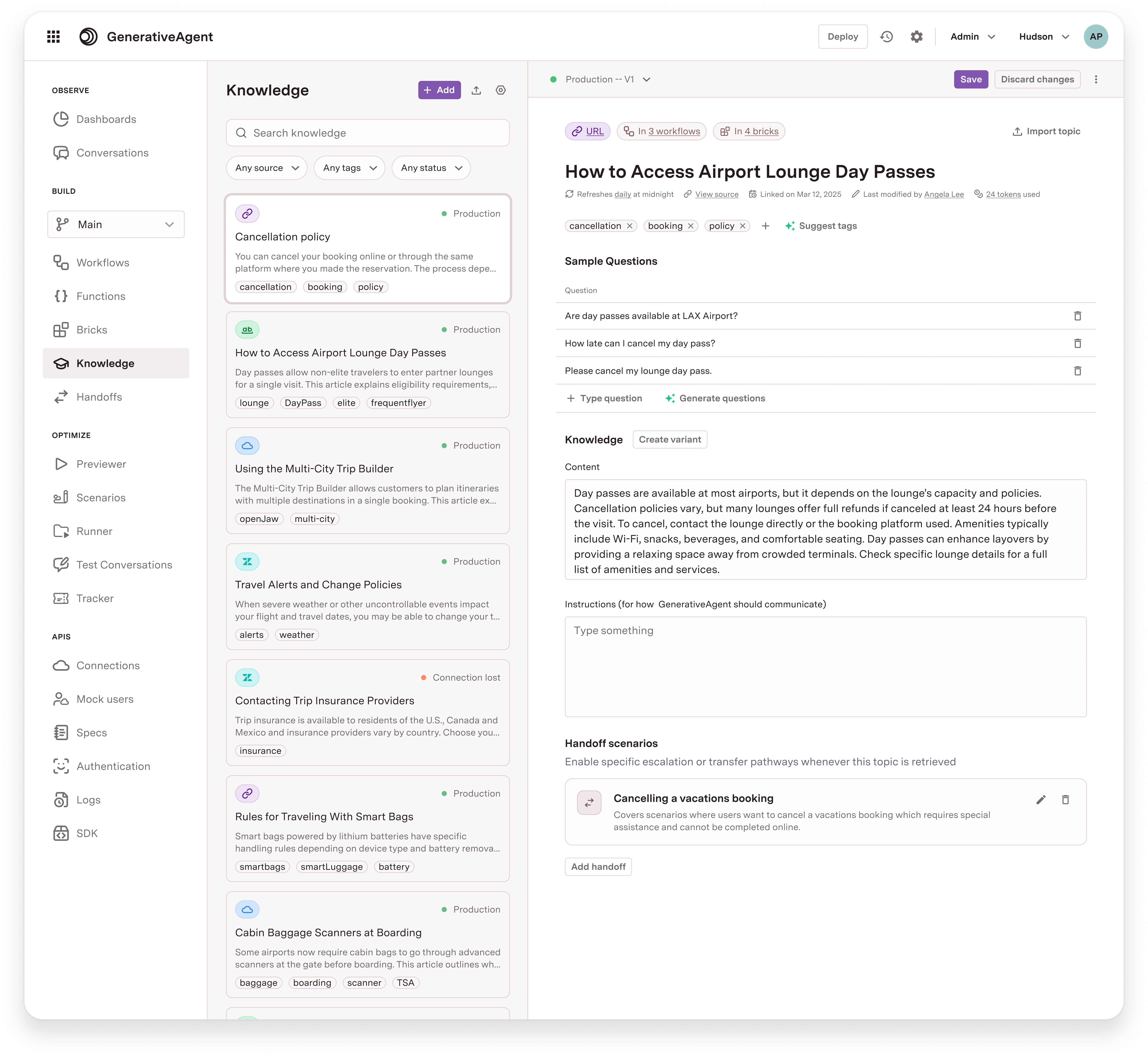
1. Navigate to **Knowledge** in the left-hand menu of the AI Console.
2. Select a topic from the list of topics.
3. In the topic details, scroll down to the **Handoff scenarios** section.
4. Click on **Add handoff** and select the handoff you want to associate with the topic.
Provide a name and description for the handoff. The description should help GenerativeAgent understand when this handoff should be triggered.
Click **Generate handoff** to create it.
These instructions tell GenerativeAgent what to do when the destination queue has agents available. You can instruct GenerativeAgent to:
* Transfer immediately
* Ask the caller for confirmation before transferring
* Collect specific information before the transfer
The instructions reference a proxy function named `handoff_[handoff_name]` (e.g., a handoff named "Billing Support" produces the function `handoff_billing_support`). You do not need to create this function manually; it is generated from the handoff configuration.
These instructions tell GenerativeAgent what to say when agents are not available. For example:
"I apologize, there are no agents available at this time. Please try calling back another time. I would be happy to help you with anything else. Is there anything I can assist you with now?"
The destination defines where the conversation will be routed and when agents are available. Configure it as a JSON object.
The destination JSON is an array of queue objects. The AI Console provides example templates via the **Examples** dropdown.
```json Example: Queue open 24/7 theme={null}
[
{
"name": "Billing Support",
"type": "Agent_queue",
"enabled": true,
"open_24": true,
"timezone": "America/New_York",
"transfer_function_name": "default_transfer"
}
]
```
```json Example: Queue with business hours theme={null}
[
{
"name": "Sales Queue",
"type": "Agent_queue",
"enabled": true,
"open_24": false,
"weekly_hours": {
"mon": [{"start": "09:00", "end": "17:00"}],
"tue": [{"start": "09:00", "end": "17:00"}],
"wed": [{"start": "09:00", "end": "17:00"}],
"thu": [{"start": "09:00", "end": "17:00"}],
"fri": [{"start": "09:00", "end": "17:00"}]
},
"timezone": "America/New_York",
"transfer_function_name": "transfer_to_sales"
}
]
```
```json Example: Full configuration with date exceptions and language support theme={null}
[
{
"name": "Premium Support",
"type": "Agent_queue",
"enabled": true,
"open_24": false,
"weekly_hours": {
"mon": [
{"start": "09:00", "end": "12:00"},
{"start": "13:00", "end": "17:00"}
],
"tue": [{"start": "09:00", "end": "17:00"}],
"wed": [{"start": "09:00", "end": "17:00"}],
"thu": [{"start": "09:00", "end": "17:00"}],
"fri": [{"start": "09:00", "end": "17:00"}],
"sat": [{"start": "10:00", "end": "14:00"}]
},
"date_exceptions": {
"2026-12-25": {"closed": true},
"2026-07-04": {"open_24": true}
},
"timezone": "America/Los_Angeles",
"supported_channel_types": ["voice", "chat"],
"supported_languages": ["en", "es"],
"transfer_function_name": "transfer_to_premium"
}
]
```
### Destination fields
| Field | Required | Description |
| ------------------------- | ----------------------- | ------------------------------------------------------------------------------------------------------------------------------------------------------------------------------------------------------------------------------ |
| `name` | Yes | The name of the queue. |
| `type` | Yes | The type of destination. Use `"Agent_queue"`. |
| `enabled` | Yes | Whether this destination is active. |
| `open_24` | Yes | If `true`, the queue is always available. If `false`, you must provide `weekly_hours`. |
| `timezone` | Yes | IANA timezone string (e.g., `America/New_York`, `America/Los_Angeles`). |
| `transfer_function_name` | Yes | The system transfer function to call when this destination is used. Must match an existing system transfer function. |
| `weekly_hours` | If `open_24` is `false` | Per-day availability. Each weekday (`mon` through `sun`) maps to an array of `{"start": "HH:MM", "end": "HH:MM"}` intervals. Multiple intervals per day are supported for split shifts. Days not listed are treated as closed. |
| `date_exceptions` | No | Override specific dates. Keyed by `YYYY-MM-DD`. Each value is one of: `{"closed": true}`, `{"open_24": true}`, or `{"intervals": [{"start": "HH:MM", "end": "HH:MM"}]}`. |
| `supported_channel_types` | No | Array of channel types this destination supports (`"voice"`, `"chat"`). Omitted means all channels. |
| `supported_languages` | No | Array of BCP 47 language codes (e.g., `"en"`, `"es"`). Omitted means all languages. |
The `transfer_function_name` must reference a system transfer function that already exists in your configuration. This function controls what parameters (SIP headers, transfer variables, etc.) are passed to your telephony or contact center system during the transfer. See [System Transfer Functions](/generativeagent/configuring/tasks-and-functions/system-transfer) for setup details.
When the handoff configuration is saved, the system validates the destination JSON schema and confirms the referenced system transfer function exists.
Click **Save** to save the handoff configuration.
## Associate Handoffs with Topics
After creating a Handoff, you need to associate it with the relevant Topics in your knowledge base. This is what connects caller intent to a routing destination. When GenerativeAgent matches a conversation to a Topic that has an associated Handoff, it evaluates whether to escalate based on the conversation context and the Handoff's conditions.
Each Topic can have one or more Handoff scenarios. For example, a "Billing inquiry" Topic might route to a "Billing Support" queue during business hours and to a "General Support" queue after hours.
To associate a handoff with a topic:
1. Navigate to **Knowledge** in the left-hand menu of the AI Console.
2. Select a topic from the list of topics.
3. In the topic details, scroll down to the **Handoff scenarios** section.
4. Click on **Add handoff** and select the handoff you want to associate with the topic.
 If a Topic and its associated Handoff are retrieved during a conversation but the Handoff is not triggered when expected, add additional instructions to the Topic to reinforce when that Handoff should be used. The Topic's instructions help GenerativeAgent decide which resolution path to take for a given scenario.
## Handoffs and System Transfers
While Handoffs and [system transfers](/generativeagent/configuring/tasks-and-functions/system-transfer) may look similar, they operate at different layers.
**Handoffs** are the right tool any time a conversation should reach a human agent queue, whether triggered from a Topic article or from inside a Task. The Handoff resolves availability, provides GenerativeAgent with the appropriate instructions, and initiates the transfer using the associated system transfer function.
**System transfers** are the underlying mechanism that defines what gets sent during a transfer. The `transfer_function_name` on a Handoff destination points to a system transfer function, which controls the parameters passed to the receiving system (e.g., SIP headers, output context on a call transfer). System transfers are associated with Handoffs. Builders should reach for Handoffs to initiate any transfer to a human agent rather than adding system transfer functions as a standalone escalation path.
## When to Use Handoffs
Use handoffs when you want to ensure that customers receive timely and relevant assistance from human agents when GenerativeAgent escalates their conversations. Handoffs are particularly useful in scenarios where:
* The customer's issue is complex and requires human judgment or empathy.
* The customer requests to speak with a human agent.
* GenerativeAgent identifies that it cannot assist the customer effectively and determines that a handoff is necessary.
Handoffs should not be used for the following scenarios:
* When the customer's issue requires an API call before the handoff (such as fetching data like account status, etc). In this case, you can use a Task to perform the API call and then transfer the conversation to a human agent with the relevant information.
If a Topic and its associated Handoff are retrieved during a conversation but the Handoff is not triggered when expected, add additional instructions to the Topic to reinforce when that Handoff should be used. The Topic's instructions help GenerativeAgent decide which resolution path to take for a given scenario.
## Handoffs and System Transfers
While Handoffs and [system transfers](/generativeagent/configuring/tasks-and-functions/system-transfer) may look similar, they operate at different layers.
**Handoffs** are the right tool any time a conversation should reach a human agent queue, whether triggered from a Topic article or from inside a Task. The Handoff resolves availability, provides GenerativeAgent with the appropriate instructions, and initiates the transfer using the associated system transfer function.
**System transfers** are the underlying mechanism that defines what gets sent during a transfer. The `transfer_function_name` on a Handoff destination points to a system transfer function, which controls the parameters passed to the receiving system (e.g., SIP headers, output context on a call transfer). System transfers are associated with Handoffs. Builders should reach for Handoffs to initiate any transfer to a human agent rather than adding system transfer functions as a standalone escalation path.
## When to Use Handoffs
Use handoffs when you want to ensure that customers receive timely and relevant assistance from human agents when GenerativeAgent escalates their conversations. Handoffs are particularly useful in scenarios where:
* The customer's issue is complex and requires human judgment or empathy.
* The customer requests to speak with a human agent.
* GenerativeAgent identifies that it cannot assist the customer effectively and determines that a handoff is necessary.
Handoffs should not be used for the following scenarios:
* When the customer's issue requires an API call before the handoff (such as fetching data like account status, etc). In this case, you can use a Task to perform the API call and then transfer the conversation to a human agent with the relevant information.