> ## Documentation Index
> Fetch the complete documentation index at: https://docs.asapp.com/llms.txt
> Use this file to discover all available pages before exploring further.
# Input Variables
> Learn how to pass information from your application to GenerativeAgent.
Input Variables allow you to provide contextual information to GenerativeAgent when analyzing a conversation. This is the main way to pass information from your application to GenerativeAgent. These variables can then be referenced in the task instructions and functions.
Use Input Variables to provide GenerativeAgent with context information like:
* Entities extracted from a previous system or API call
* Relevant customer metadata
* Conversation context, like a summary of previous interactions
* Instructions on the next steps for a given task
## Add Input Variables to a conversation
To add input variables to a conversation:
Call [`analyze`](/apis/generativeagent/analyze-conversation), adding the `inputVariables` attributes. `inputVariables` is an untyped JSON object and you can pass any key-value pairs. You need to ensure you are consistent in the key names you use between `/analyze` and the task instructions.
With each call, the system adds any new input variable to the conversation context.
```bash theme={null}
curl --request POST \
--url https://api.sandbox.asapp.com/generativeagent/v1/analyze \
--header 'Content-Type: application/json' \
--header 'asapp-api-id: ' \
--header 'asapp-api-secret: ' \
--data '{
"conversationId": "01BX5ZZKBKACTAV9WEVGEMMVS0",
"message": {
"text": "Hello, I would like to upgrade my internet plan to GOLD.",
"sender": {
"role": "agent",
"externalId": 123
},
"timestamp": "2021-11-23T12:13:14.555Z"
},
"taskName": "UpgradePlan",
"inputVariables": {
"context": "Customer called to upgrade their current plan to GOLD",
"customer_info": {
"current_plan": "SILVER",
"customer_since": "2020-01-01"
}
}
}'
```
Once you add the Input Variables to the conversation, they become part of GenerativeAgent's context. GenerativeAgent will consider them when interacting with your users.
You can also reference them directly in the task instructions.
```
The customer has a plan status of {{ input_vars.get("customer_info.current_plan") }}
```
Input variables can be used as part of [Conditional Templates](/generativeagent/configuring/tasks-and-functions/conditional-templates).
## Add Input Variables in the Previewer
While you are iterating on your tasks, you can simulate how GenerativeAgent responds with added Input Variables in the [Previewer](/generativeagent/configuring/previewer#input-variables)
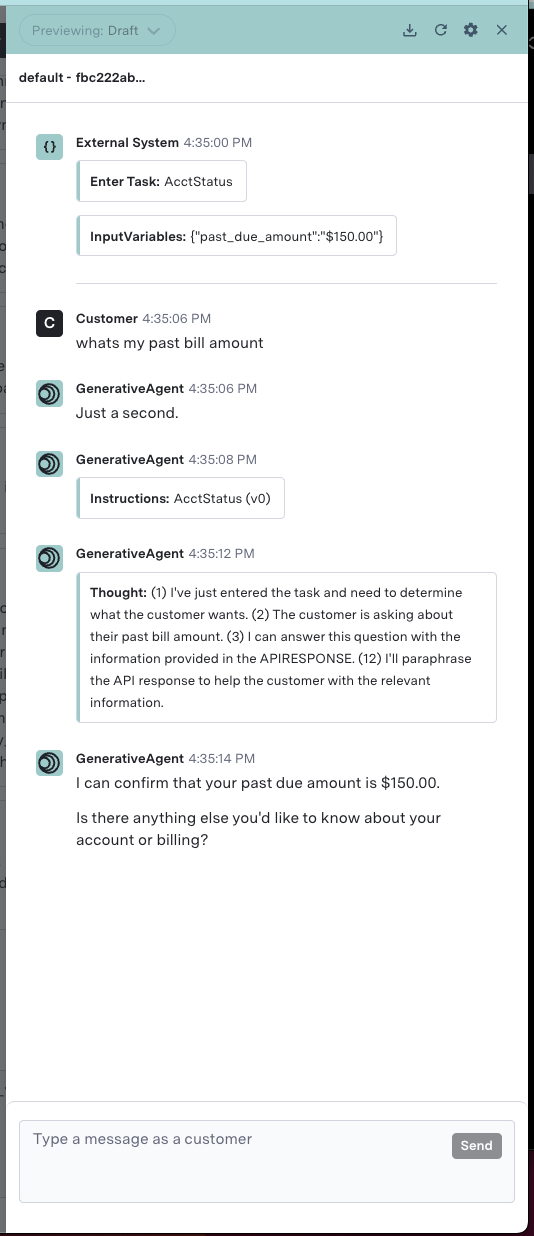 You can also simulate launching the customer directly into a specific task, instead of allowing GenerativeAgent to choose a task.
In a scenario where an IVR has already gathered information, you can ensure GenerativeAgent picks up from where the IVR left off.
You can also simulate launching the customer directly into a specific task, instead of allowing GenerativeAgent to choose a task.
In a scenario where an IVR has already gathered information, you can ensure GenerativeAgent picks up from where the IVR left off.