> ## Documentation Index
> Fetch the complete documentation index at: https://docs.asapp.com/llms.txt
> Use this file to discover all available pages before exploring further.
# Amazon Connect
> Learn how to integrate GenerativeAgent into Amazon Connect
The Amazon Connect integration with ASAPP's GenerativeAgent allows callers to have conversations with GenerativeAgent while maintaining the call entirely with in your Amazon Connect contact center.
Call transfers facilitate connecting users to GenerativeAgent via PSTN (dialing a number) while maintaining your control over the entire call duration.
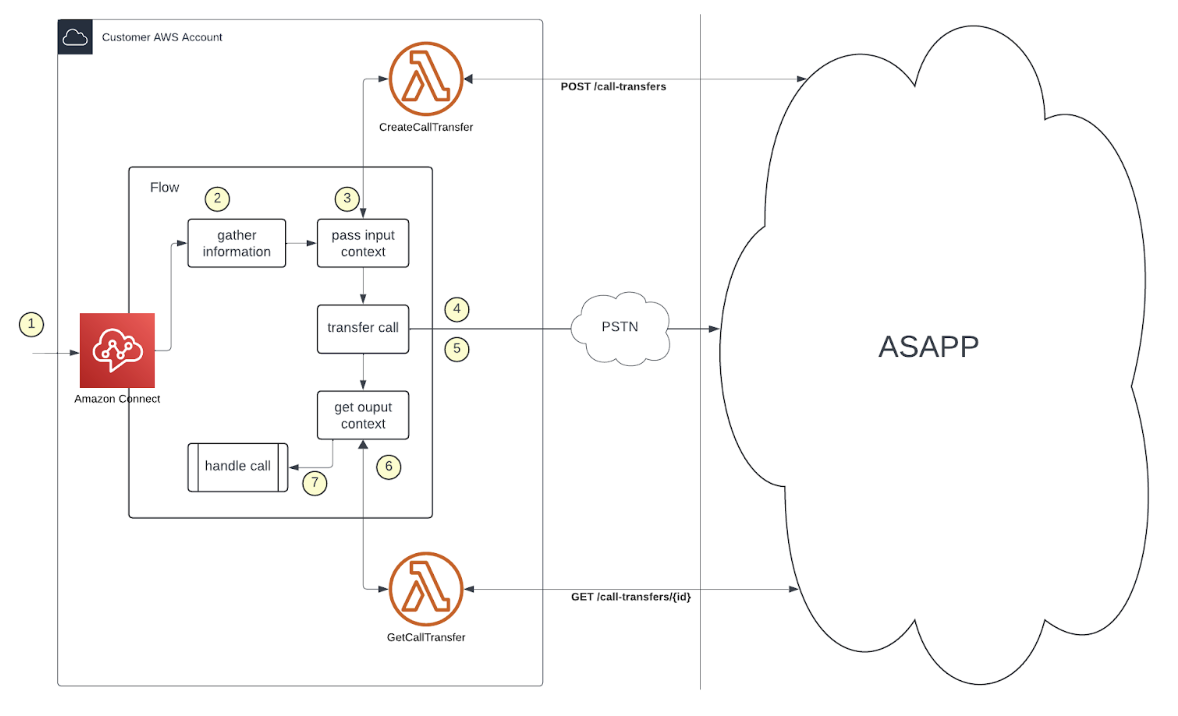
This guide demonstrates how GenerativeAgent integrates with Amazon Connect using Call Transfer over PSTN.
## How it works
At a high level, the Amazon Connect integration with GenerativeAgent works by handing off the conversation between your Amazon Connect flow and GenerativeAgent:
1. **Hand off the conversation** to GenerativeAgent through Call Transfer over PSTN.
2. **GenerativeAgent handles the conversation** using Lambda functions to communicate with ASAPP's APIs, and respond to the caller using a Text to Speech (TTS) service.
3. **Return control back** to your Amazon Connect Flow when:
* The conversation is successfully completed
* The caller requests a human agent
* An error occurs
4. **Use Output Context of the call** to determine the next course of action.
Here's how a GenerativeAgent call will work in detail within your Amazon Connect:
1. Incoming call: A customer calls your existing phone number.
2. Call Processing: Amazon Connect processes the call and determines when to transfer to GenerativeAgent.
3. Request a number: Amazon Connect invokes a Lambda function to request a phone number from ASAPP to transfer the call to.
4. Transfer the call: Amazon Connect transfers the call to the GenerativeAgent using Call Transfer over PSTN.
5. GenerativeAgent interaction: GenerativeAgent takes over the call and engages with the customer using ASAPP's APIs. It processes the customer's requests, generates responses, communicates back to the customer.
6. Call Transfer back: The call with GenerativeAgent disconnects, and control returns to Amazon Connect.
7. Request Call Context: Amazon Connect requests the call context from GenerativeAgent using a Lambda function and passes the input context/ variable to determine the outcome of the conversation.
8. Call Context: GenerativeAgent returns the call context to Amazon Connect, which includes:
* The conversation outcome
* Any error messages
* Instructions for next steps (e.g., transfer to agent)
9. Next Steps: Based on the call context, Amazon Connect decides the next steps, such as:
* Ending the call if the conversation was successful.
* Transferring to a human agent if requested by the customer.
* Handling errors appropriately.
 ## Before you Begin
Before using the GenerativeAgent integration with Amazon Connect, you need to:
* [Get your API Key Id and Secret](/getting-started/developers#access-api-credentials)
* Ensure your API key has been configured to access GenerativeAgent APIs. Reach out to your ASAPP team if you need access enabled.
* Have an existing Amazon Connect instance:
* Have claimed phone numbers.
* Access to an Amazon Connect admin account.
* Be familiar with AWS including Amazon Connect, IAM roles, and more:
You will set up and configure the following AWS services:
* **Amazon Connect** - Handles call flow and audio streaming
* **Lambda functions** - These functions will handle communication between Amazon Connect and GenerativeAgent
* Enable Call Transfer over PSTN by contacting your ASAPP account team.
## Configuring Amazon Connect with GenerativeAgent
### Step 1: Create Lambda Functions
Lambda functions are used to interact with ASAPP's GenerativeAgent APIs to create call transfers and retrieve call context. They can be created using the AWS Console or AWS API.
To create a Lambda function in AWS Console:
1. Log in to the AWS Management Console.
2. Open Lambda.
3. Select **Author from scratch** and fill in the required fields:
* **Function name**: `call-transfer` or 'get-call-context '
* **Runtime**: Select `Node.js 22.x`
* **Architecture**: Select `x86_64`
* Under **Change default execution role**, select **"Create a new role with basic Lambda permissions"**. This option automatically adds the necessary permissions for basic Lambda execution and CloudWatch logging.
* CloudWatch logging is required for debugging and monitoring Lambda executions, so ensure these permissions are included.
* If you are creating the Lambda function using infrastructure-as-code tools (such as Terraform), you must ensure the following permissions are included in the execution role:
* Allow `logs:CreateLogStream` and `logs:PutLogEvents` for all streams under your CloudWatch Log Group.
* Allow `lambda:InvokeFunction` action in your resource base policy.
* List `connect.amazonaws.com` as the Principal Service in your resource policy.
After filling in the required fields, click **Create function**.
4. In the **Function Overview** section, look for **ARN** and save it.
5. Go to the **Code** tab, click upload from and select `.zip` file to upload your Lambda function code. Click **Deploy.**
6. Go to the **Configuration** tab, select **Environment variables**, and add the following environment variables:
| Variable | Description |
| -----------------: | :---------------------------------------------------- |
| `ASAPP_API_ID` | API Credential provided by ASAPP. |
| `ASAPP_API_SECRET` | API Credential provided by ASAPP. |
| `ASAPP_API_HOST` | API hostname provided by ASAPP, usually api.asapp.com |
7. Click **Save**.
```javascript theme={null}
const ASAPP_API_ID = process.env.ASAPP_API_ID;
const ASAPP_API_SECRET = process.env.ASAPP_API_SECRET;
const ASAPP_API_HOST = process.env.ASAPP_API_HOST;
export const handler = async function (event) {
console.log("Received event:", JSON.stringify(event, null, 2));
let contactId = event.Details?.ContactData?.ContactId;
if (!contactId) {
console.error("ContactId not found in event");
return { result: "error", error: "ContactId not found in event", transferNumber: "" }
}
let taskName;
if (event.Details?.Parameters?.taskName) taskName = event.Details.Parameters.taskName;
let customerId = event.Details?.ContactData?.CustomerEndpoint?.Address;
if (event.Details?.Parameters?.customerId) customerId = event.Details.Parameters.customerId;
let requestBody = {
id: contactId,
externalConversationId: contactId,
type: "PHONE_NUMBER",
phoneNumber: {
country: "US"
},
inputContext: {
inputVariables: {}
}
};
if (taskName) requestBody.inputContext.taskName = taskName;
if (customerId) requestBody.inputContext.inputVariables.customerId = customerId;
for (const [key, value] of Object.entries(event.Details.Parameters)) {
if (key !== "taskName" && key !== "customerId") {
requestBody.inputContext.inputVariables[key] = value;
}
}
let response;
try {
response = await fetch(`https://${ASAPP_API_HOST}/generativeagent/v1/call-transfers`, {
method: "POST",
headers: {
"Content-Type": "application/json",
"asapp-api-id": ASAPP_API_ID,
"asapp-api-secret": ASAPP_API_SECRET
},
body: JSON.stringify(requestBody)
});
} catch (error) {
console.error("Error calling ASAPP API:", error);
return { result: "error", error: error.message, transferNumber: "" }
}
if (!response.ok) {
let responseText = await response.text();
console.error("Error calling ASAPP API:", response.statusText,responseText);
return { result: "error", error: response.statusText, transferNumber: "" }
}
const responseData = await response.json();
console.log("ASAPP API response:", responseData);
let transferNumber = responseData.phoneNumber?.transferNumber;
if (!transferNumber) {
console.error("Transfer number not found in ASAPP API response");
return { result: "error", error: "Transfer number not found in ASAPP API response", transferNumber: "" }
}
return { result: "ok", transferNumber: transferNumber }
};
```
**Parameters:**
| Parameter | Description |
| -----------: | :----------------------------------------------------------------------------------------------------------------------------------------------------------------------------------------------------------------- |
| `taskName` | (Optional) The name of the GenerativeAgent task to be initiated in the initial Connections. |
| `customerId` | The unique identifier for the customer. If not provided, the calling number of the caller will be used as the customerId. Ensure the value is unique and consistent for each customer to avoid integration issues. |
**Response:**
| Field | Type | Description |
| ---------------: | :----- | :--------------------------------------------------------------------- |
| `result` | string | "ok" if the call transfer was created successfully, "error" otherwise. |
| `error` | string | Error message if the call transfer failed. |
| `transferNumber` | string | A E.164 formatted PSTN number assigned to transfer the call by ASAPP. |
```javascript theme={null}
const ASAPP_API_ID = process.env.ASAPP_API_ID;
const ASAPP_API_SECRET = process.env.ASAPP_API_SECRET;
const ASAPP_API_HOST = process.env.ASAPP_API_HOST;
export const handler = async function (event) {
console.log("Received event:", JSON.stringify(event, null, 2));
let contactId = event.Details?.ContactData?.ContactId;
if (!contactId) {
console.error("ContactId not found in event");
return { result: "error", error: "ContactId not found in event", outputContext: {} }
}
let response;
try {
response = await fetch(`https://${ASAPP_API_HOST}/generativeagent/v1/call-transfers/${contactId}`, {
method: "GET",
headers: {
"asapp-api-id": ASAPP_API_ID,
"asapp-api-secret": ASAPP_API_SECRET
}
});
} catch (error) {
console.error("Error calling ASAPP API:", error);
return { result: "error", error: error.message, outputContext: {} }
}
if (!response.ok) {
console.error("Error calling ASAPP API:", response.statusText);
return { result: "error", error: response.statusText, outputContext: {} }
}
const responseData = await response.json();
console.log("ASAPP API response:", responseData);
if (!responseData.outputContext) {
console.error("Output context not found in ASAPP API response");
return { result: "error", error: "Output context not found in ASAPP API response", outputContext: {} }
}
return { result: "ok", outputContext: responseData.outputContext }
};
```
**Parameters:**
| Parameter | Description |
| ----------: | :---------------------------------------------------------------------------------------------------- |
| `contactId` | The unique identifier for the contact. This is typically the ContactId from the Amazon Connect event. |
**Response:**
| Field | Type | Description |
| --------------: | :----- | :---------------------------------------------------------------------------------------------------------------------------- |
| `result` | string | "ok" if the call context was retrieved successfully, "error" otherwise. On "Ok" response, it includes the Call Transfer Data. |
| `outputContext` | object | The output context of the call, which includes the conversation |
**Call Transfer Data**
| Field | Type | Description |
| ---------------------------------: | :----- | :--------------------------------------------------------------------------------------------------------- |
| `ID` | string | The unique identifier for the call transfer. This is typically the Transfer ID. |
| `externalConversationId` | string | The external conversation ID associated with the call transfer. |
| `status` | string | The status of the call transfer, e.g., "COMPLETED". |
| `createdAt` | string | The timestamp when the call transfer was created. |
| `callReceivedAt` | string | The timestamp when the call was received. |
| `completedAt` | string | The timestamp when the call transfer was completed. |
| `inputContext` | object | The input context for the call transfer, which includes variables such as `taskName` and `inputVariables`. |
| `inputContext.taskName` | string | The name of the task being handled by GenerativeAgent. |
| `inputContext.inputVariables` | object | Key-value pairs of input variables used in the conversation. |
| `inputContext.inputVariables.name` | string | The unique identifier for the customer. |
| `type` | string | The type of transfer, which is "PHONE\_NUMBER" for this integration. |
| `phoneNumber` | object | The phone number details for the transfer. |
| `phoneNumber.country` | string | The country code for the phone number, e.g., "US". |
| `phoneNumber.transferNumber` | string | The E.164 formatted PSTN number assigned to transfer the call by ASAPP. |
**Status**
| Status | Description |
| ----------: | :----------------------------------------------------------------------------------------- |
| `ACTIVE` | The call transfer is currently active and the temporary number is waiting to be connected. |
| `ONGOING` | The call transfer is in progress and the GenerativeAgent is still handling the call. |
| `COMPLETED` | The call transfer has been completed successfully. |
| `EXPIRED` | The call transfer has expired and the temporary number is no longer valid. |
**Output Context**
| Field | Type | Description |
| -------------------: | :----- | :--------------------------------------------------------------- |
| `transferType` | string | The type of transfer. This can either be `SYSTEM` or `AGENT`. |
| `currentTaskName` | string | The name of the current task being handled by GenerativeAgent. |
| `referenceVariables` | object | Key-value pairs of reference variables used in the conversation. |
| `transferVariables` | object | Key-value pairs of transfer variables used in the conversation. |
You can have the metrics, logging, redundancy, warm starts, and other settings configured as per your specific requirements, environment, and uses cases.
### Step 2: Add your Lambda Functions to your Amazon Connect instance
The Lambda function must be added to your Amazon Connect instance to be used in the contact flow. To do this:
1. Open the Amazon Connect console.
2. Select your Amazon Connect instance.
3. In the left navigation pane, choose **Contact flows**.
4. Choose **AWS Lambda functions** from the dropdown menu.
5. Click **Add Lambda function**.
6. Select the Lambda function `call-transfer` you created earlier.
7. Click **Add**.
8. Repeat the process for the `get-call-context` Lambda function.
### Step 3: Set Up Flow in Amazon Connect
To createa a Call Transfer record in your Amazon Connect contact flow, you need to reference the `call-transfer` Lambda function:
1. In the Amazon Connect console, open your contact flow.
2. Add an **Invoke AWS Lambda function** block at the point where you want to initiate the transfer.
3. Select the `call-transfer` Lambda function.
4. Map any required parameters (such as `taskName` or `customerId`) in the block’s configuration.
5. Use the output variable `transferNumber` from the Lambda function as the destination number in a **Transfer to phone number** block.
6. Check for failure scenarios and handle errors appropriately.
7. Connect the blocks to complete the flow.
1. Go to **"Transfer to phone number"** block and navigate to the **Properties** panel.
2. Set the **Transfer Via** to **"Phone number"**.
3. Under **Phone number**, select **Set Dynamically**.
4. The **Namespace** must be set to `External`.
5. The **Key** must be set to `transferNumber`.
6. Set **Resume Flow after Disconnect** to **Yes**.
7. Connect the output of this block to the next step in your flow.
1. Add another **Invoke AWS Lambda function** block after the transfer block.
2. Select the `get-call-context` Lambda function.
3. Map the `ContactId` from the Amazon Connect flow to the Lambda function input.
4. Use the output variable `outputContext` from the Lambda function to determine the next steps.
5. Connect the output of this block to the next step in your flow.
1. Use the output context from the `get-call-context` Lambda function to determine the next steps in your flow.
2. Based on the following fields in the output context, you can decide how to proceed:
* **Transfer Type**: If it is `AGENT`, you can transfer the call to a human agent. If it is `SYSTEM`, you can trnasfer the call back to the IVR.
* **Current Task Name**: If it matches a specific task, you can route the call accordingly.
* **Reference Variables**: Use these variables to provide additional context or information to the customer.
* **Transfer Variables**: Use these variables to handle any specific transfer logic.
## Next Steps
Now that you have integrated GenerativeAgent with Amazon Connect, here are some important next steps to consider:
Learn how to configure GenerativeAgent's behaviors, tasks, and communication style
Configure your APIs to allow GenerativeAgent to access necessary data and perform actions
Connect and optimize your knowledge base to improve GenerativeAgent's responses
Follow the deployment checklist to launch GenerativeAgent in your production environment
## Before you Begin
Before using the GenerativeAgent integration with Amazon Connect, you need to:
* [Get your API Key Id and Secret](/getting-started/developers#access-api-credentials)
* Ensure your API key has been configured to access GenerativeAgent APIs. Reach out to your ASAPP team if you need access enabled.
* Have an existing Amazon Connect instance:
* Have claimed phone numbers.
* Access to an Amazon Connect admin account.
* Be familiar with AWS including Amazon Connect, IAM roles, and more:
You will set up and configure the following AWS services:
* **Amazon Connect** - Handles call flow and audio streaming
* **Lambda functions** - These functions will handle communication between Amazon Connect and GenerativeAgent
* Enable Call Transfer over PSTN by contacting your ASAPP account team.
## Configuring Amazon Connect with GenerativeAgent
### Step 1: Create Lambda Functions
Lambda functions are used to interact with ASAPP's GenerativeAgent APIs to create call transfers and retrieve call context. They can be created using the AWS Console or AWS API.
To create a Lambda function in AWS Console:
1. Log in to the AWS Management Console.
2. Open Lambda.
3. Select **Author from scratch** and fill in the required fields:
* **Function name**: `call-transfer` or 'get-call-context '
* **Runtime**: Select `Node.js 22.x`
* **Architecture**: Select `x86_64`
* Under **Change default execution role**, select **"Create a new role with basic Lambda permissions"**. This option automatically adds the necessary permissions for basic Lambda execution and CloudWatch logging.
* CloudWatch logging is required for debugging and monitoring Lambda executions, so ensure these permissions are included.
* If you are creating the Lambda function using infrastructure-as-code tools (such as Terraform), you must ensure the following permissions are included in the execution role:
* Allow `logs:CreateLogStream` and `logs:PutLogEvents` for all streams under your CloudWatch Log Group.
* Allow `lambda:InvokeFunction` action in your resource base policy.
* List `connect.amazonaws.com` as the Principal Service in your resource policy.
After filling in the required fields, click **Create function**.
4. In the **Function Overview** section, look for **ARN** and save it.
5. Go to the **Code** tab, click upload from and select `.zip` file to upload your Lambda function code. Click **Deploy.**
6. Go to the **Configuration** tab, select **Environment variables**, and add the following environment variables:
| Variable | Description |
| -----------------: | :---------------------------------------------------- |
| `ASAPP_API_ID` | API Credential provided by ASAPP. |
| `ASAPP_API_SECRET` | API Credential provided by ASAPP. |
| `ASAPP_API_HOST` | API hostname provided by ASAPP, usually api.asapp.com |
7. Click **Save**.
```javascript theme={null}
const ASAPP_API_ID = process.env.ASAPP_API_ID;
const ASAPP_API_SECRET = process.env.ASAPP_API_SECRET;
const ASAPP_API_HOST = process.env.ASAPP_API_HOST;
export const handler = async function (event) {
console.log("Received event:", JSON.stringify(event, null, 2));
let contactId = event.Details?.ContactData?.ContactId;
if (!contactId) {
console.error("ContactId not found in event");
return { result: "error", error: "ContactId not found in event", transferNumber: "" }
}
let taskName;
if (event.Details?.Parameters?.taskName) taskName = event.Details.Parameters.taskName;
let customerId = event.Details?.ContactData?.CustomerEndpoint?.Address;
if (event.Details?.Parameters?.customerId) customerId = event.Details.Parameters.customerId;
let requestBody = {
id: contactId,
externalConversationId: contactId,
type: "PHONE_NUMBER",
phoneNumber: {
country: "US"
},
inputContext: {
inputVariables: {}
}
};
if (taskName) requestBody.inputContext.taskName = taskName;
if (customerId) requestBody.inputContext.inputVariables.customerId = customerId;
for (const [key, value] of Object.entries(event.Details.Parameters)) {
if (key !== "taskName" && key !== "customerId") {
requestBody.inputContext.inputVariables[key] = value;
}
}
let response;
try {
response = await fetch(`https://${ASAPP_API_HOST}/generativeagent/v1/call-transfers`, {
method: "POST",
headers: {
"Content-Type": "application/json",
"asapp-api-id": ASAPP_API_ID,
"asapp-api-secret": ASAPP_API_SECRET
},
body: JSON.stringify(requestBody)
});
} catch (error) {
console.error("Error calling ASAPP API:", error);
return { result: "error", error: error.message, transferNumber: "" }
}
if (!response.ok) {
let responseText = await response.text();
console.error("Error calling ASAPP API:", response.statusText,responseText);
return { result: "error", error: response.statusText, transferNumber: "" }
}
const responseData = await response.json();
console.log("ASAPP API response:", responseData);
let transferNumber = responseData.phoneNumber?.transferNumber;
if (!transferNumber) {
console.error("Transfer number not found in ASAPP API response");
return { result: "error", error: "Transfer number not found in ASAPP API response", transferNumber: "" }
}
return { result: "ok", transferNumber: transferNumber }
};
```
**Parameters:**
| Parameter | Description |
| -----------: | :----------------------------------------------------------------------------------------------------------------------------------------------------------------------------------------------------------------- |
| `taskName` | (Optional) The name of the GenerativeAgent task to be initiated in the initial Connections. |
| `customerId` | The unique identifier for the customer. If not provided, the calling number of the caller will be used as the customerId. Ensure the value is unique and consistent for each customer to avoid integration issues. |
**Response:**
| Field | Type | Description |
| ---------------: | :----- | :--------------------------------------------------------------------- |
| `result` | string | "ok" if the call transfer was created successfully, "error" otherwise. |
| `error` | string | Error message if the call transfer failed. |
| `transferNumber` | string | A E.164 formatted PSTN number assigned to transfer the call by ASAPP. |
```javascript theme={null}
const ASAPP_API_ID = process.env.ASAPP_API_ID;
const ASAPP_API_SECRET = process.env.ASAPP_API_SECRET;
const ASAPP_API_HOST = process.env.ASAPP_API_HOST;
export const handler = async function (event) {
console.log("Received event:", JSON.stringify(event, null, 2));
let contactId = event.Details?.ContactData?.ContactId;
if (!contactId) {
console.error("ContactId not found in event");
return { result: "error", error: "ContactId not found in event", outputContext: {} }
}
let response;
try {
response = await fetch(`https://${ASAPP_API_HOST}/generativeagent/v1/call-transfers/${contactId}`, {
method: "GET",
headers: {
"asapp-api-id": ASAPP_API_ID,
"asapp-api-secret": ASAPP_API_SECRET
}
});
} catch (error) {
console.error("Error calling ASAPP API:", error);
return { result: "error", error: error.message, outputContext: {} }
}
if (!response.ok) {
console.error("Error calling ASAPP API:", response.statusText);
return { result: "error", error: response.statusText, outputContext: {} }
}
const responseData = await response.json();
console.log("ASAPP API response:", responseData);
if (!responseData.outputContext) {
console.error("Output context not found in ASAPP API response");
return { result: "error", error: "Output context not found in ASAPP API response", outputContext: {} }
}
return { result: "ok", outputContext: responseData.outputContext }
};
```
**Parameters:**
| Parameter | Description |
| ----------: | :---------------------------------------------------------------------------------------------------- |
| `contactId` | The unique identifier for the contact. This is typically the ContactId from the Amazon Connect event. |
**Response:**
| Field | Type | Description |
| --------------: | :----- | :---------------------------------------------------------------------------------------------------------------------------- |
| `result` | string | "ok" if the call context was retrieved successfully, "error" otherwise. On "Ok" response, it includes the Call Transfer Data. |
| `outputContext` | object | The output context of the call, which includes the conversation |
**Call Transfer Data**
| Field | Type | Description |
| ---------------------------------: | :----- | :--------------------------------------------------------------------------------------------------------- |
| `ID` | string | The unique identifier for the call transfer. This is typically the Transfer ID. |
| `externalConversationId` | string | The external conversation ID associated with the call transfer. |
| `status` | string | The status of the call transfer, e.g., "COMPLETED". |
| `createdAt` | string | The timestamp when the call transfer was created. |
| `callReceivedAt` | string | The timestamp when the call was received. |
| `completedAt` | string | The timestamp when the call transfer was completed. |
| `inputContext` | object | The input context for the call transfer, which includes variables such as `taskName` and `inputVariables`. |
| `inputContext.taskName` | string | The name of the task being handled by GenerativeAgent. |
| `inputContext.inputVariables` | object | Key-value pairs of input variables used in the conversation. |
| `inputContext.inputVariables.name` | string | The unique identifier for the customer. |
| `type` | string | The type of transfer, which is "PHONE\_NUMBER" for this integration. |
| `phoneNumber` | object | The phone number details for the transfer. |
| `phoneNumber.country` | string | The country code for the phone number, e.g., "US". |
| `phoneNumber.transferNumber` | string | The E.164 formatted PSTN number assigned to transfer the call by ASAPP. |
**Status**
| Status | Description |
| ----------: | :----------------------------------------------------------------------------------------- |
| `ACTIVE` | The call transfer is currently active and the temporary number is waiting to be connected. |
| `ONGOING` | The call transfer is in progress and the GenerativeAgent is still handling the call. |
| `COMPLETED` | The call transfer has been completed successfully. |
| `EXPIRED` | The call transfer has expired and the temporary number is no longer valid. |
**Output Context**
| Field | Type | Description |
| -------------------: | :----- | :--------------------------------------------------------------- |
| `transferType` | string | The type of transfer. This can either be `SYSTEM` or `AGENT`. |
| `currentTaskName` | string | The name of the current task being handled by GenerativeAgent. |
| `referenceVariables` | object | Key-value pairs of reference variables used in the conversation. |
| `transferVariables` | object | Key-value pairs of transfer variables used in the conversation. |
You can have the metrics, logging, redundancy, warm starts, and other settings configured as per your specific requirements, environment, and uses cases.
### Step 2: Add your Lambda Functions to your Amazon Connect instance
The Lambda function must be added to your Amazon Connect instance to be used in the contact flow. To do this:
1. Open the Amazon Connect console.
2. Select your Amazon Connect instance.
3. In the left navigation pane, choose **Contact flows**.
4. Choose **AWS Lambda functions** from the dropdown menu.
5. Click **Add Lambda function**.
6. Select the Lambda function `call-transfer` you created earlier.
7. Click **Add**.
8. Repeat the process for the `get-call-context` Lambda function.
### Step 3: Set Up Flow in Amazon Connect
To createa a Call Transfer record in your Amazon Connect contact flow, you need to reference the `call-transfer` Lambda function:
1. In the Amazon Connect console, open your contact flow.
2. Add an **Invoke AWS Lambda function** block at the point where you want to initiate the transfer.
3. Select the `call-transfer` Lambda function.
4. Map any required parameters (such as `taskName` or `customerId`) in the block’s configuration.
5. Use the output variable `transferNumber` from the Lambda function as the destination number in a **Transfer to phone number** block.
6. Check for failure scenarios and handle errors appropriately.
7. Connect the blocks to complete the flow.
1. Go to **"Transfer to phone number"** block and navigate to the **Properties** panel.
2. Set the **Transfer Via** to **"Phone number"**.
3. Under **Phone number**, select **Set Dynamically**.
4. The **Namespace** must be set to `External`.
5. The **Key** must be set to `transferNumber`.
6. Set **Resume Flow after Disconnect** to **Yes**.
7. Connect the output of this block to the next step in your flow.
1. Add another **Invoke AWS Lambda function** block after the transfer block.
2. Select the `get-call-context` Lambda function.
3. Map the `ContactId` from the Amazon Connect flow to the Lambda function input.
4. Use the output variable `outputContext` from the Lambda function to determine the next steps.
5. Connect the output of this block to the next step in your flow.
1. Use the output context from the `get-call-context` Lambda function to determine the next steps in your flow.
2. Based on the following fields in the output context, you can decide how to proceed:
* **Transfer Type**: If it is `AGENT`, you can transfer the call to a human agent. If it is `SYSTEM`, you can trnasfer the call back to the IVR.
* **Current Task Name**: If it matches a specific task, you can route the call accordingly.
* **Reference Variables**: Use these variables to provide additional context or information to the customer.
* **Transfer Variables**: Use these variables to handle any specific transfer logic.
## Next Steps
Now that you have integrated GenerativeAgent with Amazon Connect, here are some important next steps to consider:
Learn how to configure GenerativeAgent's behaviors, tasks, and communication style
Configure your APIs to allow GenerativeAgent to access necessary data and perform actions
Connect and optimize your knowledge base to improve GenerativeAgent's responses
Follow the deployment checklist to launch GenerativeAgent in your production environment