> ## Documentation Index
> Fetch the complete documentation index at: https://docs.asapp.com/llms.txt
> Use this file to discover all available pages before exploring further.
# AI Transcribe Websocket
> Integrate AI Transcribe for real-time speech-to-text transcription
Your organization can use AI Transcribe to transcribe voice interactions between contact center agents and their customers, supporting various use cases including analysis, coaching, and quality management.
ASAPP AI Transcribe is a streaming speech-to-text transcription service that works with both live streams and audio recordings of completed calls. Integrating your voice system with GenerativeAgent using the AI Transcribe Websocket enables real-time communication, allowing for seamless interaction between your voice platform and GenerativeAgent's services.
AI Transcribe is powered by a speech recognition model that transforms spoken form to written forms in real-time, including punctuation and capitalization. The model can be customized to support domain-specific needs by training on historical call audio and adding custom vocabulary to further boost recognition accuracy.
## How it works
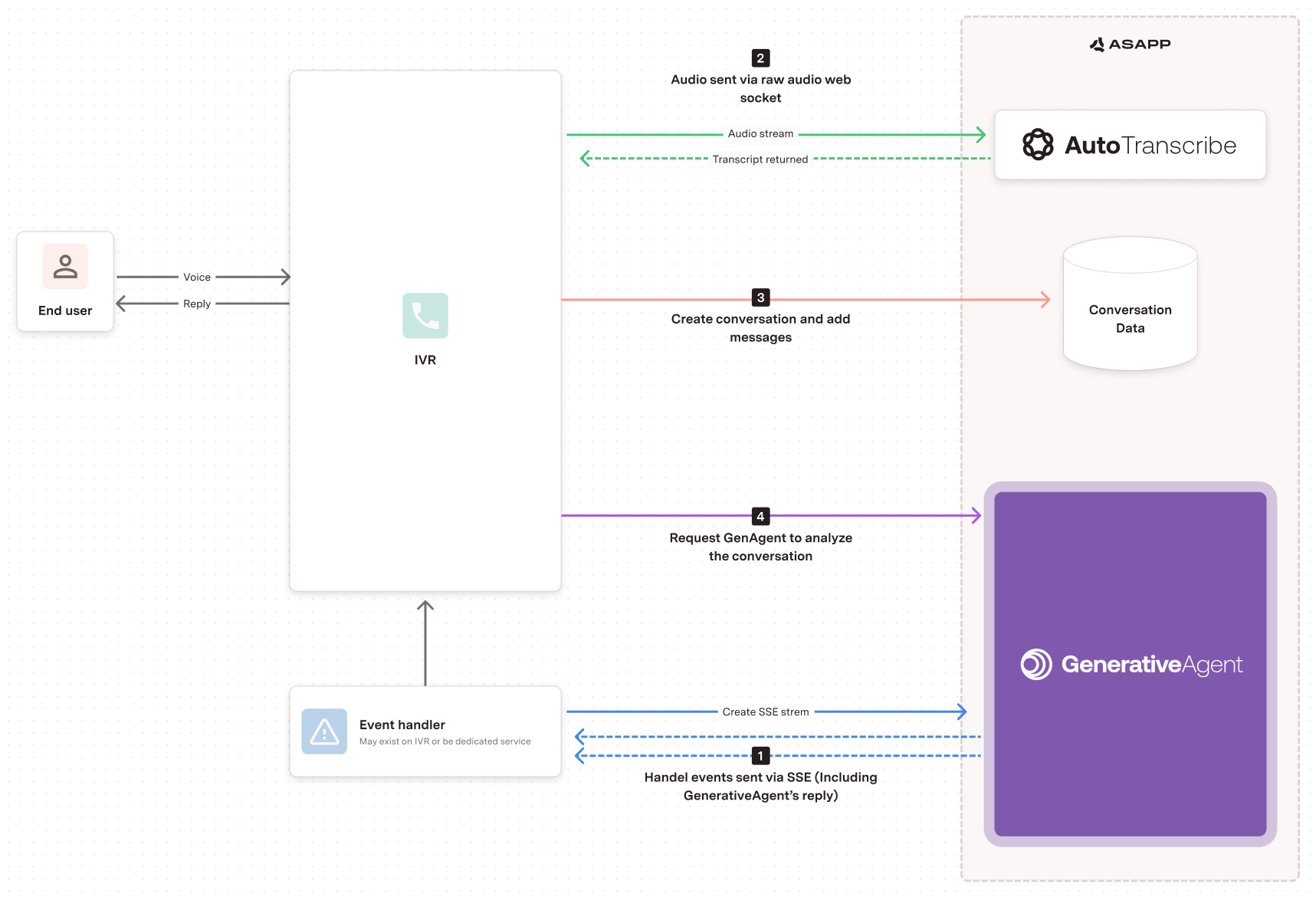 1. Create SSE Stream: The Event Handler (which may exist on the IVR or be a dedicated service) creates a Server-Sent Events (SSE) stream with GenerativeAgent.
2. Audio Stream: The IVR sends the audio stream from the end user to AI Transcribe.
3. Create Conversation: The IVR creates a conversation and adds messages to the Conversation Data.
4. Request Analysis: The IVR requests GenerativeAgent to analyze the conversation.
The Event Handler then handles events sent via SSE, including GenerativeAgent's reply, which is sent back to the user through the IVR.
## Benefits of using Websocket to Stream events
* Persistent connection between your voice system and the GenerativeAgent server
* API streaming for audio, call signaling, and returned transcripts
* Real-time data exchange for quick responses and efficient handling of user queries
* Bi-directional communication for smooth and responsive interaction
## Before you Begin
Before you start integrating to GenerativeAgent, you need to:
* [Get your API Key Id and Secret](/getting-started/developers)
* Ensure your API key has been configured to access AI Transcribe and GenerativeAgent APIs. Reach out to your ASAPP team if you unsure.
* [Configure Tasks and Functions](/generativeagent/configuring "Configuring GenerativeAgent").
## Implementation Steps
1. Create AI Transcribe Streaming URL
2. Listen and Handle GenerativeAgent Events
3. Open a Connection
4. Start an Audio Stream
5. Send the Audio Stream
6. Analyze the conversation with GenerativeAgent
7. Stop the Audio Stream
## Step 1: Create AI Transcribe Streaming URL
First, you need to [create a streaming URL](/apis/autotranscribe/get-streaming-url) that will be the WebSocket connection to AI Transcribe.
```bash theme={null}
curl -X GET 'https://api.sandbox.asapp.com/autotranscribe/v1/streaming-url' \
--header 'asapp-api-id: ' \
--header 'asapp-api-secret: ' \
--header 'Content-Type: application/json' \
--data '{
"externalId": ""
}'
```
A successful response returns a 200 and a secure WebSocket short-lived access URL (TTL: 5 minutes):
```json theme={null}
{
"streamingUrl": ""
}
```
## Step 2: Listen and Handle GenerativeAgent Events
GenerativeAgent sends events for all conversations through a single [Server-Sent-Event](https://developer.mozilla.org/en-US/docs/Web/API/Server-sent_events) (SSE) stream. [Listen and handle these events](/generativeagent/integrate/handling-events) to enable GenerativeAgent interaction with your users.
## Step 3: Open a Connection
Create the WebSocket connection using the access URL:
`wss://?token=`
## Step 4: Start a stream audio message
Start streaming audio into the AI Transcribe Websocket using this message sequence:
| Your Stream Request | ASAPP Response |
| :---------------------- | :---------------------- |
| `startStream` message | `startResponse` message |
| Stream audio - audio-in | `transcript` message |
| `finishStream` message | `finalResponse` message |
Format WebSocket protocol request messages as text (UTF-8 encoded string data); only the audio stream should be in binary format. All response messages will be formatted as text.
Send a `startStream` message:
```json theme={null}
{
"message":"startStream",
"sender": {
"role": "customer",
"externalId": "JD232442"
}
}
```
You'll receive a `startResponse`:
```json theme={null}
{
"message": "startResponse",
"streamID": "128342213",
"status": {
"code": "1000",
"description": "OK"
}
}
```
## Step 5: Send the audio stream
Stream audio as binary data:
`ws.send()`
You'll receive `transcript` messages:
```json theme={null}
{
"message": "transcript",
"start": 0,
"end": 1000,
"utterance":
[
{"text": "Hi, my ID is 123."}
]
}
```
## Step 6: Analyze conversations with GenerativeAgent
Call the [`/analyze`](/apis/generativeagent/analyze-conversation) endpoint to evaluate the conversation:
```bash theme={null}
curl -X POST 'https://api.sandbox.asapp.com/generativeagent/v1/analyze' \
--header 'asapp-api-id: ' \
--header 'asapp-api-secret: ' \
--header 'Content-Type: application/json' \
--data '{
"conversationId": "01HNE48VMKNZ0B0SG3CEFV24WM"
}'
```
You can also include a message when calling analyze:
```bash theme={null}
curl -X POST 'https://api.sandbox.asapp.com/generativeagent/v1/analyze' \
--header 'asapp-api-id: ' \
--header 'asapp-api-secret: ' \
--header 'Content-Type: application/json' \
--data '{
"conversationId": "01HNE48VMKNZ0B0SG3CEFV24WM",
"message": {
"text": "hello, can I see my bill?",
"sender": {
"externalId": "321",
"role": "customer"
},
"timestamp": "2024-01-23T11:50:50Z"
}
}'
```
As the conversation goes, it is possible to give GenerativeAgent more context of the conversation by using the`taskName` and `inputVariables` attributes.
You can also simulate Tasks and Input Variables in the [Previewer](/generativeagent/configuring/previewer#input-variables)
```bash theme={null}
curl --request POST \
--url https://api.sandbox.asapp.com/generativeagent/v1/analyze \
--header 'Content-Type: application/json' \
--header 'asapp-api-id: ' \
--header 'asapp-api-secret: ' \
--data '{
"conversationId": "01BX5ZZKBKACTAV9WEVGEMMVS0",
"message": {
"text": "Hello, I would like to upgrade my internet plan to GOLD.",
"sender": {
"role": "agent",
"externalId": 123
},
"timestamp": "2021-11-23T12:13:14.555Z"
},
"taskName": "UpgradePlan",
"inputVariables": {
"context": "Customer called to upgrade their current plan to GOLD",
"customer_info": {
"current_plan": "SILVER",
"customer_since": "2020-01-01"
}
}
}'
```
## Step 7: Stop the streaming audio message
Send a `finishStream` message:
```json theme={null}
{
"message": "finishStream"
}
```
You'll receive a `finalResponse`:
```json theme={null}
{
"message": "finalResponse",
"streamId": "128342213",
"status": {
"code": "1000",
"description": "OK"
},
"summary": {
"totalAudioBytes": 300,
"audioDurationMs": 6000,
"streamingSeconds": 6,
"transcripts": 10
}
}
```
## Next Steps
With your system integrated into GenerativeAgent, you're ready to use it. You may find these other pages helpful:
1. Create SSE Stream: The Event Handler (which may exist on the IVR or be a dedicated service) creates a Server-Sent Events (SSE) stream with GenerativeAgent.
2. Audio Stream: The IVR sends the audio stream from the end user to AI Transcribe.
3. Create Conversation: The IVR creates a conversation and adds messages to the Conversation Data.
4. Request Analysis: The IVR requests GenerativeAgent to analyze the conversation.
The Event Handler then handles events sent via SSE, including GenerativeAgent's reply, which is sent back to the user through the IVR.
## Benefits of using Websocket to Stream events
* Persistent connection between your voice system and the GenerativeAgent server
* API streaming for audio, call signaling, and returned transcripts
* Real-time data exchange for quick responses and efficient handling of user queries
* Bi-directional communication for smooth and responsive interaction
## Before you Begin
Before you start integrating to GenerativeAgent, you need to:
* [Get your API Key Id and Secret](/getting-started/developers)
* Ensure your API key has been configured to access AI Transcribe and GenerativeAgent APIs. Reach out to your ASAPP team if you unsure.
* [Configure Tasks and Functions](/generativeagent/configuring "Configuring GenerativeAgent").
## Implementation Steps
1. Create AI Transcribe Streaming URL
2. Listen and Handle GenerativeAgent Events
3. Open a Connection
4. Start an Audio Stream
5. Send the Audio Stream
6. Analyze the conversation with GenerativeAgent
7. Stop the Audio Stream
## Step 1: Create AI Transcribe Streaming URL
First, you need to [create a streaming URL](/apis/autotranscribe/get-streaming-url) that will be the WebSocket connection to AI Transcribe.
```bash theme={null}
curl -X GET 'https://api.sandbox.asapp.com/autotranscribe/v1/streaming-url' \
--header 'asapp-api-id: ' \
--header 'asapp-api-secret: ' \
--header 'Content-Type: application/json' \
--data '{
"externalId": ""
}'
```
A successful response returns a 200 and a secure WebSocket short-lived access URL (TTL: 5 minutes):
```json theme={null}
{
"streamingUrl": ""
}
```
## Step 2: Listen and Handle GenerativeAgent Events
GenerativeAgent sends events for all conversations through a single [Server-Sent-Event](https://developer.mozilla.org/en-US/docs/Web/API/Server-sent_events) (SSE) stream. [Listen and handle these events](/generativeagent/integrate/handling-events) to enable GenerativeAgent interaction with your users.
## Step 3: Open a Connection
Create the WebSocket connection using the access URL:
`wss://?token=`
## Step 4: Start a stream audio message
Start streaming audio into the AI Transcribe Websocket using this message sequence:
| Your Stream Request | ASAPP Response |
| :---------------------- | :---------------------- |
| `startStream` message | `startResponse` message |
| Stream audio - audio-in | `transcript` message |
| `finishStream` message | `finalResponse` message |
Format WebSocket protocol request messages as text (UTF-8 encoded string data); only the audio stream should be in binary format. All response messages will be formatted as text.
Send a `startStream` message:
```json theme={null}
{
"message":"startStream",
"sender": {
"role": "customer",
"externalId": "JD232442"
}
}
```
You'll receive a `startResponse`:
```json theme={null}
{
"message": "startResponse",
"streamID": "128342213",
"status": {
"code": "1000",
"description": "OK"
}
}
```
## Step 5: Send the audio stream
Stream audio as binary data:
`ws.send()`
You'll receive `transcript` messages:
```json theme={null}
{
"message": "transcript",
"start": 0,
"end": 1000,
"utterance":
[
{"text": "Hi, my ID is 123."}
]
}
```
## Step 6: Analyze conversations with GenerativeAgent
Call the [`/analyze`](/apis/generativeagent/analyze-conversation) endpoint to evaluate the conversation:
```bash theme={null}
curl -X POST 'https://api.sandbox.asapp.com/generativeagent/v1/analyze' \
--header 'asapp-api-id: ' \
--header 'asapp-api-secret: ' \
--header 'Content-Type: application/json' \
--data '{
"conversationId": "01HNE48VMKNZ0B0SG3CEFV24WM"
}'
```
You can also include a message when calling analyze:
```bash theme={null}
curl -X POST 'https://api.sandbox.asapp.com/generativeagent/v1/analyze' \
--header 'asapp-api-id: ' \
--header 'asapp-api-secret: ' \
--header 'Content-Type: application/json' \
--data '{
"conversationId": "01HNE48VMKNZ0B0SG3CEFV24WM",
"message": {
"text": "hello, can I see my bill?",
"sender": {
"externalId": "321",
"role": "customer"
},
"timestamp": "2024-01-23T11:50:50Z"
}
}'
```
As the conversation goes, it is possible to give GenerativeAgent more context of the conversation by using the`taskName` and `inputVariables` attributes.
You can also simulate Tasks and Input Variables in the [Previewer](/generativeagent/configuring/previewer#input-variables)
```bash theme={null}
curl --request POST \
--url https://api.sandbox.asapp.com/generativeagent/v1/analyze \
--header 'Content-Type: application/json' \
--header 'asapp-api-id: ' \
--header 'asapp-api-secret: ' \
--data '{
"conversationId": "01BX5ZZKBKACTAV9WEVGEMMVS0",
"message": {
"text": "Hello, I would like to upgrade my internet plan to GOLD.",
"sender": {
"role": "agent",
"externalId": 123
},
"timestamp": "2021-11-23T12:13:14.555Z"
},
"taskName": "UpgradePlan",
"inputVariables": {
"context": "Customer called to upgrade their current plan to GOLD",
"customer_info": {
"current_plan": "SILVER",
"customer_since": "2020-01-01"
}
}
}'
```
## Step 7: Stop the streaming audio message
Send a `finishStream` message:
```json theme={null}
{
"message": "finishStream"
}
```
You'll receive a `finalResponse`:
```json theme={null}
{
"message": "finalResponse",
"streamId": "128342213",
"status": {
"code": "1000",
"description": "OK"
},
"summary": {
"totalAudioBytes": 300,
"audioDurationMs": 6000,
"streamingSeconds": 6,
"transcripts": 10
}
}
```
## Next Steps
With your system integrated into GenerativeAgent, you're ready to use it. You may find these other pages helpful: