> ## Documentation Index
> Fetch the complete documentation index at: https://docs.asapp.com/llms.txt
> Use this file to discover all available pages before exploring further.
# Direct API Integration
You have the option to integrate with GenerativeAgent using the our APIs to directly provide the conversation transcript. This may be helpful if you:
* Have your own Speech-to-Text (STT) and Text-to-Speech (TTS) service.
* Adding GenerativeAgent to a text only channel like SMS or web site chat.
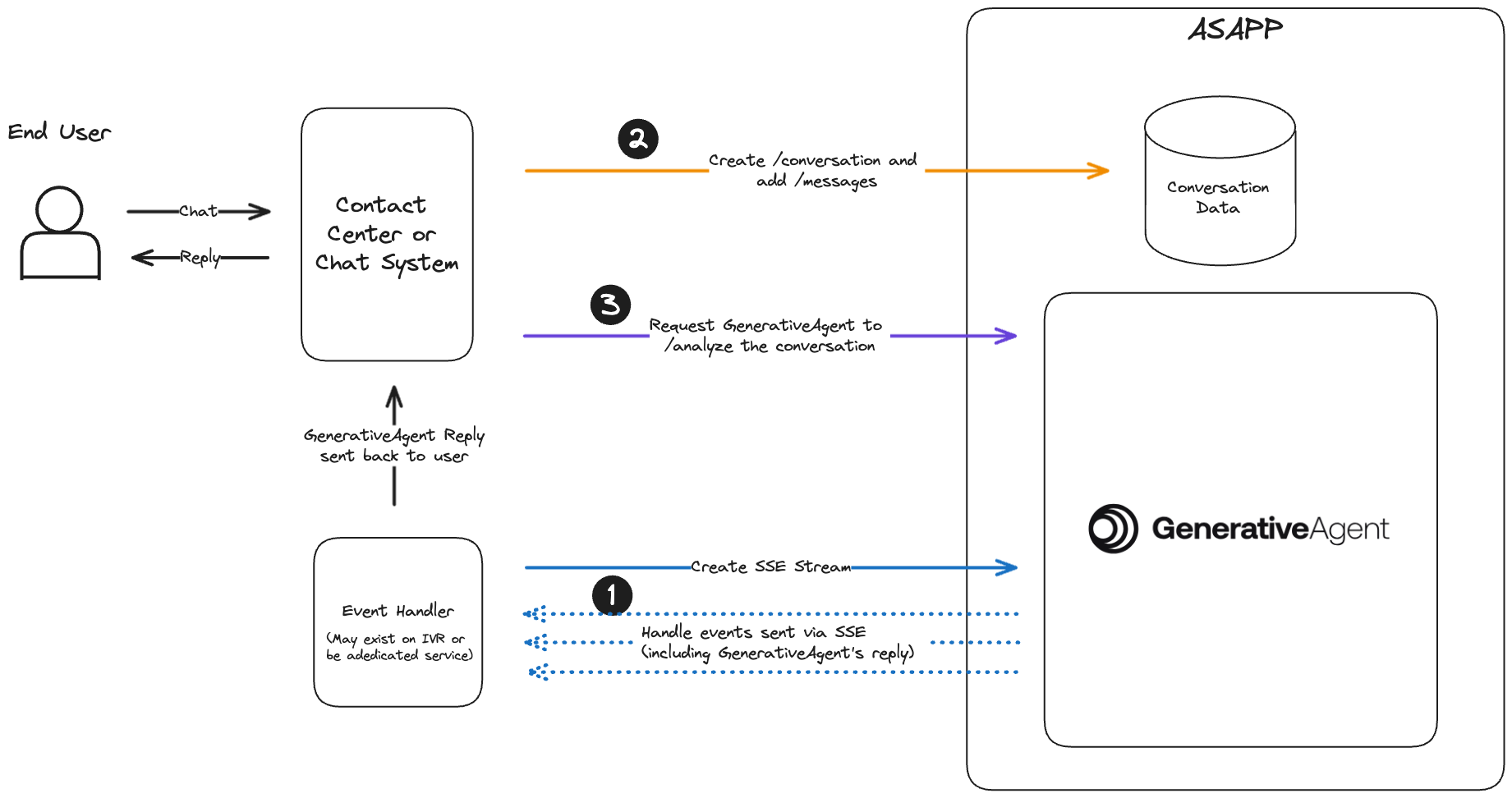
GenerativeAgent works on a loop where you will send text content of the conversation and have GenerativeAgent analyze a conversation, then handle the results from GenerativeAgent.
This process is repeated until GenerativeAgent addresses the user's needs, or GenerativeAgent is unable to help the user and requests a transfer to agent.
Your text-only integration needs to handle:
* Listening and Handling GenerativeAgent events. Create a single SSE stream where events from all conversations are sent.
* Connecting your chat system and trigger GenerativeAgent.
1. Create a conversation
2. Add Messages
3. Analyze a conversation
This diagram shows the interaction between your server and ASAPP, these steps are explained in more detail below:
 ## Before you Begin
Before you start integrating to GenerativeAgent, you need to:
* [Get your API Key Id and Secret](/getting-started/developers)
* Ensure your API key has been configured to access GenerativeAgent APIs. Reach out to your ASAPP team if you unsure.
* [Configure Tasks and Functions](/generativeagent/configuring).
## Step 1: Listen and Handle GenerativeAgent Events
GenerativeAgent sends you events during the conversation. All events for all conversations being evaluated by GenerativeAgent are sent through the single [Server-Sent-Event](https://developer.mozilla.org/en-US/docs/Web/API/Server-sent_events) (SSE) stream..
To create the SSE stream URL, POST to [`/streams`](/apis/generativeagent/create-stream-url):
```bash theme={null}
curl -X POST 'https://api.sandbox.asapp.com/generativeagent/v1/streams' \
--header 'asapp-api-id: ' \
--header 'asapp-api-secret: ' \
--header 'Content-Type: application/json' \
--data '{}'
```
A successful request returns 200 and the streaming URL you will reconnect with.
```json theme={null}
{
"streamId": "01ARZ3NDEKTSV4RRFFQ69G5FAV",
"streamingUrl": "https://ws-coradnor.asapp.com/push-api/connect/sse?token=token",
"messageTypes": [
"generative-agent-message"
]
}
```
Save the `streamId`. You will use this later to send the GenerativeAgent events to this SSE stream.
You need to [listen and handle these events](/generativeagent/integrate/handling-events) to enable GenerativeAgent to interact with your users.
## Step 2: Create a Conversation
A `conversation` represents a thread of messages between an end user and one or more agents. GenerativeAgent evaluates and responds in a given conversation.
[Create a `conversation`](/apis/conversations/create-or-update-a-conversation) providing your Ids for the conversation and customer:
```bash theme={null}
curl -X POST 'https://api.sandbox.asapp.com/conversation/v1/conversations' \
--header 'asapp-api-id: ' \
--header 'asapp-api-secret: ' \
--header 'Content-Type: application/json' \
--data '{
"externalId": "1",
"customer": {
"externalId": "[Your id for the customer]",
"name": "customer name"
},
"timestamp": "2024-01-23T11:42:42Z"
}'
```
A successfully created conversation returns a status code of 200 and the conversation's `id`. Save the conversation id as it is used when calling GenerativeAgent
```json theme={null}
{"id":"01HNE48VMKNZ0B0SG3CEFV24WM"}
```
## Step 3: Add messages
Whether you are implementing a text based channel or using your own transcription, provide the utterances from your users by creating **`messages`**. A `message` represents a single communication within a conversation.
[Create a `message`](/apis/messages/create-a-message) providing the text of what your user said:
```bash theme={null}
curl -X POST 'https://api.sandbox.asapp.com/conversation/v1/conversations/01HNE48VMKNZ0B0SG3CEFV24WM/messages' \
--header 'asapp-api-id: ' \
--header 'asapp-api-secret: ' \
--header 'Content-Type: application/json' \
--data '{
"text": "Hello, I would like to upgrade my internet plan to GOLD.",
"sender": {
"role": "customer",
"externalId": "[Your id for the customer]"
},
"timestamp": "2024-01-23T11:42:42Z"
}'
```
Continue to provide the messages while the conversation progresses.
You can provide a single message as part of the `/analyze` call if that better works with the design of your system.
## Step 4: Analyze conversation with GenerativeAgent
Once you have the SSE stream connected and are sending messages, you need to engage GenerativeAgent with a given conversation.
To have GenerativeAgent analyze a conversation, make a [POST request to `/analyze`](/apis/generativeagent/analyze-conversation):
```bash theme={null}
curl -X POST 'https://api.sandbox.asapp.com/generativeagent/v1/analyze' \
--header 'asapp-api-id: ' \
--header 'asapp-api-secret: ' \
--header 'Content-Type: application/json' \
--data '{
"conversationId": "01HNE48VMKNZ0B0SG3CEFV24WM",
"streamId": "01ARZ3NDEKTSV4RRFFQ69G5FAV"
}'
```
Make sure to include the `streamId` created when you started the SSE Stream.
GenerativeAgent evaluates the conversation at that moment of time to determine a response. GenerativeAgent is not aware of any additional messages that are sent while processing.
A successful response returns a 200 and the conversation Id.
```json theme={null}
{
"conversationId":"01HNE48VMKNZ0B0SG3CEFV24WM"
}
```
GenerativeAgent's response is communicated by the [events](/generativeagent/integrate/handling-events) sent through the SSE stream.
### Analyze with Message
You have the option to send a message when calling analyze.
```bash theme={null}
curl -X POST 'https://api.sandbox.asapp.com/generativeagent/v1/analyze' \
--header 'asapp-api-id: ' \
--header 'asapp-api-secret: ' \
--header 'Content-Type: application/json' \
--data '{
"conversationId": "01HNE48VMKNZ0B0SG3CEFV24WM",
"streamId": "01ARZ3NDEKTSV4RRFFQ69G5FAV",
"message": {
"text": "hello, can I see my bill?",
"sender": {
"externalId": "321",
"role": "customer"
},
"timestamp": "2024-01-23T11:50:50Z"
}
}'
```
A successful response returns a 200 status code the id of the conversation and the message that was created.
```json theme={null}
{
"conversationId":"01HNE48VMKNZ0B0SG3CEFV24WM",
"messageId":"01HNE6ZEAC94ENQT1VF2EPZE4Y"
}
```
### Add Input Variables and Task context
As the conversation goes, it is possible to give GenerativeAgent more context of the conversation by using the`taskName` and `inputVariables` attributes.
You can also simulate Tasks and Input Variables in the [Previewer](/generativeagent/configuring/previewer#input-variables)
```bash theme={null}
curl --request POST \
--url https://api.sandbox.asapp.com/generativeagent/v1/analyze \
--header 'Content-Type: application/json' \
--header 'asapp-api-id: ' \
--header 'asapp-api-secret: ' \
--data '{
"conversationId": "01BX5ZZKBKACTAV9WEVGEMMVS0",
"message": {
"text": "Hello, I would like to upgrade my internet plan to GOLD.",
"sender": {
"role": "agent",
"externalId": 123
},
"timestamp": "2021-11-23T12:13:14.555Z"
},
"taskName": "UpgradePlan",
"inputVariables": {
"context": "Customer called to upgrade their current plan to GOLD",
"customer_info": {
"current_plan": "SILVER",
"customer_since": "2020-01-01"
}
}
}'
```
## Next Steps
With your system implemented into GenerativeAgent, sending messages and engage GenerativeAgent, you are ready to use GenerativeAgent.
You may find these other pages helpful in using GenerativeAgent:
## Before you Begin
Before you start integrating to GenerativeAgent, you need to:
* [Get your API Key Id and Secret](/getting-started/developers)
* Ensure your API key has been configured to access GenerativeAgent APIs. Reach out to your ASAPP team if you unsure.
* [Configure Tasks and Functions](/generativeagent/configuring).
## Step 1: Listen and Handle GenerativeAgent Events
GenerativeAgent sends you events during the conversation. All events for all conversations being evaluated by GenerativeAgent are sent through the single [Server-Sent-Event](https://developer.mozilla.org/en-US/docs/Web/API/Server-sent_events) (SSE) stream..
To create the SSE stream URL, POST to [`/streams`](/apis/generativeagent/create-stream-url):
```bash theme={null}
curl -X POST 'https://api.sandbox.asapp.com/generativeagent/v1/streams' \
--header 'asapp-api-id: ' \
--header 'asapp-api-secret: ' \
--header 'Content-Type: application/json' \
--data '{}'
```
A successful request returns 200 and the streaming URL you will reconnect with.
```json theme={null}
{
"streamId": "01ARZ3NDEKTSV4RRFFQ69G5FAV",
"streamingUrl": "https://ws-coradnor.asapp.com/push-api/connect/sse?token=token",
"messageTypes": [
"generative-agent-message"
]
}
```
Save the `streamId`. You will use this later to send the GenerativeAgent events to this SSE stream.
You need to [listen and handle these events](/generativeagent/integrate/handling-events) to enable GenerativeAgent to interact with your users.
## Step 2: Create a Conversation
A `conversation` represents a thread of messages between an end user and one or more agents. GenerativeAgent evaluates and responds in a given conversation.
[Create a `conversation`](/apis/conversations/create-or-update-a-conversation) providing your Ids for the conversation and customer:
```bash theme={null}
curl -X POST 'https://api.sandbox.asapp.com/conversation/v1/conversations' \
--header 'asapp-api-id: ' \
--header 'asapp-api-secret: ' \
--header 'Content-Type: application/json' \
--data '{
"externalId": "1",
"customer": {
"externalId": "[Your id for the customer]",
"name": "customer name"
},
"timestamp": "2024-01-23T11:42:42Z"
}'
```
A successfully created conversation returns a status code of 200 and the conversation's `id`. Save the conversation id as it is used when calling GenerativeAgent
```json theme={null}
{"id":"01HNE48VMKNZ0B0SG3CEFV24WM"}
```
## Step 3: Add messages
Whether you are implementing a text based channel or using your own transcription, provide the utterances from your users by creating **`messages`**. A `message` represents a single communication within a conversation.
[Create a `message`](/apis/messages/create-a-message) providing the text of what your user said:
```bash theme={null}
curl -X POST 'https://api.sandbox.asapp.com/conversation/v1/conversations/01HNE48VMKNZ0B0SG3CEFV24WM/messages' \
--header 'asapp-api-id: ' \
--header 'asapp-api-secret: ' \
--header 'Content-Type: application/json' \
--data '{
"text": "Hello, I would like to upgrade my internet plan to GOLD.",
"sender": {
"role": "customer",
"externalId": "[Your id for the customer]"
},
"timestamp": "2024-01-23T11:42:42Z"
}'
```
Continue to provide the messages while the conversation progresses.
You can provide a single message as part of the `/analyze` call if that better works with the design of your system.
## Step 4: Analyze conversation with GenerativeAgent
Once you have the SSE stream connected and are sending messages, you need to engage GenerativeAgent with a given conversation.
To have GenerativeAgent analyze a conversation, make a [POST request to `/analyze`](/apis/generativeagent/analyze-conversation):
```bash theme={null}
curl -X POST 'https://api.sandbox.asapp.com/generativeagent/v1/analyze' \
--header 'asapp-api-id: ' \
--header 'asapp-api-secret: ' \
--header 'Content-Type: application/json' \
--data '{
"conversationId": "01HNE48VMKNZ0B0SG3CEFV24WM",
"streamId": "01ARZ3NDEKTSV4RRFFQ69G5FAV"
}'
```
Make sure to include the `streamId` created when you started the SSE Stream.
GenerativeAgent evaluates the conversation at that moment of time to determine a response. GenerativeAgent is not aware of any additional messages that are sent while processing.
A successful response returns a 200 and the conversation Id.
```json theme={null}
{
"conversationId":"01HNE48VMKNZ0B0SG3CEFV24WM"
}
```
GenerativeAgent's response is communicated by the [events](/generativeagent/integrate/handling-events) sent through the SSE stream.
### Analyze with Message
You have the option to send a message when calling analyze.
```bash theme={null}
curl -X POST 'https://api.sandbox.asapp.com/generativeagent/v1/analyze' \
--header 'asapp-api-id: ' \
--header 'asapp-api-secret: ' \
--header 'Content-Type: application/json' \
--data '{
"conversationId": "01HNE48VMKNZ0B0SG3CEFV24WM",
"streamId": "01ARZ3NDEKTSV4RRFFQ69G5FAV",
"message": {
"text": "hello, can I see my bill?",
"sender": {
"externalId": "321",
"role": "customer"
},
"timestamp": "2024-01-23T11:50:50Z"
}
}'
```
A successful response returns a 200 status code the id of the conversation and the message that was created.
```json theme={null}
{
"conversationId":"01HNE48VMKNZ0B0SG3CEFV24WM",
"messageId":"01HNE6ZEAC94ENQT1VF2EPZE4Y"
}
```
### Add Input Variables and Task context
As the conversation goes, it is possible to give GenerativeAgent more context of the conversation by using the`taskName` and `inputVariables` attributes.
You can also simulate Tasks and Input Variables in the [Previewer](/generativeagent/configuring/previewer#input-variables)
```bash theme={null}
curl --request POST \
--url https://api.sandbox.asapp.com/generativeagent/v1/analyze \
--header 'Content-Type: application/json' \
--header 'asapp-api-id: ' \
--header 'asapp-api-secret: ' \
--data '{
"conversationId": "01BX5ZZKBKACTAV9WEVGEMMVS0",
"message": {
"text": "Hello, I would like to upgrade my internet plan to GOLD.",
"sender": {
"role": "agent",
"externalId": 123
},
"timestamp": "2021-11-23T12:13:14.555Z"
},
"taskName": "UpgradePlan",
"inputVariables": {
"context": "Customer called to upgrade their current plan to GOLD",
"customer_info": {
"current_plan": "SILVER",
"customer_since": "2020-01-01"
}
}
}'
```
## Next Steps
With your system implemented into GenerativeAgent, sending messages and engage GenerativeAgent, you are ready to use GenerativeAgent.
You may find these other pages helpful in using GenerativeAgent: