> ## Documentation Index
> Fetch the complete documentation index at: https://docs.asapp.com/llms.txt
> Use this file to discover all available pages before exploring further.
# Web Authentication
This section details the process for authenticating your users to the ASAPP Chat SDK.
* [Authenticating at Page Load](#authenticating-at-page-load "Authenticating at Page Load")
* [Authenticating Asynchronously](#authenticating-asynchronously "Authenticating Asynchronously")
* [Using the 'UserLoginHandler' Method](#using-the-userloginhandler-method "Using the 'UserLoginHandler' Method")
* [GenerativeAgent API Authentication](#generativeagent-api-authentication)
Before getting started, make sure you've [embedded the ASAPP Chat SDK](/generativeagent/integrate/web-sdk/web-quick-start#1-embed-the-script "1. Embed the Script") into your site.
Your site is responsible for the entirety of the user authentication process. This includes the presentation of an interface for login and the maintenance of a session, and for the retrieval and formatting of context data about that user. Please read the section on using the [Authentication with the ContextProvider](/generativeagent/integrate/web-sdk/web-contextprovider#authentication "Authentication") to understand how you can pass authorization information to the Chat SDK.
Once your site has authenticated a user, you can securely pass that authentication forward to the ASAPP Chat environment by making certain calls to the ASAPP Chat SDK (more on those calls below). Your user can then be authenticated both on your web site and in the ASAPP Chat Environment, enabling them to execute within the ASAPP Chat use cases that require authentication.
ASAPP provides two methods for authenticating a user to the ASAPP Chat SDK.
* You can proactively [authenticate your user at page load](#authenticating-at-page-load "Authenticating at Page Load").
* You can [authenticate your user midway through a session](#authenticating-asynchronously "Authenticating Asynchronously") using the [SetCustomer API](/generativeagent/integrate/web-sdk/web-javascript-api#setcustomer "'setCustomer'").
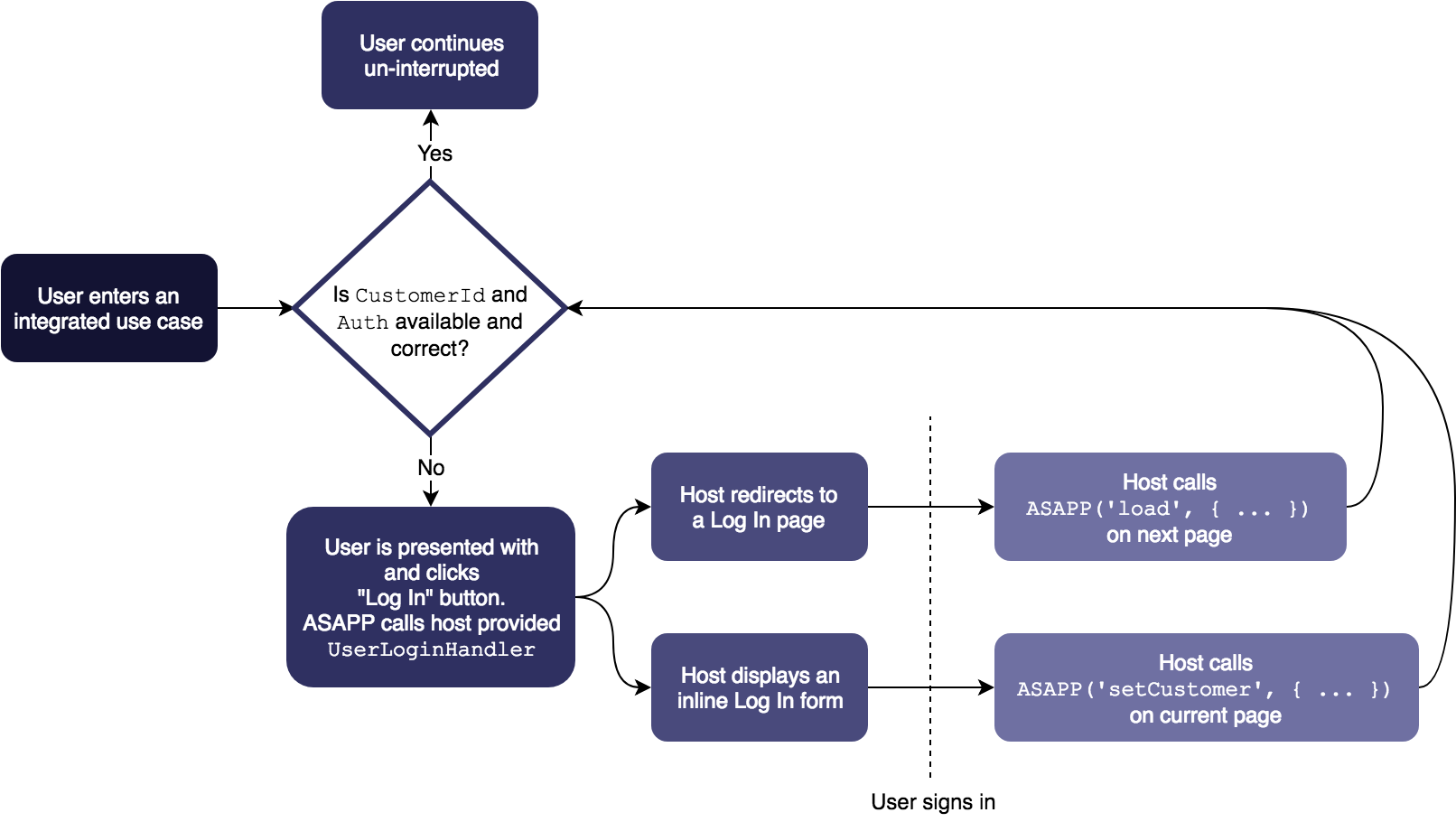
With rare exceptions, you must also configure [UserLoginHandler](#using-the-userloginhandler-method "Using the 'UserLoginHandler' Method") to enable ASAPP to handle cases where a user requires authentication or re-authentication in the midst of a chat session (e.g., if a user's authentication credentials expire during a chat session.)
 ## Authenticating at Page Load
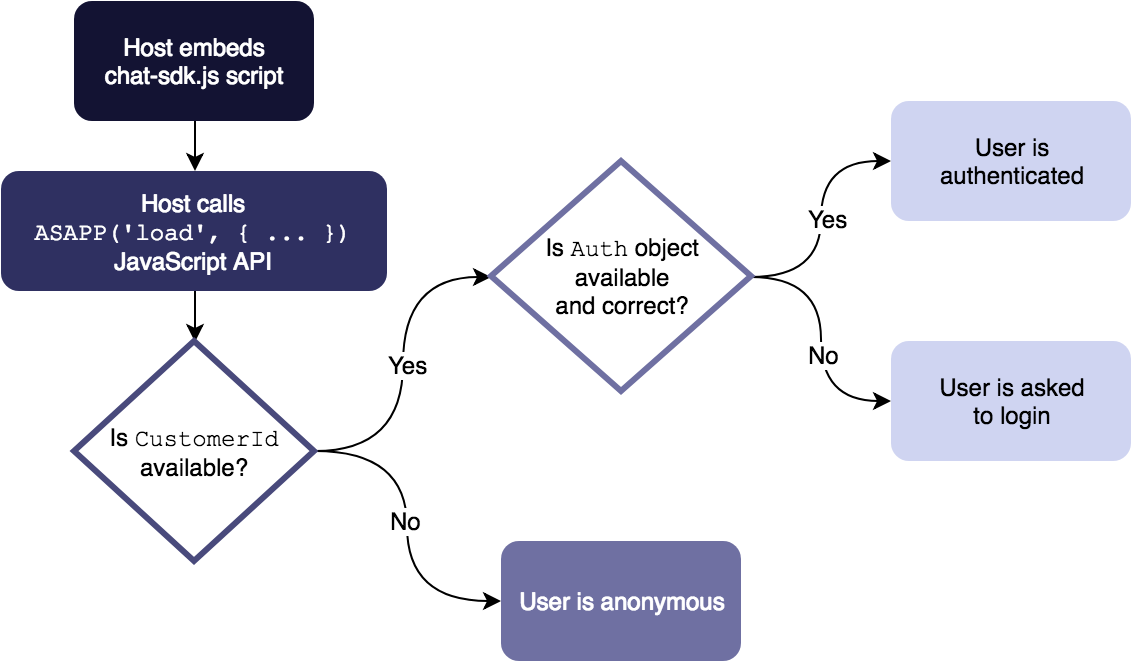
If a user who is already authenticated with your site requests a page that includes ASAPP chat functionality, you can proactively authenticate that user to the ASAPP SDK at page load time. This allows an authenticated user who initiates a chat session to have immediate access to their account details without having to login again.
To authenticate a user to the ASAPP Chat SDK on page load, use the ASAPP [Load API](/generativeagent/integrate/web-sdk/web-javascript-api#load "'load'") providing both [ContextProvider](/generativeagent/integrate/web-sdk/web-app-settings#contextprovider "ContextProvider") and [CustomerId](/generativeagent/integrate/web-sdk/web-app-settings#customerid "CustomerId") as additional keys in the [Load method](/generativeagent/integrate/web-sdk/web-javascript-api#load "'load'").
For example:
```javascript theme={null}
```
The sample above initializes the ASAPP Chat SDK with your user's `CustomerId` and a `ContextProvider` incorporating that user's `Auth`.
When a user opens the ASAPP Chat SDK, they are already authenticated to the chat client and can access account information within the chat without being asked to login again.
## Authenticating Asynchronously
If a user's authentication credentials are not available at page load time, you can authenticate asynchronously using the ASAPP [SetCustomer](/generativeagent/integrate/web-sdk/web-javascript-api#setcustomer "'setCustomer'") API.
After you've retrieved your user's credentials, you can call the API to authenticate that user with the ASAPP Chat SDK mid-session.
You might want to asynchronously authenticate a user to the ASAPP Chat SDK when (for example) that user has just completed a login flow, or if their credentials are retrieved after the page initially loads, or if a session expires and the user needs to reauthenticate.
The following sample snippet shows how to call the SetCustomer API:
```javascript theme={null}
```
Once you call the [SetCustomer](/generativeagent/integrate/web-sdk/web-javascript-api#setcustomer "'setCustomer'") method, and as long as the provided `Auth` information remains valid on your backend, any ASAPP Chat SDK actions that require authentication authenticate properly.
The SetCustomer method is typically called as part of the [UserLoginHandler](/generativeagent/integrate/web-sdk/web-app-settings#userloginhandler-11877 "UserLoginHandler").
See the section on [Using the 'UserLoginHandler' Method](#using-the-userloginhandler-method "Using the 'UserLoginHandler' Method") for a complete picture of how you may want to authenticate a user during an ASAPP Chat SDK session.
## Using the 'UserLoginHandler' Method
## Authenticating at Page Load
If a user who is already authenticated with your site requests a page that includes ASAPP chat functionality, you can proactively authenticate that user to the ASAPP SDK at page load time. This allows an authenticated user who initiates a chat session to have immediate access to their account details without having to login again.
To authenticate a user to the ASAPP Chat SDK on page load, use the ASAPP [Load API](/generativeagent/integrate/web-sdk/web-javascript-api#load "'load'") providing both [ContextProvider](/generativeagent/integrate/web-sdk/web-app-settings#contextprovider "ContextProvider") and [CustomerId](/generativeagent/integrate/web-sdk/web-app-settings#customerid "CustomerId") as additional keys in the [Load method](/generativeagent/integrate/web-sdk/web-javascript-api#load "'load'").
For example:
```javascript theme={null}
```
The sample above initializes the ASAPP Chat SDK with your user's `CustomerId` and a `ContextProvider` incorporating that user's `Auth`.
When a user opens the ASAPP Chat SDK, they are already authenticated to the chat client and can access account information within the chat without being asked to login again.
## Authenticating Asynchronously
If a user's authentication credentials are not available at page load time, you can authenticate asynchronously using the ASAPP [SetCustomer](/generativeagent/integrate/web-sdk/web-javascript-api#setcustomer "'setCustomer'") API.
After you've retrieved your user's credentials, you can call the API to authenticate that user with the ASAPP Chat SDK mid-session.
You might want to asynchronously authenticate a user to the ASAPP Chat SDK when (for example) that user has just completed a login flow, or if their credentials are retrieved after the page initially loads, or if a session expires and the user needs to reauthenticate.
The following sample snippet shows how to call the SetCustomer API:
```javascript theme={null}
```
Once you call the [SetCustomer](/generativeagent/integrate/web-sdk/web-javascript-api#setcustomer "'setCustomer'") method, and as long as the provided `Auth` information remains valid on your backend, any ASAPP Chat SDK actions that require authentication authenticate properly.
The SetCustomer method is typically called as part of the [UserLoginHandler](/generativeagent/integrate/web-sdk/web-app-settings#userloginhandler-11877 "UserLoginHandler").
See the section on [Using the 'UserLoginHandler' Method](#using-the-userloginhandler-method "Using the 'UserLoginHandler' Method") for a complete picture of how you may want to authenticate a user during an ASAPP Chat SDK session.
## Using the 'UserLoginHandler' Method
 ```javascript theme={null}
```
```javascript theme={null}
```