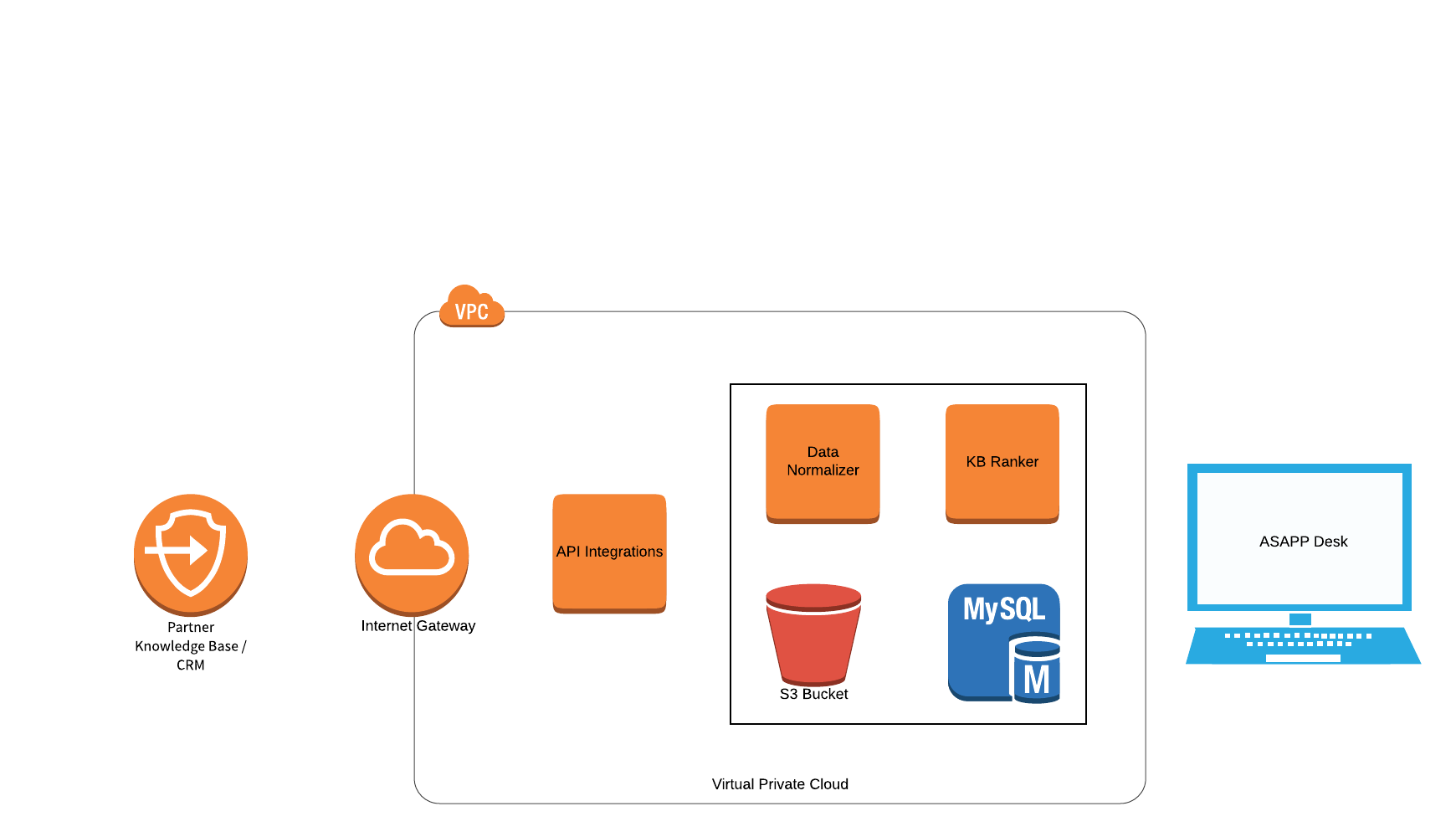
Knowledge Base (KB) is a technology used to store structured and unstructured information that agents can reference while servicing customer inquiries. You can integrate KB data into ASAPP Desk by manually uploading articles through an offline process or by integrating with digital systems that expose content via REST APIs. Knowledge Base helps Agents access information without requiring them to navigate external systems by surfacing KB content directly within Agent Desk’s Right Hand Panel view. This approach reduces Average Handle Time and increases concurrency. KB also learns from agent interactions, suggests relevant articles, and supports Agent Augmentation.

Integration

ASAPP integrates with customer Knowledge Base systems or CRMs to pull data and make it available to Agent Desk. A dedicated service accomplishes this by consuming data from external systems that support standard REST APIs. The service layer offers enough flexibility to integrate with various industry-standard Knowledge Base systems as well as proprietary in-house systems. The service programmatically retrieves new and updated articles regularly to surface fresh and accurate content to agents in real-time. The system transforms data pulled from external systems into ASAPP’s standard format and securely stores it in S3 and in a database. Refer to the Data Storage section below for more details.

Configuration

The service that integrates with customers uses configuration-driven approaches to interface with different systems supporting various data formats and structures. ASAPP requires the following information to integrate with APIs:
  • REST endpoints and API definitions, data schemas and SLAs
    • URLs, Connection info, and Test Accounts for each environment
    • Authentication and Authorization requirements
    • JSON schema defining requests and responses, preferably Swagger
    • API Host that can handle HTTPS/TLS traffic
    • Resource
    • HTTP Method(s) supported
    • Content Type(s) supported and other Request Headers
    • Error handling documentation
    • Response sizes to expect
    • API Call Rate limits, if any
    • Response time SLAs
  • API Response Requirements
    • Every ‘article’ should contain at least a unique identifier and last updated date timestamp.
    • Hierarchical data needs to clearly define the parent-child relationships
    • Content should not contain any PII/PCI related information
  • Refreshing Data
    • On a set cadence as determined and agreed upon by both parties
  • Size of data to help in capacity planning and scaling

Data Storage

Once the service receives KB content, it stores the data in a secure S3 bucket that serves as the source of truth for all Knowledge Base articles. The system then structures and packages the data into standard Knowledge Base types: Category, Folder, and Article. The service then cleans, processes, and stores the packaged data in a database for further usage.

Data Processing

ASAPP runs all Knowledge Base articles stored in the database through a Knowledge Base Ranker service, which ranks articles and feeds Agent Augmentation. Given a set of user utterances, the KB Ranker service assigns a score to every article in the Knowledge Base based on how relevant those articles are for that agent at that moment in the conversation. ASAPP determines relevance by considering the frequency of words in an article within the corpus of articles and words from a given subset of utterances.

Data Refresh

ASAPP can refresh data periodically and schedule it to meet customer needs. ASAPP uses a Unix cron style scheduler to run the refresh job, which allows flexible configuration. Data Refresh replaces all current folders and articles with new ones received. The refresh does not affect article ranking, as the system maintains their state separately.