

The system only uses the Mock Data when testing the API Connection. Use Test Users to test and simulate Tasks and Function responses.
Mock Users
A mock user is a collection of mock responses that simulate how your server may respond. Each endpoint in use by an API Connection can have a mock response defined. By default, the mock user will return the default mock data defined in the API Connection’s API Source. To Create a Mock User:1
Navigate to API Integration Hub > API Mock Users
Access the API Mock Users section from the API Integration Hub.
2
Click 'Create User'
Select the ‘Create User’ button to start creating a new mock user.
3
Specify the User Details
Provide the following information:
- Name of the User
- Description of the User
4
Define Mock Responses
The newly created mock user will have a default mock response for each endpoint in the API Connection.You can check “Override Default Mock response” and specify a new mock response.Make sure to save the mock user to apply the changes.
Using Mock Users
You can use Mock Users to test your transformations. From within the Response interface, you can select the mock user to use in the “Test Response” panel.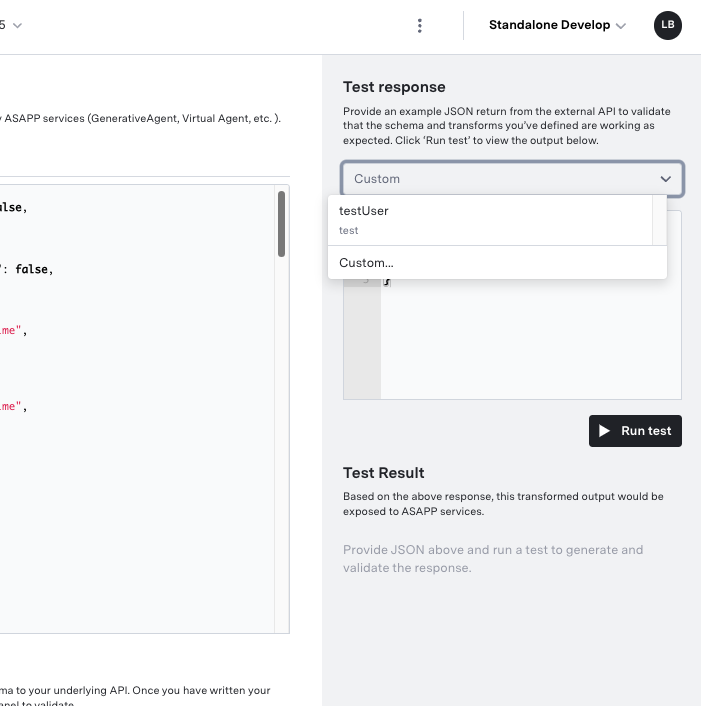
Next Steps
Test Users
Learn how to use test users to simulate and validate task and function responses
Connect APIs
Understand how to connect and configure external APIs with your application
Authentication Methods
Learn how to authenticate your API connections
Integration Guide
Step-by-step guide to integrate APIs with your GenerativeAgent implementation