

- Media gateways for receiving call audio from Twilio
- HTTPS API which enables the customer to GET a streaming URL to which call audio is sent and POST requests to start and stop call transcription
- Webhook to POST real-time transcripts to a designated URL of your choosing, alongside two additional APIs to retrieve transcripts after-call for one or a batch of conversations
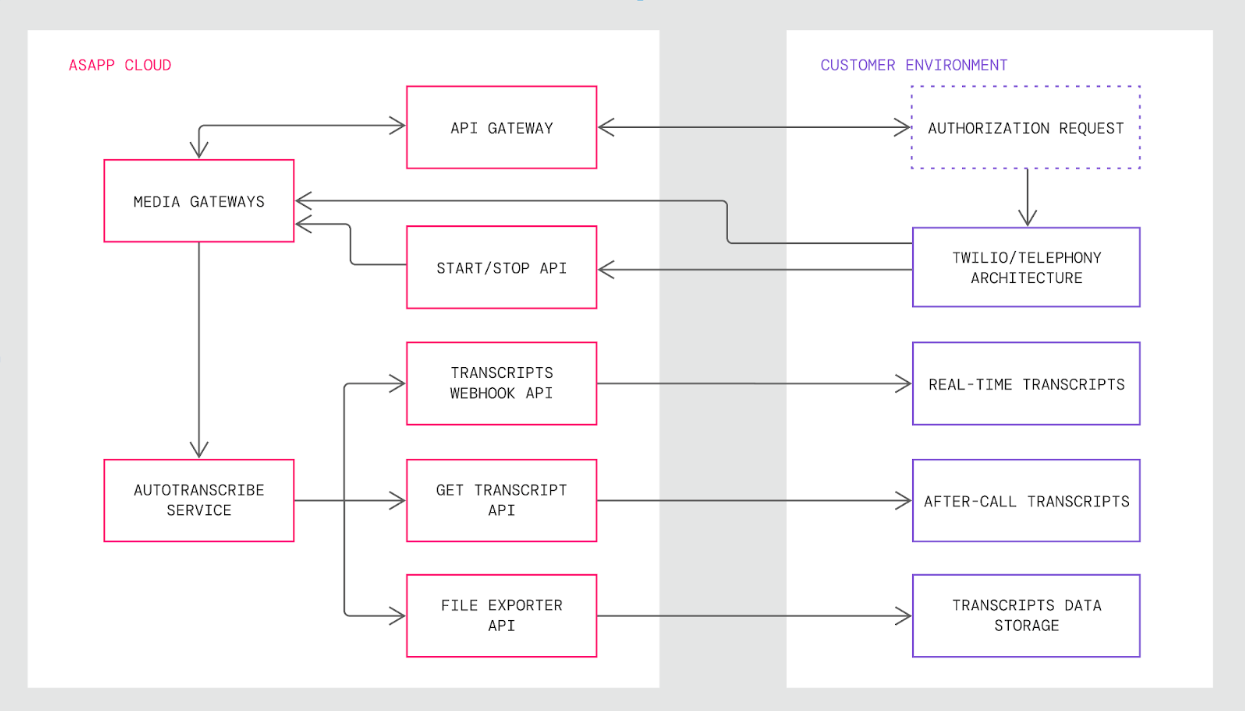
Integration Steps
There are four steps to integrate AI Transcribe into Twilio:- Authenticate with ASAPP and Obtain a Twilio Media Stream URL
- Send Audio to Media Gateway
- Send Start and Stop Requests
- Receive Transcript Outputs
Requirements
Audio Stream Codec Twilio provides audio in the mu-law format with 8000 sample rate, which ASAPP supports. You do not need any modification or additional transcoding when forking audio to ASAPP.When supplying recorded audio to ASAPP for AI Transcribe model training prior to implementation, send uncompressed .WAV media files with speaker-separated channels.
Integrate with Twilio
1. Authenticate with ASAPP and Obtain a Twilio Media Stream URL
A Twilio media stream URL is required to start streaming audio. Begin by authenticating with ASAPP to obtain this URL.All requests to ASAPP sandbox and production APIs must use
HTTPS protocol. Traffic using HTTP will not be redirected to HTTPS.GET /mg-autotranscribe/v1/twilio-media-stream-url
HTTP headers (required):
2. Send Audio to Media Gateway
With the URL obtained in the previous step, instruct Twilio to start sending Media Stream to ASAPP Media Gateway components. Media Gateway (MG) components receive real-time audio along with Call SID metadata.Twilio provides multiple ways to initiate Media Stream, which are described in their documentation.
statusCallback URL. Twilio will use this URL in the event connectivity is lost or has an error. The customer call center will need to process this callback and instruct Twilio to again start new Media Streams, assuming transcriptions are still desired.
ASAPP offers a software-as-a-service approach to hosting MGs at ASAPP’s VPC in the PCI-scoped zone.
Network Connectivity
Twilio cloud will send audio to ASAPP cloud via secure (TLS 1.2) WebSocket connections over the internet. The system does not require additional or custom networking.
Port Details
Ports and protocols in use for the AI Transcribe implementations are shown below:
- Audio Streams: Secure WebSocket with destination port 443
- API Endpoints: TCP 443
statusCallback parameter (along with statusCallbackMethod if needed) of the Twilio API. Should a failure occur, the URL you specified in the statusCallback parameter will receive the HTTP request informing of a failure.
If you receive a failure notification, it means ASAPP has stopped receiving audio from Twilio and no more transcriptions for that call will take place. To restart transcriptions:
- Obtain a Twilio Media Stream URL - unless failure occurred within 5 minutes of the start of the call, you won’t be able to reuse the original call streaming URL.
- Send Audio to Media Gateway - instruct Twilio through their API to start a new media stream to the Twilio Media Stream URL that ASAPP provided.
- Send Start request (see 3. Sending Start and Stop Requests for details).
3. Send Start and Stop Requests
As outlined in requirements, get in touch with your ASAPP team to receive the API keys needed to interact with ASAPP endpoints. The/start-streaming and /stop-streaming endpoints of the Start/Stop API control when transcription occurs for every call.
See the API Reference to learn how to interact with this API.
ASAPP will not begin transcribing call audio until you request it to, thus preventing transcription of audio at the very beginning of the audio streaming session, which may include IVR, hold music, or queueing.
Stop requests pause or end transcription for any needed reason. For example, you could use a stop request mid-call when the agent places the call on hold or at the end of the call to prevent transcribing post-call interactions such as satisfaction surveys.
AI Transcribe is only meant to transcribe conversations between customers and agents - you should implement start and stop requests to ensure the system does not transcribe non-conversation audio (e.g., hold music, IVR menus, surveys). Attempted transcription of non-conversation audio will negatively impact other services meant to consume conversation transcripts, such as ASAPP AI Summary.
4. Receive Transcript Outputs
AI Transcribe outputs transcripts using three separate mechanisms, each corresponding to a different temporal use case:- Real-time: Webhook posts complete utterances to your target endpoint as they are transcribed during the live conversation
- After-call: GET endpoint responds to your requests for a designated call with the full set of utterances from that completed conversation
- Batch: File Exporter service responds to your request for a designated time interval with a link to a data feed file that includes all utterances from that interval’s conversations
Real-Time via Webhook
ASAPP sends transcript outputs in real-time via HTTPS POST requests to a target URL of your choosing. Authentication Once the target is selected, work with your ASAPP account team to implement one of the following supported authentication mechanisms:- Custom CAs: Custom CA certificates for regular TLS (1.2 or above).
- mTLS: Mutual TLS using custom certificates provided by the customer.
- Secrets: A secret token. The secret name is configurable as is whether it appears in the HTTP header or as a URL parameter.
- OAuth2 (client_credentials): Client credentials to fetch tokens from an authentication server.
/start-streaming endpoint, AI Transcribe begins to publish transcript messages, each of which contains a full utterance for a single call participant.
The expected latency between when ASAPP receives audio for a completed utterance and provides a transcription of that same utterance is 200-600ms.
Perceived latency will also be influenced by any network delay sending audio to ASAPP and receiving transcription messages in return.
transcript type messages is JSON encoded with these fields:
Expected
transcript message format:
After-Call via GET Request
AI Transcribe makes a full transcript available at the following endpoint for a given completed call:GET /conversation/v1/conversation/messages
Once a conversation is complete, make a request to the endpoint using a conversation identifier and the system returns every message in the conversation.
Message Limit
This endpoint responds with up to 1,000 transcribed messages per conversation, approximately a two-hour continuous call. You receive all messages in a single response without any pagination.
To retrieve all messages for calls that exceed this limit, use either a real-time mechanism or File Exporter for transcript retrieval.
You set transcription settings (e.g., language, detailed tokens, redaction) for a given call with the Start/Stop API when you initiate call transcription. All transcripts retrieved after the call will reflect the initially requested settings with the Start/Stop API.
Batch via File Exporter
AI Transcribe makes full transcripts for batches of calls available using the File Exporter service’sutterances data feed.
You can use the File Exporter service as a batch mechanism for exporting data to your data warehouse, either on a scheduled basis (e.g., nightly, weekly) or for ad hoc analyses. Data that populates feeds for the File Exporter service updates once daily at 2:00AM UTC.
Visit Retrieving Data from ASAPP for a guide on how to interact with the File Exporter service.
Use Case Example
Real-Time Transcription This real-time transcription use case example consists of an English language call between an agent and customer with redaction enabled, ending with a hold. Note that redaction is enabled by default and does not need to be requested explicitly.-
Obtain a Twilio media streaming URL destination by authenticating with ASAPP.
GET
/mg-autotranscribe/v1/twilio-media-stream-urlResponse STATUS 200: OK - Twilio media stream url in the response body
-
With the URL obtained in the previous step, instruct Twilio to start Media Stream to ASAPP media gateway components. ASAPP will now receive real-time audio via Twilio Stream along with metadata, most notably the call’s SID:
CA5b040e075515c424391012acc5a870cf -
When the customer and agent are connected, send ASAPP a request to start transcription for the call:
POST
/mg-autotranscribe/v1/start-streamingRequest
-
The agent and customer begin their conversation and ASAPP’s webhook publisher sends separate HTTPS POST
transcriptmessages for each participant to a target endpoint configured to receive the messages. HTTPS POST for Customer Utterance
-
Later in the conversation, the agent puts the customer on hold. This triggers a request to the
/stop-streamingendpoint to pause transcription and prevents hold music and promotional messages from being transcribed. POST/mg-autotranscribe/v1/stop-streamingRequest