

Overview
Unlike traditional bots with predefined flows, GenerativeAgent uses natural language processing to understand and respond to a wide range of customer queries and issues. GA works in Tasks. Each Task is a logical agent: it carries its own knowledge, tools, and instructions, and runs through an agentic loop to help the customer.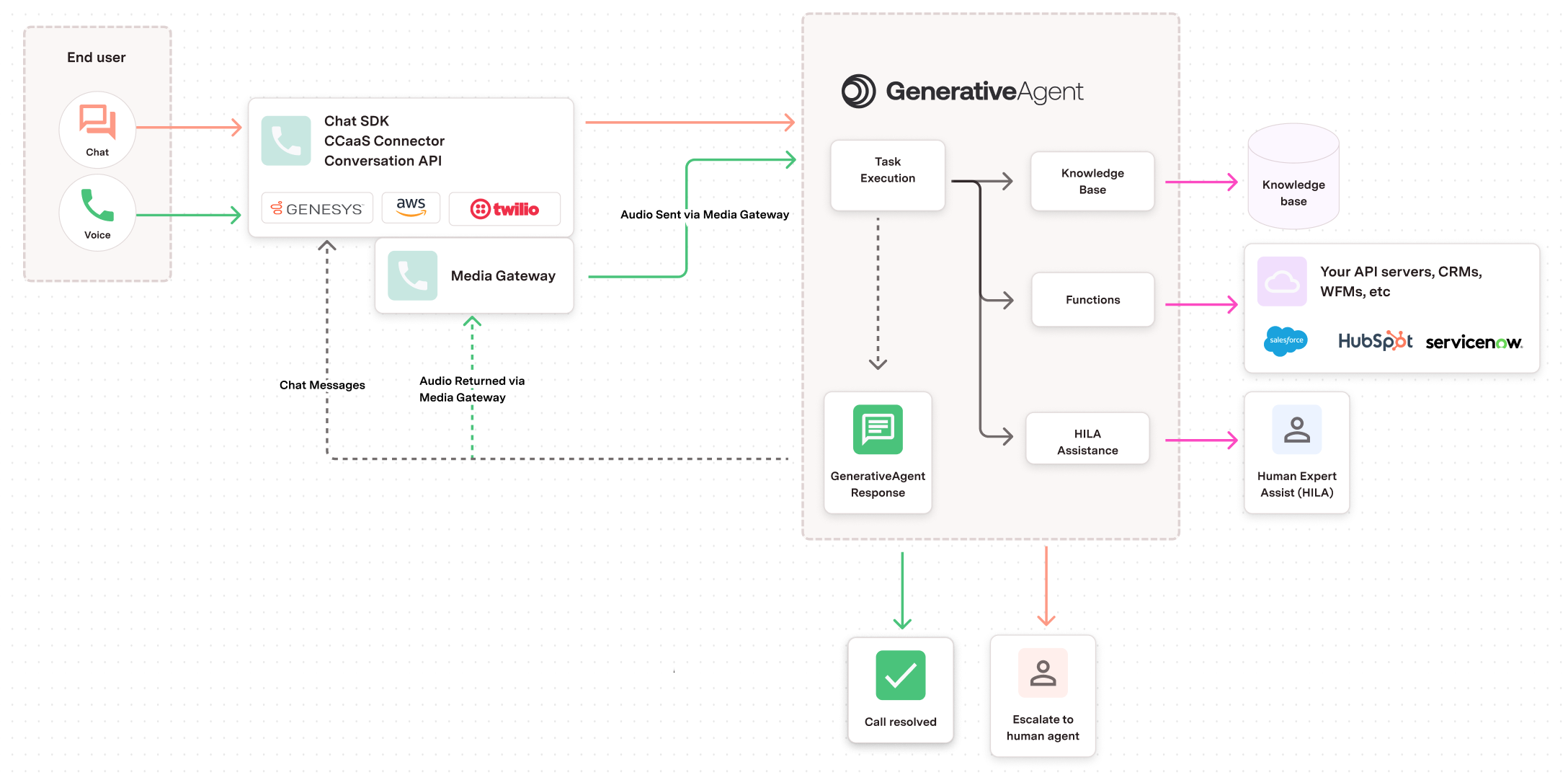
What happens each turn
At the start of each turn, GenerativeAgent is inside a Task. GA assembles a fresh context window:- Limited set of the most relevant KB topics relevant to the conversation
- The active Task’s instructions
- The Functions available to call as tools
- All current context variables
- The conversation history
- Any actions GA has already taken, including tool call results
- Answer from an topic: respond using the surfaced KB content.
- Trigger a Handoff: route the conversation to a human agent queue.
- Switch Task: move into a different Task when the conversation direction changes.
- Continue the current Task’s procedure: follow the next step of the Task’s instructions. This can include calling a Function, asking the customer for more information, requesting Human-in-the-Loop (HILA) assistance, or anything else the procedure dictates.
Architecture
GenerativeAgent runs on different models depending on the channel. Voice (Talker-Reasoner): Two models split the work.-
The Talker is the customer-facing model. Its default stance is to follow the Reasoner’s instructions, which in practice usually means progressing the active Task’s procedure. The Talker acts on its own in three cases:
- Answering from a Topic
- Initiating a Handoff
- Switching Task
- The Reasoner holds the Task’s instructions and runs the full agentic loop: calling Functions, evaluating results, planning the next step. It instructs the Talker on what to do next. In practice that’s often something like what to say to the customer, what information to ask for, or what to clarify before continuing.
How deployments grow
Most customers start with GenerativeAgent answering from the knowledge base and routing callers to human queues via Handoffs. This covers the intake work a traditional IVR would handle. No Task configuration is required for this first stage. As teams identify which conversations could be automated, they layer in Tasks. A Task is where procedures, API calls, and multi-step logic live. Handoffs used during KB routing are equally available inside Tasks for human escalation. See Using GenerativeAgent to Route Conversations for the first-deployment walkthrough.Core components
Environments
GenerativeAgent operates across three environments to support safe testing and progressive deployment:- Draft: Configure and test components before deployment.
- Sandbox: Staging environment to validate behavior with real APIs.
- Production: Live environment serving real customer conversations.