

How it works
The user filters conversations based on the completion status of the conversation or goals. Once you apply the filter, review the conversations that meet the selected criteria to understand where the GenerativeAgent may have fallen short in achieving customer goals. The findings from this evaluator can be used to improve the GenerativeAgent’s performance, enhance training data, and ultimately lead to better customer experiences.Filtering the conversations
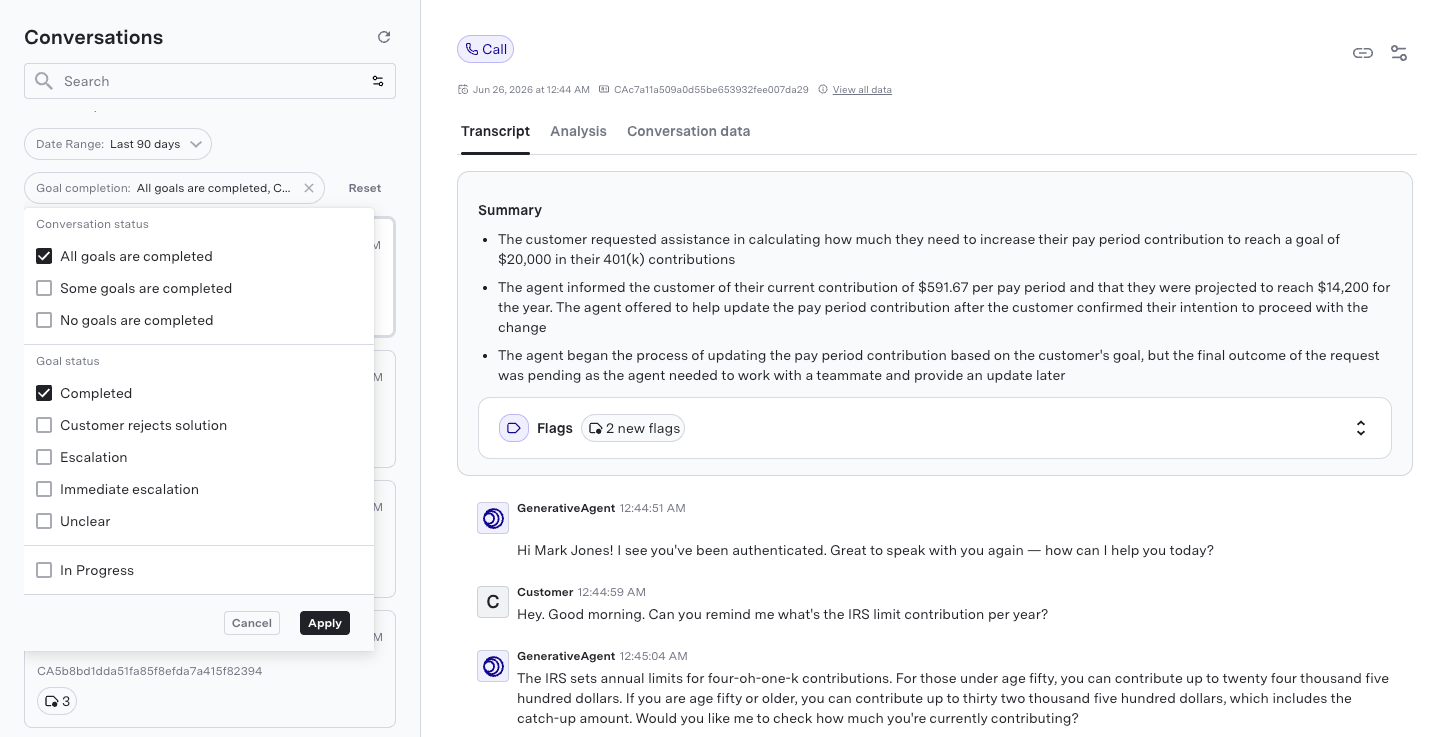
Use the Filter option in the Conversations interface to filter by Goal Completion status. You can narrow down the conversations based on the following criteria:Topline Completion Status
- “All goals are resolved”: Conversations where all customer goals were successfully addressed by the GenerativeAgent.
- “Some goals are unresolved”: Conversations where one or more customer goals were not fully addressed.
- “None goals are resolved”: Conversations where none of the customer goals were met.
Specific Assessments
- “Completed”: Goals that were successfully addressed by the GenerativeAgent.
- “Escalation”: Goals that led to escalation to a human agent after some interaction with the GenerativeAgent.
- “Immediate Escalation”: Goals that resulted in immediate escalation to a human agent without any attempt by the GenerativeAgent to address them.
- “Unclear”: Goals where it is unclear whether they were met due to lack of customer response.
- “Customer Rejected Solution”: Goals where the customer explicitly rejected the solution provided by the GenerativeAgent.
Reviewing Goals
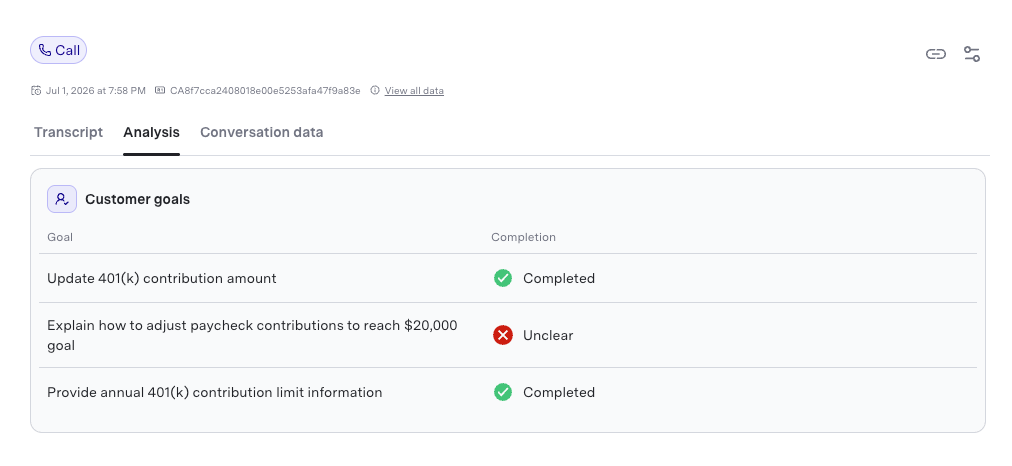
After filtering the conversations, you can proceed to review the goals associated with those conversations to understand the root cause of incomplete or unmet goals. When reviewing a conversation, the goals associated with that conversation are displayed in the Analysis section. The Customer goals are listed along the order they were detected by the evaluator. Each goal displays its completions status, which includes the specific assessment (e.g., Completed, Escalation, etc.) and any relevant notes or comments.Autosummary displays a brief conversation summary above the goals section when enabled.
Next Steps
Once the goal completion status has been reviewed, you can take further actions to improve the GenerativeAgent’s performance. This may include:- Training and Optimization: Use the insights gained from the goal completion analysis and get in touch with your ASAPP team to train and optimize the GenerativeAgent for better performance in future interactions.
- Feedback Loop: Implement a feedback loop where insights from goal completion reviews are used to continuously improve the agent’s capabilities and response strategies.
- Customer Follow-up: Identify customers whose goals were not met and consider following up with them to address any unresolved issues or concerns.
Manual Annotation
Manually annotate conversations to provide feedback and identify quality issues.
Conversation Monitoring
Monitor and review conversations for compliance and quality assurance using GenerativeAgent.
Quality Reports
Monitor and improve GenerativeAgent quality with an automated score for every conversation.