

Flagging a GenerativeAgent Turn
Flagging a GenerativeAgent Turn
Reviewers will have the ability to flag specific GenerativeAgent turns and provide additional comments explaining the reason for the flag or if further action is needed.They also have the option to update Conversation Monitoring rationale to add more context for review and fine-tuning the classification.
Issue Type Classification
Issue Type Classification
Assign a tag to Conversation Monitoring or manual flags to classify and investigate the type of issue identified in the flagged turn. This helps in categorizing issues for analysis and resolution.
Flag Refinement
Flag Refinement
When a turn is flagged, reviewers can:
- Confirm the flag if they agree with the automated assessment
- Recategorize the flag as needed
- Dismiss the flag if they believe the turn is false positive
- Add nuance or rationale to the flag for better context
When to Use Manual Annotations
Use manual annotations to:-
Control conversation quality
- Catch issues automated systems miss: Flag incorrect, incomplete, or risky model responses that automated evaluation didn’t detect
- Ensure compliance: Highlight policy, tone, or guideline violations that require human judgment
-
Improve automated evaluators
- Validate automated flags: Confirm or override automated evaluator flags to improve evaluator accuracy and reduce false positives
- Train evaluators: Use confirmed or corrected flags as labeled training data to improve your automated evaluation systems
-
Enhance your GenerativeAgent system
- Identify knowledge gaps: Discover missing information in knowledge bases, APIs, or domain-specific instructions
- Improve orchestration: Use annotated examples to refine conversation flows and routing logic
- Enhance test suites: Add real-world scenarios from annotations to verify GenerativeAgent behavior
-
Manage review workflows
- Track follow-ups: Flag conversations requiring investigation, escalation, or additional review
Adding Manual Annotations
1
Navigate to a conversation
Navigate to the Conversations interface and select a conversation to review.
2
Identify the turn to annotate
Identify the GenerativeAgent turn you want to annotate.
3
Click Add Flag
Hover over the turn and click the Add Flag button.
4
Add comments and rationale
Add any supporting comments or rationale for the flag. You can also update Conversation Monitoring rationale if the turn was already flagged by automated systems.
5
Categorize the issue (optional)
Select a category for the issue from the dropdown menu. This helps classify the type of issue for better organization and analysis.
6
Set the severity level
Set the severity of the flag to critical or major. Severity determines how the flag is prioritized during review, and you can filter conversations by it later.
7
Add tags (optional)
Assign tags to classify the issue type. Common classifications include:
- Policy violations
- Tone or guideline issues
- Incorrect information
- Incomplete responses
- Escalation required
8
Save the annotation
Click Save to apply the annotation.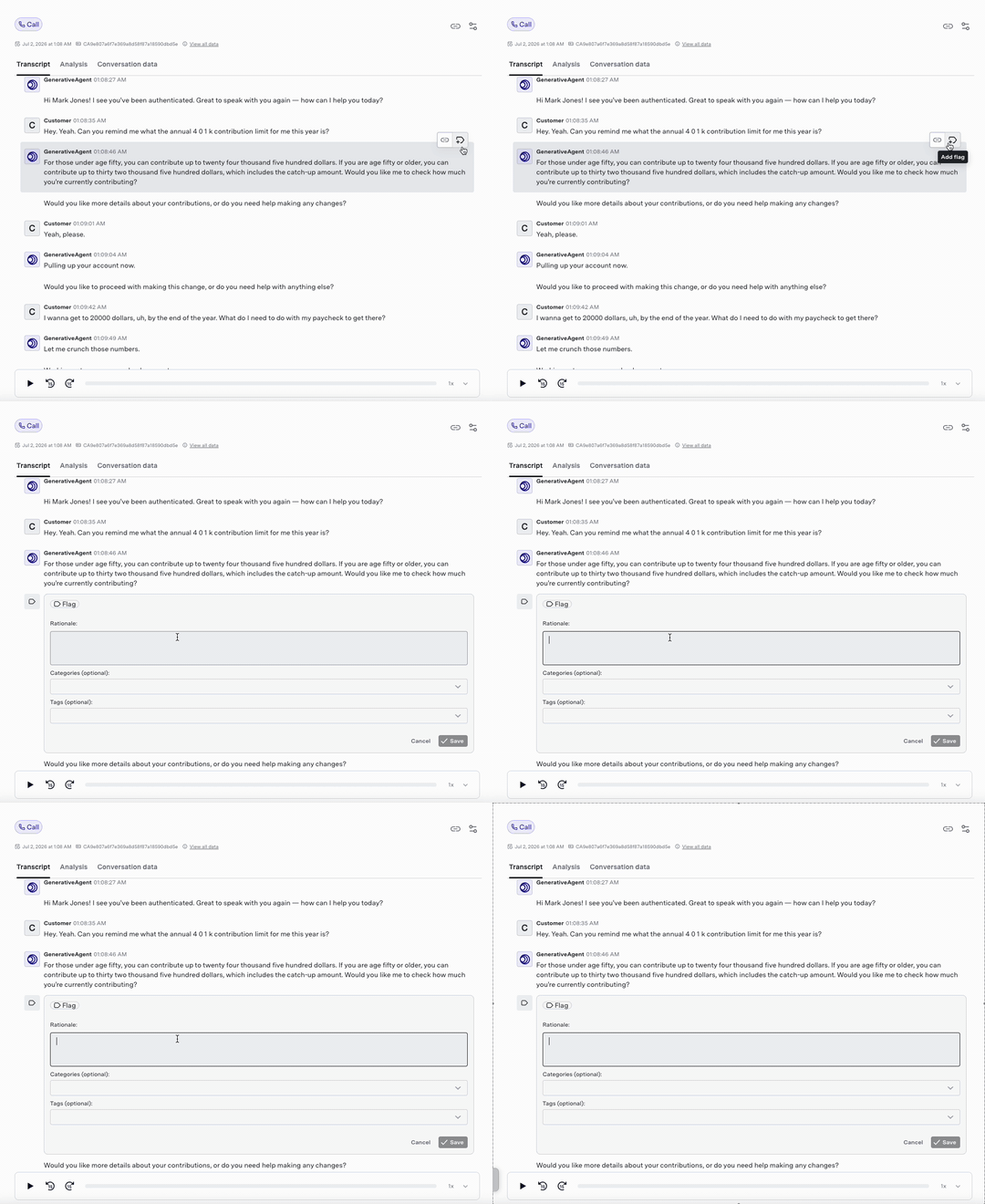
You can edit existing flags at any time.For turns already flagged by automated Conversation Monitoring or other reviewers, you can confirm, recategorize, dismiss, or update the rationale to refine the annotation and improve evaluator training data.
Reviewing and Filtering annotations
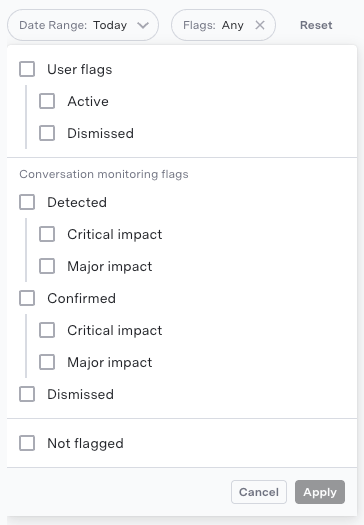
The Flags section under Summary in the Conversations interface provides a consolidated view of all annotations. For each conversation, you can see:- All flags (both manual and automated) with their categories and severity levels
- Reviewer comments and rationale for each flag
- The associated GenerativeAgent transcripts
- Flag type (Manual vs. Automated)
- Tags assigned to flags
- Annotation severity level (critical or major)
Best Practices
When creating manual annotations, follow these best practices:- Write specific rationale that describes what went wrong and why it matters
- Apply consistent categorization to support downstream training and evaluation
- Clearly state your reasoning when overriding conversation monitoring flags
- Create concise but actionable annotations
Next Steps
The insights gained from manual annotations can be used to improve GenerativeAgent’s performance in several ways:- Evaluator training: Train automated evaluators using confirmed or corrected flags as labeled data to reduce false positives and negatives
- Configuration improvements: Use annotated examples to detect knowledge gaps and improve orchestration flows
- Knowledge updates: Update knowledge bases, APIs, and domain-specific instructions based on feedback that identifies missing or incorrect information
- Test suite enhancement: Update test suites with this feedback to verify specific GenerativeAgent behavior when deploying new tasks and configurations
Goal Completion Evaluator
Spot and review customer goals not being met during GenerativeAgent interactions.
Conversation Monitoring
Monitor and review conversations for compliance and quality assurance using GenerativeAgent.
Quality Reports
Monitor and improve GenerativeAgent quality with an automated score for every conversation.