

If you need to collect caller context before connecting to GenerativeAgent (for example, account numbers or menu selections), an advanced IVR integration pattern is also supported. See the Advanced Integration Pattern section below.
How it works
Azure Communication Services separates call control (HTTP callbacks) from audio streaming (WebSocket). ASAPP handles both channels through the ACS media gateway. At a high level, the integration works as follows:- Caller dials your ACS phone number. Azure generates an
IncomingCallevent and routes it to ASAPP’s webhook via your Event Grid subscription. - ASAPP answers the call. The media gateway answers the call using Azure’s Call Automation API and opens a bidirectional WebSocket audio stream.
- GenerativeAgent handles the conversation. ASAPP streams audio in real time between the caller and GenerativeAgent, and automatically detects and forwards DTMF tones (keypad input).
- The call ends. The call ends when GenerativeAgent completes the conversation, the caller hangs up, or a connection failure occurs.
Detailed call flow
Detailed call flow
1. Call initiationThe caller dials your ACS phone number. Azure receives the inbound PSTN call and generates an
IncomingCall event.2. IncomingCall notificationAzure Event Grid sends a webhook notification to ASAPP with your asapp-api-id and asapp-api-secret authentication headers. The event includes the call identifier, caller and called phone numbers, and an incomingCallContext token required to answer the call. For advanced integrations, the event may also include custom data collected by your IVR in customContext.voipHeaders.ASAPP’s API gateway validates the authentication headers, maps them to your account, adds routing metadata, and forwards the event to the media gateway router.3. Event routingThe media gateway router receives the validated event, extracts the routing header, responds 200 OK to Azure, converts the event to protobuf, and forwards it to an available media gateway pod.4. Token generationThe media gateway pod retrieves JWT signing keys from Vault and generates two authentication tokens:- A WebSocket token: short-lived (30 seconds), used to authenticate Azure’s audio streaming connection.
- A callback token: longer-lived (3 hours), used to authenticate Azure’s call state callback notifications.
- A callback URL with the embedded callback JWT for subsequent call state events.
- A WebSocket streaming URL with the embedded WebSocket JWT for audio streaming.
During a call
Once the call is active, ASAPP manages audio, input detection, and recording concurrently.- Audio (caller to GenerativeAgent): ACS streams audio to ASAPP, which transcodes and forwards it to GenerativeAgent.
- Audio (GenerativeAgent to caller): ASAPP receives GenerativeAgent’s audio responses, transcodes, and sends them to ACS.
- DTMF detection: When the caller presses a keypad key, ACS sends a DTMF event over the WebSocket. ASAPP forwards it to GenerativeAgent.
- Call recording: If recording is enabled, ASAPP captures both audio streams.
Before you begin
Before configuring the integration, you need:- API credentials (API ID and API Secret) provisioned by ASAPP during onboarding. Contact your ASAPP account team to enable the ACS integration and receive your credentials.
- An Azure subscription with an Azure Communication Services resource.
- A phone number provisioned in your ACS resource.
- Permissions to create Event Grid subscriptions on your ACS resource.
Configure the Azure Event Grid subscription
To complete the direct integration, set up an Azure Event Grid subscription on your ACS resource to routeIncomingCall events to ASAPP’s webhook.
1
Navigate to your ACS resource
In the Azure portal, open your Azure Communication Services resource and go to Events in the left menu.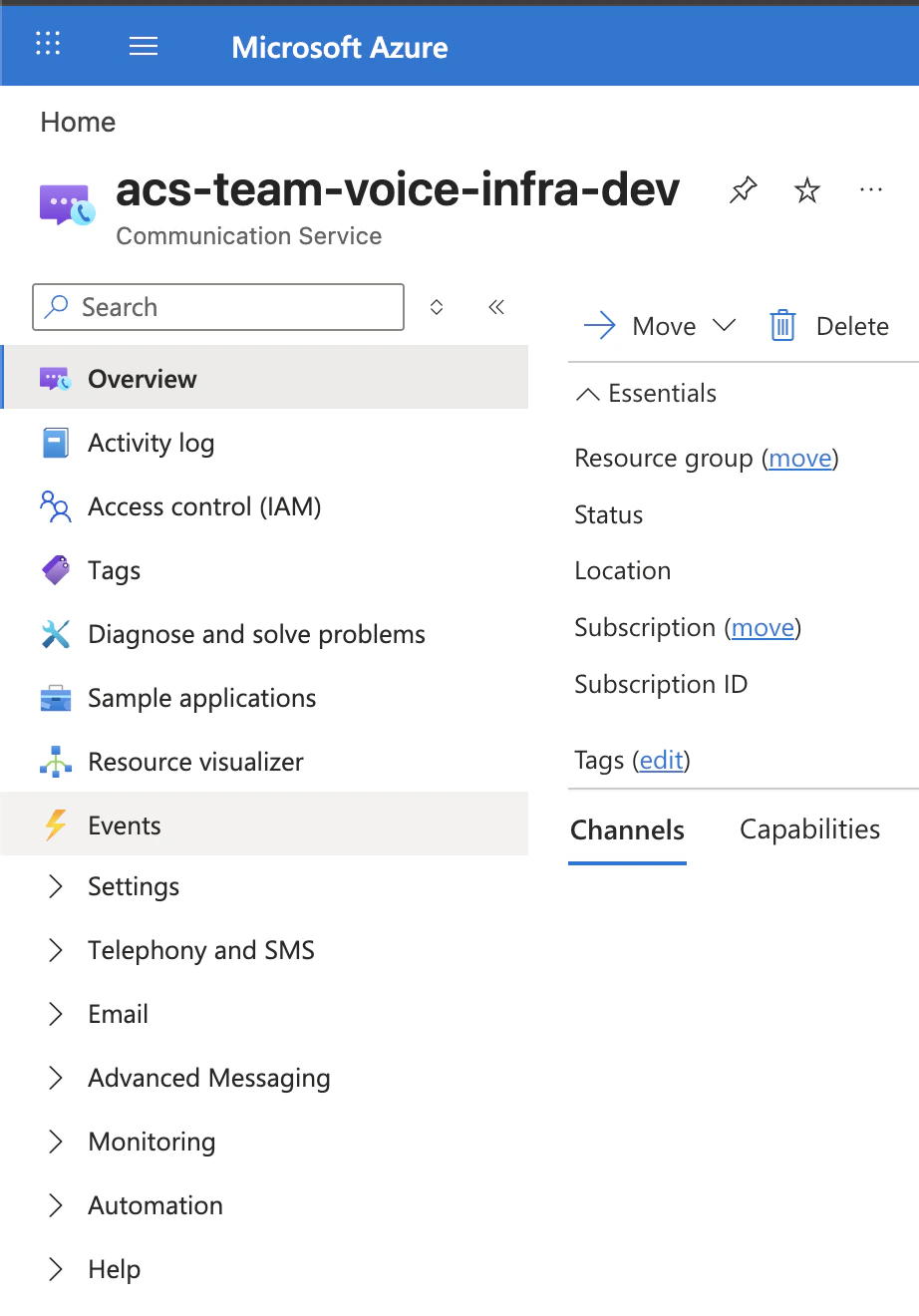
2
Create an Event Subscription
Click + Event Subscription and configure the following: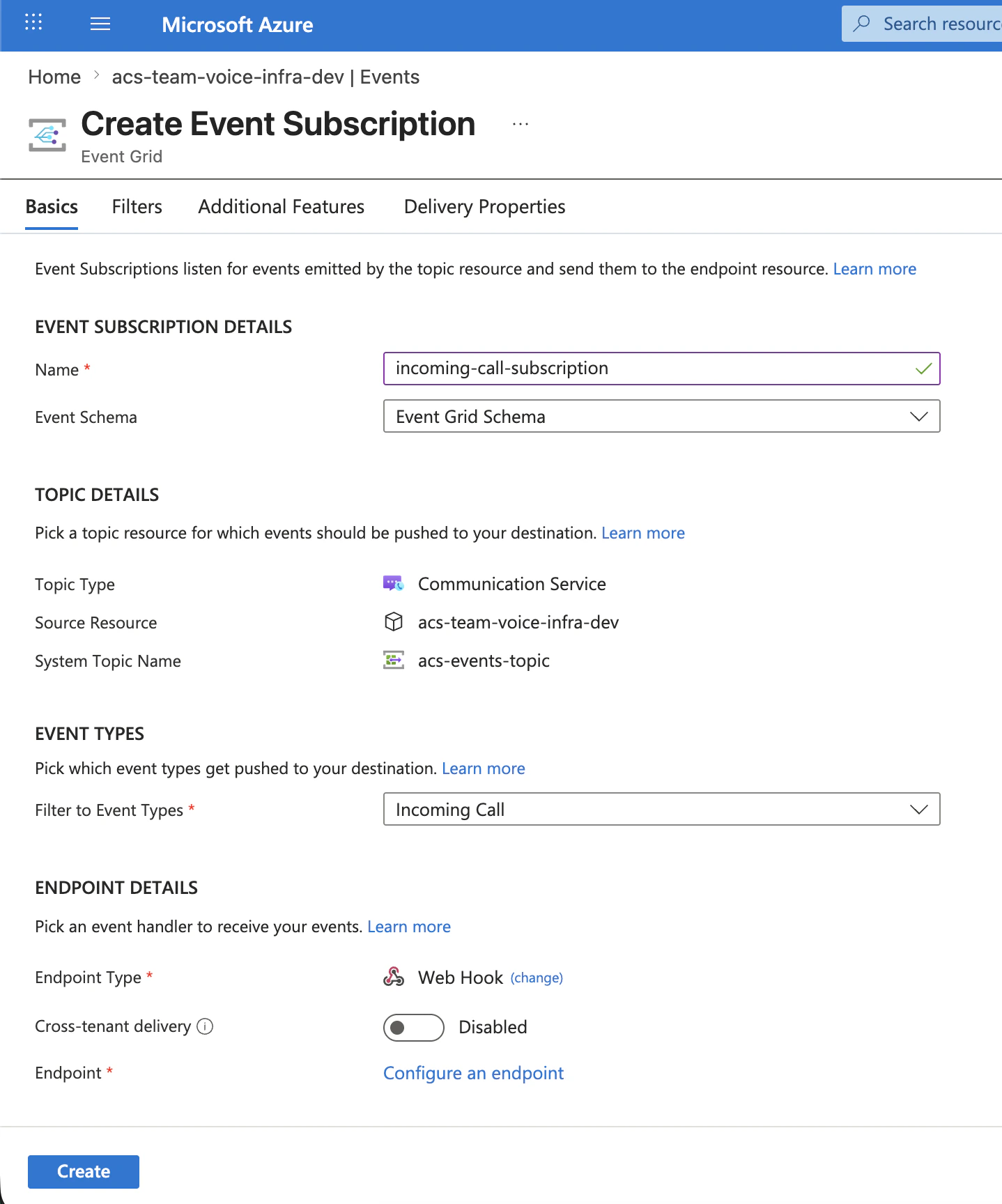
3
Add authentication headers
In the Delivery Properties tab, add the following custom headers using the credentials provided by ASAPP: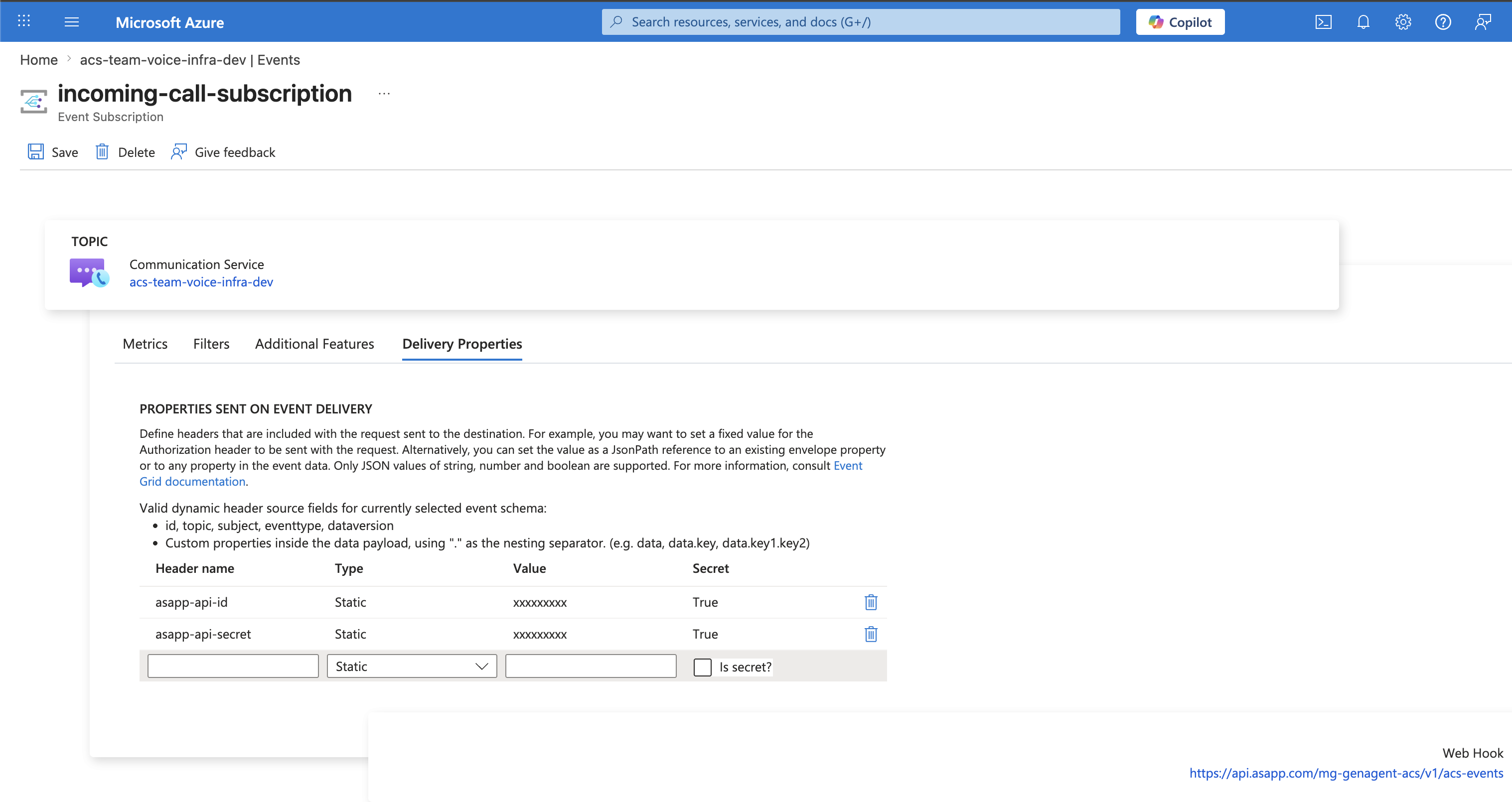
Mark both values as secret so Azure obscures them in the portal.
4
Validate and save
Azure sends a validation request to the webhook endpoint to confirm it is accessible. Once validated, save the subscription.
IncomingCall events from your ACS phone number now route to ASAPP automatically.You need a separate Event Grid subscription for each ASAPP environment (sandbox and production). Use your sandbox credentials and endpoint for testing, and switch to production credentials when going live.
Advanced Integration Pattern
If you need to run pre-call IVR logic before connecting to GenerativeAgent (for example, collecting an account number, authenticating the caller, or routing through a menu), you can use an advanced integration pattern. In this pattern, you deploy your own IVR service that handles the initial call, then transfers to GenerativeAgent with collected context.This pattern requires you to build and deploy an IVR service in your own Azure infrastructure using the Azure Communication Services Call Automation SDK.
How it works
Instead of routing calls directly to ASAPP, your Event Grid routesIncomingCall events to your own IVR service first. Your IVR collects caller context, then transfers the call to ASAPP using a dedicated ACS user identity. A second Event Grid subscription routes these transferred calls to ASAPP’s webhook.
Any key-value pairs your IVR passes in the transfer’s custom context are forwarded to GenerativeAgent as input variables, enabling personalized conversations based on data collected during your IVR flow.
Example: Your IVR collects the caller’s account number via DTMF. It passes accountNumber: "12345" in the transfer’s custom context. GenerativeAgent receives this as an input variable and can personalize the greeting accordingly.
Setup
Azure configuration-
Create an ACS
CommunicationUserIdentifierfor ASAPP usingCommunicationIdentityClient.createUser(). This is the identity your IVR transfers calls to. Provide this identifier to your ASAPP account team during onboarding. -
Create two Event Grid subscriptions on your ACS resource:
- Receive
IncomingCallwebhooks from Azure Event Grid. - Use the Azure Communication Services Call Automation SDK to control calls programmatically (available in .NET, JavaScript, Python, and Java).
- Answer the call using
answerCall()with theincomingCallContextclaim. - Collect caller context using
getCallMedia().startRecognizing()for audio prompts and DTMF input. - Transfer the call to ASAPP’s CommunicationUserIdentifier using
transferCallToParticipant(), passing collected data incustomCallingContext.voipHeaders.
customCallingContext.voipHeaders are passed to GenerativeAgent as input variables.
Returning control to your IVR
If GenerativeAgent needs to return control to your IVR (for example, to route to a human agent based on conversation outcome), provide your IVR service’s CommunicationUserIdentifier in the transfer’s custom context. ASAPP stores this identifier and uses it to transfer the call back with GenerativeAgent’s output variables in the custom context.
Test the integration
To test your integration:- Call your ACS phone number from a test phone.
- Confirm GenerativeAgent answers and responds to your questions.
- Test variations including normal conversations, requests for a human agent, and caller hangup.
Next Steps
Configuration Overview
Learn how to configure GenerativeAgent’s behaviors, tasks, and communication style
Connect your APIs
Configure your APIs to allow GenerativeAgent to access necessary data and perform actions
Input Variables
Pass caller context to GenerativeAgent to personalize conversations
Go Live
Follow the deployment checklist to launch GenerativeAgent in your production environment